How do I increase the volume when pinging my 2nd gen Airpods, in FindMy?

When pinging my 2nd gen Airpods, in FindMy, the sound is so quiet I cannot hear them. What's the fix to making the volume louder, in order to actually find them?

They're able to be heard beside me, when I ping them, but, not from the next room.

Posted on Jan 6, 2023 8:30 AM

Reply
Question marked as Top-ranking reply

Posted on Jan 8, 2023 4:22 PM

Hey Jaimatjak,


It looks like you're coming from the article: Find your lost AirPods That would have the best information regarding locating your AirPods.


While there isn't a way to manually adjust the volume of the AirPods ping, when using Find My to play a sound on them, the sound should gradually get louder.


"Play a sound on your AirPods

If your AirPods are near any of your Apple devices and connected to Bluetooth, you can play a sound to help you find them. With AirPods Pro (2nd generation), you can also play a sound to help find your charging case.

  1. Open the Find My app.
  2. Select the Devices tab.
  3. Choose your AirPods from the list.
  4. Tap Play Sound to play a sound that gets louder gradually.
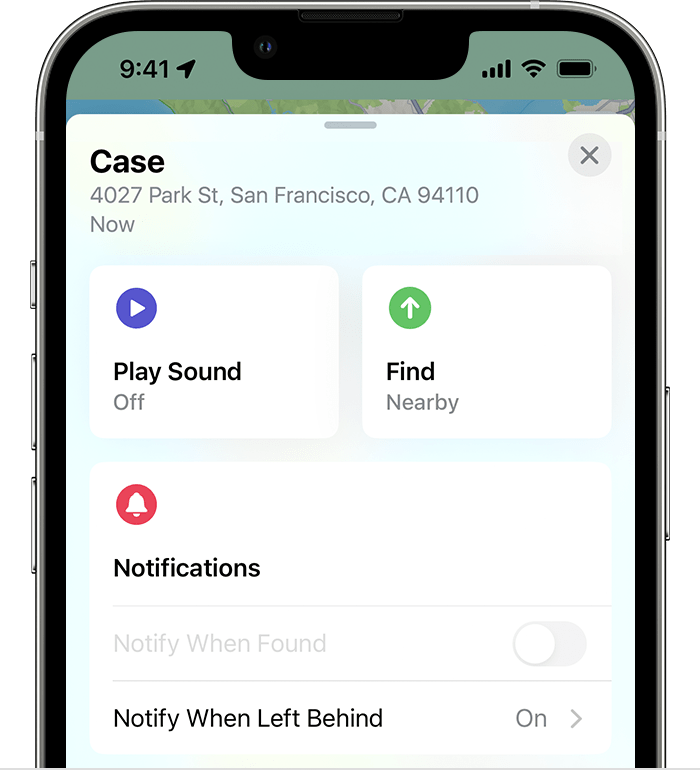
  5. In Find My, you can tap Play Sound to help you find your AirPods

Make sure that your AirPods are not in or on your ears before you play a sound."


Thanks!



2 replies
Question marked as Top-ranking reply

Jan 8, 2023 4:22 PM in response to Jaimatjak

Hey Jaimatjak,


It looks like you're coming from the article: Find your lost AirPods That would have the best information regarding locating your AirPods.


While there isn't a way to manually adjust the volume of the AirPods ping, when using Find My to play a sound on them, the sound should gradually get louder.


"Play a sound on your AirPods

If your AirPods are near any of your Apple devices and connected to Bluetooth, you can play a sound to help you find them. With AirPods Pro (2nd generation), you can also play a sound to help find your charging case.

  1. Open the Find My app.
  2. Select the Devices tab.
  3. Choose your AirPods from the list.
  4. Tap Play Sound to play a sound that gets louder gradually.
  5. In Find My, you can tap Play Sound to help you find your AirPods

Make sure that your AirPods are not in or on your ears before you play a sound."


Thanks!


This thread has been closed by the system or the community team. You may vote for any posts you find helpful, or search the Community for additional answers.

How do I increase the volume when pinging my 2nd gen Airpods, in FindMy?

Welcome to Apple Support Community
A forum where Apple customers help each other with their products. Get started with your Apple Account.