Is iTunes for Windows incompatible with advanced data protection/2fa?

Every time I try to login to iTunes I am getting a message that states " Your account uses security keys for two factor authentication, and they aren't supported on iCloud for Windows. You can access your iCloud data including photos, files, and documents on icloud.com.


There is a link to icloud.com and a link to "learn more about apple ID security keys" which leads to a non existent page on apple's site. What is the deal here?

Posted on Jan 10, 2023 6:41 AM

Reply
Question marked as Top-ranking reply

Posted on Feb 14, 2023 12:53 AM

Yes, sadly, iTunes and more specifically, iCloud for Windows, has not yet been updated to support security keys for 2FA. Sad thing is that most browsers support security keys for 2FA, so if you're an Apple Music subscriber, you're better accessing your iTunes library on a 2FA supported browser and going to music.apple.com until Apple hopefully updates their apps for 2FA support. Not sure if music.apple.com works for those not subscribed to Apple Music, but it is worth a try attempting a login just to see if you can still do things you'd be able to do on iTunes. [Edit: What you see on music.apple.com tends to line up with what you see on your iPhone/iPad. So it will not be like your iTunes library. But if you sync your devices, then it shouldn't be too much of a problem. Lack of smart playlists not showing up is the only real issue. But if you have an Apple device, you can do what I do, just export the smart playlist to a new playlist on your device and that will automatically create a normal playlist that will also show on the web player (may need to refresh page to see it on the left side, or just select that playlist from All Playlists).]


Not going to lie, I think Apple has been slowly (and quietly) trying to push the use of their web player since it works on both Mac and Windows (and other operating systems) without having to try to code for the multitude of operating systems out there. I think they've sort of gone the route of Amazon Music and Spotify, and rarely bother updating the app, but focus more on the browser side and the layout of their services, as well as trying to feature more things that may interest users.


4 replies
Question marked as Top-ranking reply

Feb 14, 2023 12:53 AM in response to dwuuds

Yes, sadly, iTunes and more specifically, iCloud for Windows, has not yet been updated to support security keys for 2FA. Sad thing is that most browsers support security keys for 2FA, so if you're an Apple Music subscriber, you're better accessing your iTunes library on a 2FA supported browser and going to music.apple.com until Apple hopefully updates their apps for 2FA support. Not sure if music.apple.com works for those not subscribed to Apple Music, but it is worth a try attempting a login just to see if you can still do things you'd be able to do on iTunes. [Edit: What you see on music.apple.com tends to line up with what you see on your iPhone/iPad. So it will not be like your iTunes library. But if you sync your devices, then it shouldn't be too much of a problem. Lack of smart playlists not showing up is the only real issue. But if you have an Apple device, you can do what I do, just export the smart playlist to a new playlist on your device and that will automatically create a normal playlist that will also show on the web player (may need to refresh page to see it on the left side, or just select that playlist from All Playlists).]


Not going to lie, I think Apple has been slowly (and quietly) trying to push the use of their web player since it works on both Mac and Windows (and other operating systems) without having to try to code for the multitude of operating systems out there. I think they've sort of gone the route of Amazon Music and Spotify, and rarely bother updating the app, but focus more on the browser side and the layout of their services, as well as trying to feature more things that may interest users.

Jan 12, 2023 2:15 PM in response to dwuuds

Hi there dwuuds,


You can learn more about security keys using this information from Apple advances user security with powerful new data protections:

Security Keys
Apple introduced two-factor authentication for Apple ID in 2015. Today, with more than 95 percent of active iCloud accounts using this protection, it is the most widely used two-factor account security system in the world that we’re aware of. Now with Security Keys, users will have the choice to make use of third-party hardware security keys to enhance this protection. This feature is designed for users who, often due to their public profile, face concerted threats to their online accounts, such as celebrities, journalists, and members of government. For users who opt in, Security Keys strengthens Apple’s two-factor authentication by requiring a hardware security key as one of the two factors. This takes our two-factor authentication even further, preventing even an advanced attacker from obtaining a user’s second factor in a phishing scam.
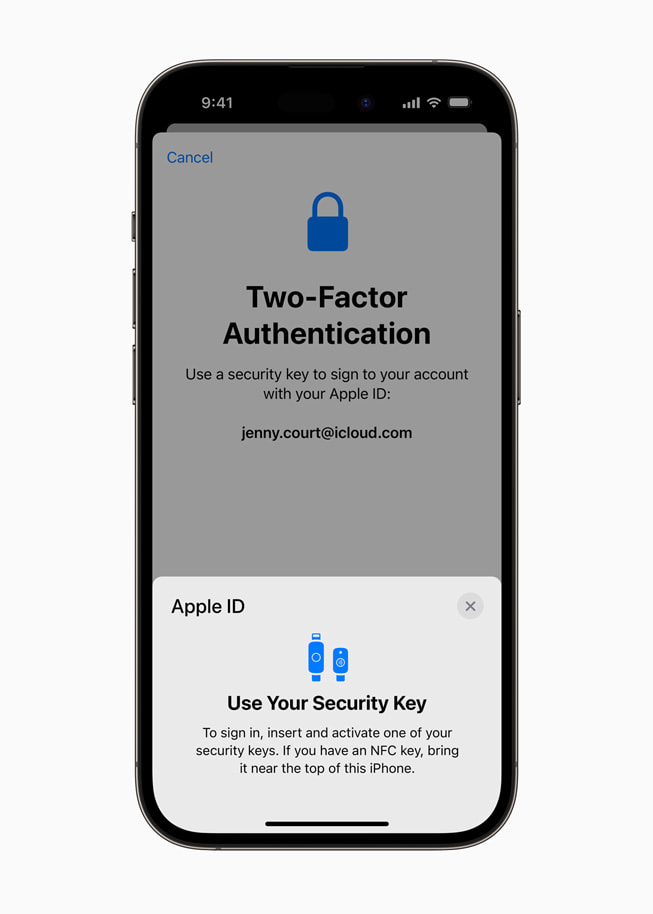
Two-factor authentication using Security Keys for Apple ID on iPhone 14 Pro.
Security Keys for Apple ID provides users the choice to require a physical security key to sign in to their Apple ID account.


You can also learn more about the security of your data in iCloud here: iCloud data security overview


Take care!

This thread has been closed by the system or the community team. You may vote for any posts you find helpful, or search the Community for additional answers.

Is iTunes for Windows incompatible with advanced data protection/2fa?

Welcome to Apple Support Community
A forum where Apple customers help each other with their products. Get started with your Apple Account.