After Ventura update Mail is not working - how do I fix it?
After Ventura update Mail is not working - how do I fix it?
MacBook Air 13″, macOS 13.1
After Ventura update Mail is not working - how do I fix it?
MacBook Air 13″, macOS 13.1
Hello sgsellars,
If you aren't able to send or receive email the steps below may help:
Check for status messages
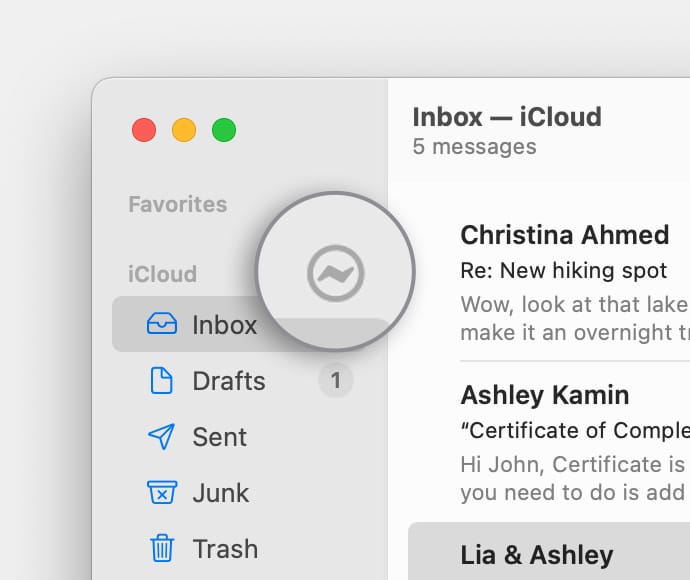
You might see a status icon such as a lightning boltor warning symbol
next to your account's inbox in the Mail sidebar, or in the upper-right corner of the Mail window. Click it to learn more.
• If the status is Network Offline, make sure that your Mac is connected to the internet, then try again.
• If the status is Login Failed, check with your email service provider (ESP) to be sure that your account is set up correctly on your Mac.
• If Mail asks for your password, but entering the password doesn't help, find out why your email provider is rejecting your password.
• If your email service is experiencing a temporary outage, your email provider might have a status message on their website. For example, Apple's system status page shows the status of iCloud Mail. Status pages are also available for other email services, such as Gmail and Outlook. Some brief service outages might not appear on a system status page, so you might want to wait a few hours and try again.
Test using webmail
Many email providers offer webmail, which is a way to use email with a web browser such as Safari, instead of with an email app such as Mail. For example, if you're using an iCloud Mail account, you can use iCloud.com to send and receive email.
Webmail is a good way to verify that your account is valid, but it doesn't mean that your account is set up correctly in Mail. Your email provider can help you verify your email settings and check for other issues that affect sending or receiving email.
Remove your email account, then add it back
If no other solutions work, follow these steps:
1. Remove your email account in Mail.
2. Add your email account in Mail again.
3. Try to send and receive email.
You can also find those steps in this resource: If you can’t send or receive email on your Mac - Apple Support
Should that still persist, do you get any particular errors or prompts?
Is this happening with multiple email accounts?
Let us know, and we'll keep moving forward from there.
I agree! Mail does not work on my iMac since loading Ventura. I have done force quit, erased internet mail contact and tried many, many times to try to add new Mail site.....nothing works!! get the same warning that user name or password doesn't match....come on Apple.
Ever since my MacBook Air updated to Ventura 13.4.1, my Yahoo Mail intermittently decides to not let me click on anything. The screen freezes. I have to hit the back arrow and then go into Yahoo mail again in order to "clear" the problem. I also sporadically get a message from Safari saying that the page is not responding and Yahoo Mail must be force reloaded. I never had this problem before the Ventura update. Any suggestions?
I was working fine till my ISP made some changes. Now none of my emails from three different ISPs work on Mac mail. They all work online from the individual ISP, they receive, but none will send. I see the blue send bar but they are not in the sent box, nor are they received and the weird thing is this only occurs on my desktop with Ventura. My laptop with Big Sur is fine, and my ioS devices are fine. This is a serious mess and is interfering with my ability to function normally at work. I will be working with an apple rep to reload the OS on Saturday but if that doesn't work, they suggested we wipe my mac and I am unwilling to do that. Any other ideas will be gratefully received. Does anyone use an alternate mail system that works? I may end up just going online.
Similar problems here. All of a sudden, Apple mail search does not work. This includes from a user with admin privs. Ironically, the search function works with a new user with system privs. Search includes Apple mail and search from the finder desktop. Cool, but I have about 70,000 emails. Previous version of Mail worked perfectly. Inference is that problem is related to Ventura 13.5.1.
I have tried everything and spent a great deal of time with Apple tech support. Some approaches have been to reset privs using Terminal, reindexing spotlight, setting and resetting user privs. Tech support guys have not been able to isolate the problem.
Nice. Real nice.
I'm stunned after seeing this issue raised here for the past year that I was recommended by Apple to update Ventura 13.6.1. Yesterday my Apple mail worked, today I can't send anything from it. If I click the squiggly icon next to one of my email accounts in Apple mail, nothing happens. It seems plain from this string that my only option is to keep gmail and yahoo mail tabs open in my browser to stay on top of my work and personal email. Seriously Apple.... at least I had the good sense to google the "upgrade operating system to Sonoma" before doing that and found out its a dog. Wish I had done the same search before updating Ventura.
Fix it Apple!!
Looks like installing Ventura 13.6.6. was a mistake.
Mail receives but cannot send. The local MacOnline shop says I need to update my software again, but looks like my 2017 MacBookPro is too old.
Also OldTomBanks' solution above sounds a bit too techo and dangerous for a luddite like me.
One hack I have found is to write the email as normal, then save it in drafts. It then appears on my phone drafts and I can send it.
Blue tooth (and therefore airdrop) doesn't work any more either, so I'm off to the local gizmo shop to buy a plug in one.
These 2 things will keep me going until I get back from this business trip, and let apple rip me off for yet another laptop.
Not happy because the only reason I have stuck with apple is for airdrop!
None of the suggestions are working for me.
I can add that it was a temporary fix, I have the same problem again.
Ventura is crap, avoid it
It is NOT solved!
Ventura have made my 1,5 year old MacbookPro 16 more or less unusable and Apply do not care!
Ventura is a mess -- avoid it. Apple support, please note after a week on the phone, I'm going to drop Apple Mail and. maybe my MBP M1 machine, too.
I am able to send and receive mail but am unable to quit mail as advised when I attempt an update to the OS. MAC Ventura. I will add more information when I can capture the error box. Thanks.
No kidding. This was a nightmare after converting to Ventura on Macbook Pro M1 and 2. Truly horrendous. Apple support people were excellent, but they had no clue.
After Ventura update Mail is not working - how do I fix it?