iPhone 6 stuck in guided access, can't turn off, don't know passcode

My daughter accidentally enabled guided access on her iPhone 6. She also seems to have set a six digit passcode for guided access which she doesn't know, and we don't either. The phone can be restarted but not just shut down, it restarts automatically. When it restarts, it goes straight back into guided access, stuck on the iMessage app.


What I've tried:

I have tried plugging it in to iTunes and have backed it up, thinking I could restore it but it asks me to turn off Find My to restore the phone. I can't turn off Find My because the phone is stuck in guided access. There doesn't seem to be any way to turn it off other than on the phone itself.


I've tried to mark it as lost in iCloud, but some kind of error occurs and the message pops up that it 'a problem' occurred and it won't allow me to mark it as lost, either through icloud on the computer or through the family settings on my phone apple ID. The phone does not have a passcode set, only guided access has one (which we don't know).


I've tried repeatedly guessing the passcode with no luck. :-(


Any help is very welcome! I have literally tried every solution I can find online and nothing works!

iPhone 6, iOS 12

Posted on Jan 12, 2023 1:06 PM

Reply
1 reply

Jan 15, 2023 12:26 PM in response to clementine194

Hi there clementine194,


If Touch ID was enabled for the Guided Access, that can be used to end the session, as mentioned below:


"End a Guided Access session

Triple-click the Side or Home button, enter your Guided Access passcode, then tap End. Or if you turned on Touch ID or Face ID for Guided Access, double-click the Side or Home button."


That information, and more, can be found here: Use Guided Access with iPhone, iPad, and iPod touch - Apple Support


If that wasn't enabled, you could see if force restarting the iPhone 6 may help. If needed, the steps below show how to do that:


"Force restart iPhone 6 and 6 Plus, iPhone 6s and 6s Plus, iPhone SE, or iPhone 5s

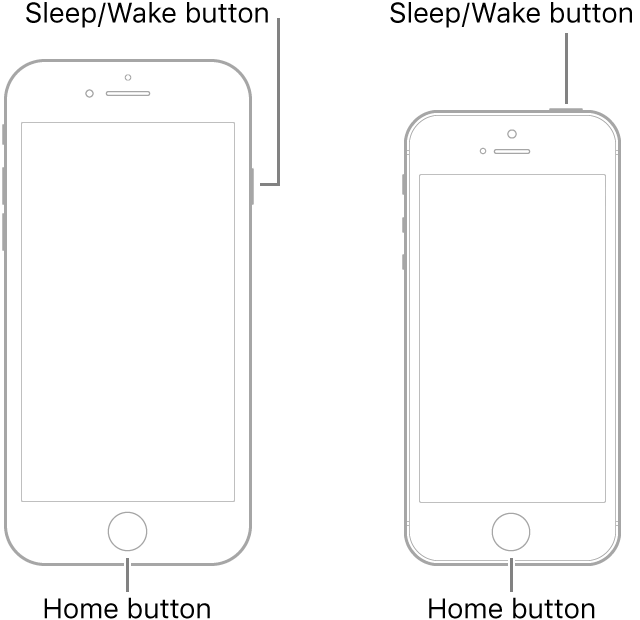
  1. Press and hold both the Sleep/Wake button and the Home button.
  2. When the Apple logo appears, release both buttons.


Illustrations of two of iPhone models with the screens facing up. Both have Home buttons near the bottoms of the devices. The leftmost model has a Sleep/Wake button on the right edge of the device near the top, while the rightmost model has a Sleep/Wake button on the top of the device, near the right edge.

"


Those steps are from this article: Force restart iPhone - Apple Support


If you continue to encounter this issue after those steps, you can contact Apple Support for further assistance. You can reach out with the following link: Contact - Official Apple Support


Take care!

This thread has been closed by the system or the community team. You may vote for any posts you find helpful, or search the Community for additional answers.

iPhone 6 stuck in guided access, can't turn off, don't know passcode

Welcome to Apple Support Community
A forum where Apple customers help each other with their products. Get started with your Apple Account.