iCloud
How do you set up an iCloud email?
iPhone 13 Pro Max, iOS 16
How do you set up an iCloud email?
iPhone 13 Pro Max, iOS 16
Hello nextlevelk9ky,
Thanks for reaching out to Apple Support Communities. We see you have some questions about setting up iCloud Mal, and we'd like to help. The following link should be able to assist, as it walks through steps on how to set this up on your device: Set up iCloud Mail on all your devices
As it looks like you have questions about an iPhone, these steps may be able to help:
Set up iCloud Mail on your iPhone, iPad, or iPod touch
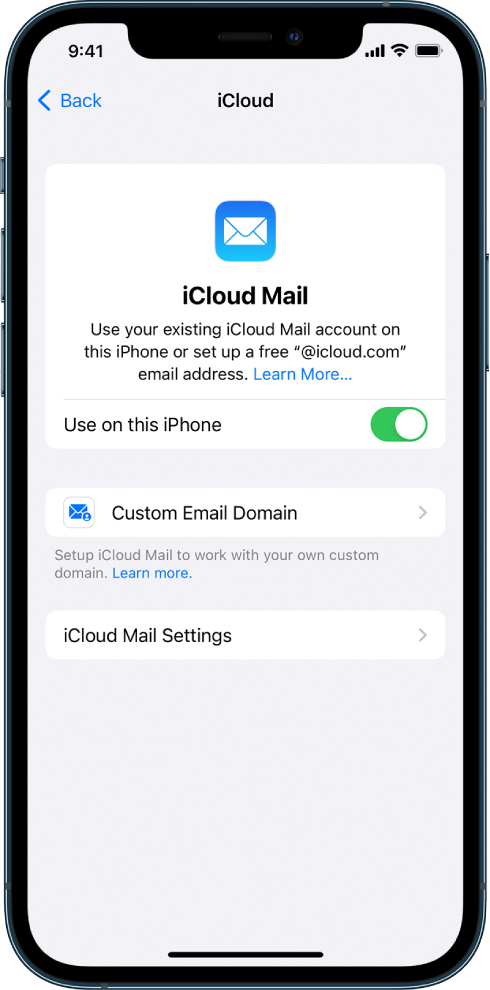
1) On your iPhone, iPad, or iPod touch, go to Settings > [your name] > iCloud.
2) If you want to send and receive iCloud Mail on your device, do one of the following:
•iOS 16, iPadOS 16, or later: Tap Mail, then turn on Use on this [device].
•iOS 15, iPadOS 15, or earlier: Turn on iCloud Mail (or Mail).
3) If you want to keep Mail settings up to date across your devices, turn on iCloud Drive. The following settings stay up to date:
•The order of your mailboxes (for all iOS and iPadOS devices)
•Email address suggestions (for all iOS, iPadOS, and macOS devices)
•VIPs (for all iOS, iPadOS, and macOS devices)
4) To view your iCloud Mail, open the Mail app. Tap a mailbox or folder in the iCloud section.
Let us know if this helps.
Regards.
Hello nextlevelk9ky,
Thanks for reaching out to Apple Support Communities. We see you have some questions about setting up iCloud Mal, and we'd like to help. The following link should be able to assist, as it walks through steps on how to set this up on your device: Set up iCloud Mail on all your devices
As it looks like you have questions about an iPhone, these steps may be able to help:
Set up iCloud Mail on your iPhone, iPad, or iPod touch
1) On your iPhone, iPad, or iPod touch, go to Settings > [your name] > iCloud.
2) If you want to send and receive iCloud Mail on your device, do one of the following:
•iOS 16, iPadOS 16, or later: Tap Mail, then turn on Use on this [device].
•iOS 15, iPadOS 15, or earlier: Turn on iCloud Mail (or Mail).
3) If you want to keep Mail settings up to date across your devices, turn on iCloud Drive. The following settings stay up to date:
•The order of your mailboxes (for all iOS and iPadOS devices)
•Email address suggestions (for all iOS, iPadOS, and macOS devices)
•VIPs (for all iOS, iPadOS, and macOS devices)
4) To view your iCloud Mail, open the Mail app. Tap a mailbox or folder in the iCloud section.
Let us know if this helps.
Regards.
iCloud