
App requests not coming threw
Why is my childrens app requests not coming threw to be approved but they can still ask
Why is my childrens app requests not coming threw to be approved but they can still ask
Hi Katyfair,
The following steps address what you're describing specifically, and should provide a solution:
"If your Ask to Buy requests are missing
If you miss an Ask to Buy notification, you can find the request in Notification Center on your iPhone, iPad, iPod touch, or Mac. If you still don't see your Ask to Buy requests, check your Family Sharing settings, check which Apple ID you're signed in with, and make sure that you're on a supported device.
Open Notification Center on your iPhone, iPad, or iPod touch
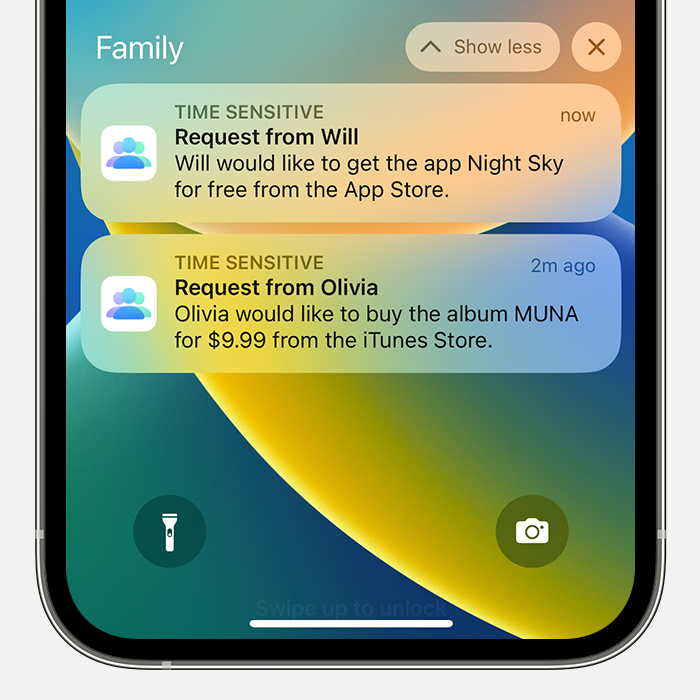
You can find these steps along with other information that may be helpful, here: If Ask to Buy isn't working - Apple Support
If you have followed the steps correctly and you still have the issue, let us know if you get any specific alerts or error messages when trying, as those may help us determine what might be causing the issue.
We also recommend restarting your device and keeping it updated as those steps assure you have cleared out any minor software issues and are running the most current version.
Restart your iPhone - Apple Support
Update your iPhone or iPad - Apple Support
If you still have questions, reach out to Apple Support directly, as this may require closer guidance: Get Support
Cheers!
Hi Katyfair,
The following steps address what you're describing specifically, and should provide a solution:
"If your Ask to Buy requests are missing
If you miss an Ask to Buy notification, you can find the request in Notification Center on your iPhone, iPad, iPod touch, or Mac. If you still don't see your Ask to Buy requests, check your Family Sharing settings, check which Apple ID you're signed in with, and make sure that you're on a supported device.
Open Notification Center on your iPhone, iPad, or iPod touch
You can find these steps along with other information that may be helpful, here: If Ask to Buy isn't working - Apple Support
If you have followed the steps correctly and you still have the issue, let us know if you get any specific alerts or error messages when trying, as those may help us determine what might be causing the issue.
We also recommend restarting your device and keeping it updated as those steps assure you have cleared out any minor software issues and are running the most current version.
Restart your iPhone - Apple Support
Update your iPhone or iPad - Apple Support
If you still have questions, reach out to Apple Support directly, as this may require closer guidance: Get Support
Cheers!
App requests not coming threw

