Hello IcuErRN,
You mentioned the Beats only work when you have your iPhone with you. Are the Beats still paired with your iPhone when you are trying to pair them with your Apple Watch?
You can check in the iPhone Bluetooth settings: Set up and use Bluetooth accessories on iPhone – Apple Support
On your iPhone
- Go to Settings
- Tap on Bluetooth
- Tap on My Devices
- Look for your Beats and tap the "i"and chose disconnect
Now try pairing your Beats with your Apple Watch.
Connect Apple Watch to Bluetooth headphones or speakers – Apple Support
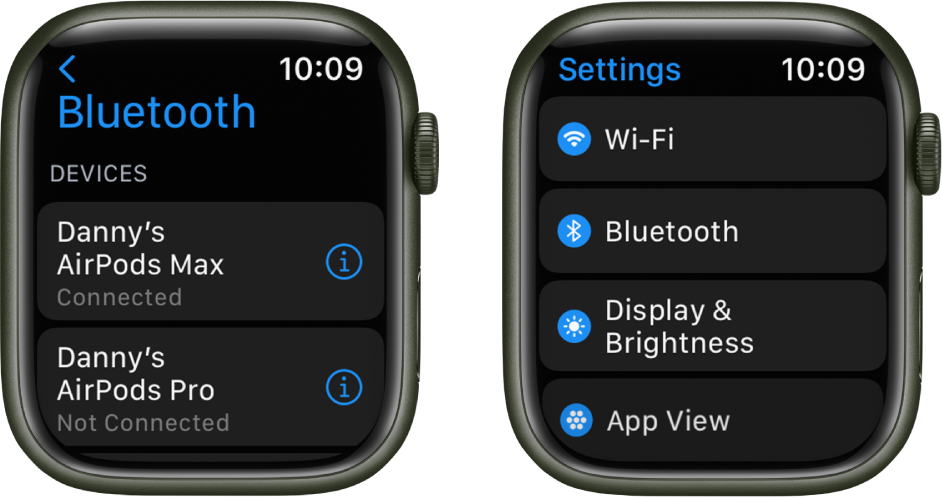
"You need Bluetooth headphones or speakers to listen to most audio on your Apple Watch (Siri, phone calls, voicemail, and voice memos play through the speaker on Apple Watch). Follow the instructions that came with the headphones or speakers to put them in discovery mode. When the Bluetooth device is ready, follow these steps:
- Open the Settings app
 on your Apple Watch, then tap Bluetooth.
 - Tap the device when it appears.
You can also tap  on the play screens of the Audiobooks, Music, Now Playing, and Podcasts apps to open the Bluetooth setting.
Choose an audio output
- Touch and hold the bottom of the screen, then swipe up to open Control Center.
- Tap , then choose the device you want to use."
Cheers!





 next to the music that you want to sync. If you can't add specific albums or playlists, try downloading them to your iPhone before you sync with your watch.