Macbook Pro M1 login crash to off state

I return to the machine and find it is off. I start it up to get the login screen, I enter the password and the screen goes black. It seems that it completely shut down because I press the power button I get the startup gong and the whole thing repeats.


If I hold down the power button and try to start up in safe mode, it immediately shuts down to the black screen. If I choose ‘options’ instead of safe mode it instantly shuts down again. After 10 attempts, I eventually get into the “options”. I then tried to reinstall monterey and got this error “This volume cannot be downgraded.”


Eventually, after about 20 login attempts the system will load. It may remain stable for an hour or a month. This is the third time it has happened and I can no longer rely on the machine for work.


I have removed all the login items except Calendar. I have reviewed the unsigned apps


Any ideas please?


MacBook Pro Apple Silicon

Posted on Jan 28, 2023 6:06 AM

Reply

Similar questions

3 replies

Jan 30, 2023 11:28 AM in response to oxcart

Hi there oxcart,


Are any issues found if you go into macOS Recovery and run First Aid on your disk? We're asking this to ensure that is fine because if not, it can cause issues with a Mac and how it works. If needed, the steps below show how to do that, after getting into macOS Recovery:


"Select your disk in Disk Utility

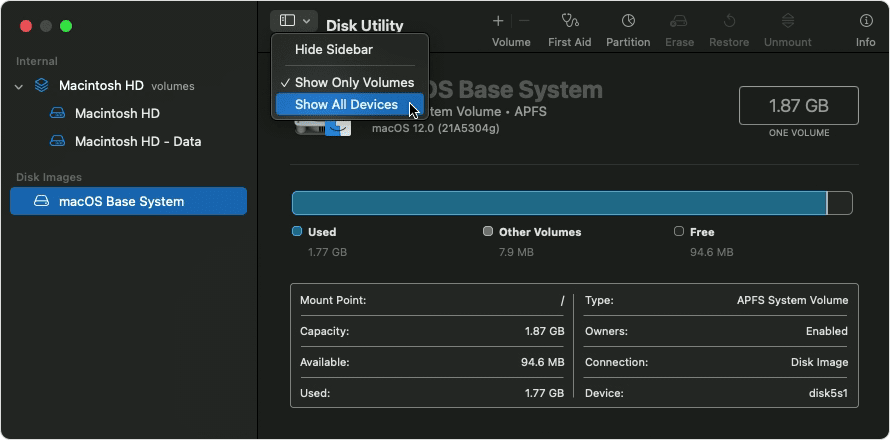
Choose View > Show All Devices (if available) from the menu bar or toolbar in Disk Utility.

Disk Utility: Show All Devices

The sidebar in Disk Utility should now show each available disk or other storage device, beginning with your startup disk. And beneath each disk you should see any containers and volumes on that disk. Don't see your disk?"


That information, and more, can be found here: How to repair a Mac disk with Disk Utility - Apple Support


Let us know what happens after running First Aid or if you've already tried this.


Take care!

Jan 31, 2023 5:08 AM in response to oxcart

Thank you for being pro-active and suppling the Etrecheck report 👍


This will be of a great help


1 - Configuration profiles found - This computer may have configuration profiles installed. These are sometimes used by malware.


2 - Configuration Profiles:
    com.apple.security.FDERecoveryKeyEscrow
        EncryptCertPayloadUUID
        Location
    com.apple.MCX
        dontAllowFDEDisable
    com.apple.security.pkcs1
        AllowAllAppsAccess


3 -com.apple.mdm


This machine Appears to be Associated with a MDM Service ( Mobile Digital Management ) service.


Is this computer Owned or Enrolled in such as service by a Company, University, Organization etc.


If Yes, you will need to communicate with the IT Department of the Company, University, Organization etc as they Control the computer


There is very little we ( users like you and me ) would be able to fix this issue


Jan 31, 2023 3:30 AM in response to claire504

Hi, Thanks for the suggestions. On each occasion that this has happened I have run first aid as soon as I got back into the system and it has not found a problem. Unfortunately this is an intermittent problem and is therefore hard to pin down. It occurs when the computer sleeps and I'm beginning to suspect a hardware problem.

This thread has been closed by the system or the community team. You may vote for any posts you find helpful, or search the Community for additional answers.

Macbook Pro M1 login crash to off state

Welcome to Apple Support Community
A forum where Apple customers help each other with their products. Get started with your Apple Account.