export videos to external hard drive

When I export a video with HEVC codec to my external hard drive, it won't transfer the original date created info. Upon the completion of the export, the information in "get info" changes to some other random date. How can I export the video and keep the original created date?

MacBook Air

Posted on Feb 7, 2023 5:34 PM

Reply

Similar questions

11 replies

Feb 8, 2023 7:12 AM in response to tvjohnny

Works for me even to a FAT (MBR) thumb drive (all metadata and file dates as originals OK). But if I drag and drop THEN the original file is NOT exported and dates are current and also other metadata such as GPS is dropped off.


Notice that if you have edited dates inside Photos.app (same applies also to Google Photos), then the original internal file dates are NOT saved to the file but only to the app's database and care must be used to apply those edits also to the exported original image and movie files (i.e. join the data from the sidecar .xmp or .json files to the actual .jpg or .mov files etc).

Feb 9, 2023 12:06 AM in response to tvjohnny

> xmp file does show the original date when opened with text edit


You can use 3rd party tools like GraphicConverter to join the .xmp info to the .jpg (if you export from Photos.app as .jpg, i.e. not as original, then the updated metadata is in the exported new .jpg). And use exiftool to do the same for .mp4, m4v and .mov movies (I have not tested how Photos.app behaves if it is re-encoding movies, i.e. not as original).


How do you export or share edited Mac Pho… - Apple Community


How to retain metadata modification date … - Apple Community


Feb 9, 2023 2:00 AM in response to Matti Haveri

> how Photos.app behaves if it is re-encoding movies


I did a quick test and macOS 13.2 Photos.app seems to export edited metadata to re-encoded movies as expected (the Keywords did not export, though):


exiftool -a -G1 -s -api QuickTimeUTC=1 blank.mov 

[Keys]          DisplayName                     : Photos Title
[Keys]          Description                     : Photos Description
[Keys]          GPSCoordinates                  : 33 deg 27' 6.84" S, 70 deg 39' 1.80" W
[Keys]          CreationDate                    : 1988:08:08 12:00:00+03:00


The export/re-encode date is in these file date and QuickTime date tags:


[MacOS]         FileCreateDate                  : 2023:02:09 11:29:52+02:00
[System]        FileModifyDate                  : 2023:02:09 11:29:52+02:00
[QuickTime]     CreateDate                      : 2023:02:09 11:29:52+02:00
[QuickTime]     ModifyDate                      : 2023:02:09 11:29:52+02:00


So you should be able to export edited date tags to re-encoded movies if you have that option selected:
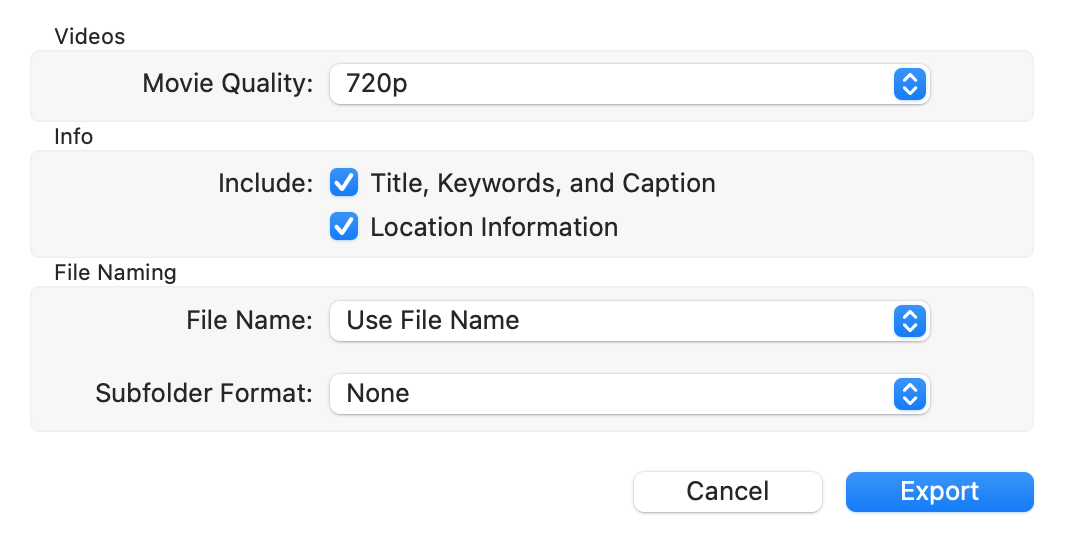


...but in your initial post you mentioned HEVC and Photos.app does not seem to support that, only H.264. I have used exiftool to copy metadata tags from the original movie to the re-encoded HEVC .mp4 done with Final Cut Pro or ffmpeg.


p.s. I do not use iCloud Photos so YMMV. Oh, so many variables...

Feb 22, 2023 12:14 PM in response to tvjohnny

On my IPad I use an app FileBrowser which has access to the photos library to copy or export (both work) the video to any location I want the video to use (on iPad, iCloud, jas, usb drive) which then puts a copy in the destination location with the correct create date. This enables me to keep the files on the iPad and use straight away in DaVinci resolve with the correct date. In DaVinci the import from photos function provides the date of import.

Feb 9, 2023 1:10 AM in response to tvjohnny

When you are using iCloud Photos to transfer the videos from the iPhone to your Mac, the file creation dates as seen in the Info in the Finder are changed to the date and time you downloaded the file from iCloud. That could be any date between you took the video and the date you exported it from Photos.


if you want to see the original date when the when the video has been taken in the finder, write the date into the filename, when you export the video.


Feb 8, 2023 7:31 AM in response to Matti Haveri

doesn't work for me. never edited dates inside photo app. I took videos on phone with icloud sync on. videos do not export to my ExFat external drive with the original date, just some random date that has nothing to do with when I shot the original. im not dragging and dropping--im using the export function in Photos.

if I export with an xmp sidecar file, the date on the xmp file is from day of export. In that case, I wind up with 2 files-the video and the xmp, both with different dates than the original.

This thread has been closed by the system or the community team. You may vote for any posts you find helpful, or search the Community for additional answers.

export videos to external hard drive

Welcome to Apple Support Community
A forum where Apple customers help each other with their products. Get started with your Apple Account.

