Unnecessary reminder pop-up boxes when sending e-mail.

The latest version of mail is now interposing unnecessary reminder pop-up box messages that need to be answered when the send button is pressed, in order to complete dispatch of a message. Is there a way to deactivate this unnecessary reminders that we now need to contend with?

MacBook Pro 16″, macOS 13.2

Posted on Feb 10, 2023 7:39 AM

Reply
Question marked as Top-ranking reply

Posted on Feb 12, 2023 2:47 PM

Hey there sunnibakchat,


Thanks for reaching out to the Apple Support Communities.


Just to clarify, are you clicking on the Send button, or the pop-up menu next to the Send button?


For more details, check out this link here: Write, send, and schedule emails in Mail on Mac - Apple Support


Send an email
In the Mail app  on your Mac, click the Send button  (or use the Touch Bar).

Schedule an email with Send Later
In the Mail app  on your Mac, click the pop-up menu next to the Send button , then choose an option.

Emails you choose to send later appear in the Send Later mailbox in the sidebar.
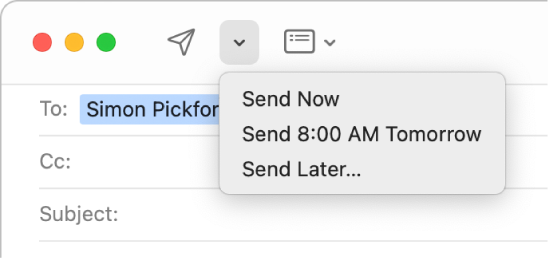
A menu in the message window showing different options for sending an email—Send Now, Send 8:00 AM Tomorrow, and Send Later.


If click on the Send button, can you provide us with a few more details on the pop-up box you're seeing?


Also, check out the information in the additional resource on the changes that came with Mail on macOS Ventura: What’s new in Mail on Mac? - Apple Support


Keep us updated on what you find.


Have a great day.

7 replies
Question marked as Top-ranking reply

Feb 12, 2023 2:47 PM in response to sunnibakchat

Hey there sunnibakchat,


Thanks for reaching out to the Apple Support Communities.


Just to clarify, are you clicking on the Send button, or the pop-up menu next to the Send button?


For more details, check out this link here: Write, send, and schedule emails in Mail on Mac - Apple Support


Send an email
In the Mail app  on your Mac, click the Send button  (or use the Touch Bar).

Schedule an email with Send Later
In the Mail app  on your Mac, click the pop-up menu next to the Send button , then choose an option.

Emails you choose to send later appear in the Send Later mailbox in the sidebar.
A menu in the message window showing different options for sending an email—Send Now, Send 8:00 AM Tomorrow, and Send Later.


If click on the Send button, can you provide us with a few more details on the pop-up box you're seeing?


Also, check out the information in the additional resource on the changes that came with Mail on macOS Ventura: What’s new in Mail on Mac? - Apple Support


Keep us updated on what you find.


Have a great day.

Feb 13, 2023 12:30 PM in response to sunnibakchat

Brian White


As I mentioned, I’m not using Ventura so don’t see this myself, but the point isn’t only that there’s no way to turn it off if you wanted to, but that in Apple’s implementation of it in Mail, it appears to be overly aggressive and offers no way to adjust it for either missing attachment or missing recipient reminders.


Ventura Mail - turn off attachment reminder? - TidBITS Talk - TidBITS Talk

Feb 13, 2023 8:06 AM in response to sunnibakchat

Hi sunnibakchat,


Since noticing this has the Mail app been closed out and the Mac restarted? Performing these steps can help when experiencing unexpected behaviors on your devices.


To Quit Mail


  1. Tap Mail in the menu bar
  2. Select Quit Mail


Quit apps on Mac - Apple Support


To restart your Mac

  1. Go to the Apple menu (  )
  2. Select Restart


Shut down or restart your Mac - Apple Support


Once steps are performed, test to see if this continues to occur.


Take Care!


Feb 13, 2023 1:44 AM in response to Chris_V89

Hello Chris,


yes, the “Send” button is being pressed.


The two most common pop-up messages are “missing recipients” and another to do with the recipient not having a digital certificate to unable encryption.


If you work for Apple, and these pop-up messages cannot be disabled, some logical insight as to why these features, which appear to be completely non-essential (and inefficiency gaining) have been interposed between the completion and dispatch of an e-mail?


This thread has been closed by the system or the community team. You may vote for any posts you find helpful, or search the Community for additional answers.

Unnecessary reminder pop-up boxes when sending e-mail.

Welcome to Apple Support Community
A forum where Apple customers help each other with their products. Get started with your Apple Account.
