Phone ringing while playing music and on DND

While playing Spotify during a class the music stopped when someone called me. I had to silence the call and restart the playlist. My iphone8 was on DND. This has never happened before.

A friend has also reported that her iPhone 13 rang while on DND. This is problematic as it is very disruptive to the session. This had never happened before but it happened to both of us within the past few days. How do we stop this from happening?

iPhone 8 Plus

Posted on Feb 13, 2023 5:36 PM

Reply
Question marked as Top-ranking reply

Posted on Feb 15, 2023 12:16 PM

Thanks for replying, hcd312, and that additional info, it really helps! DND works differently when unlocked, but you maybe able to change that behavior:


"Change your Do Not Disturb settings

If you don't want to be disturbed at a certain time, you can set a schedule and change other Do Not Disturb features to help you concentrate.

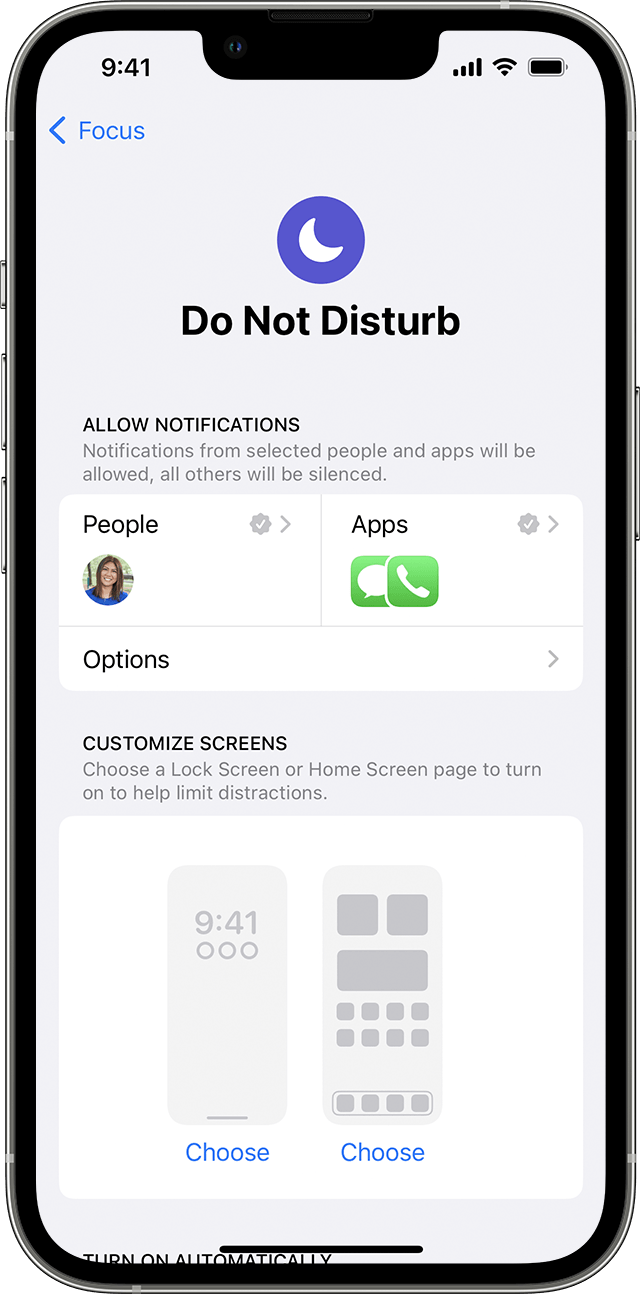
iPhone screen showing how to adjust Do not Disturb settings 

  1. Go to Settings > Focus.
  2. Tap Do Not Disturb.
  3. You can select allowed or silenced notifications from people and apps, connect your Lock Screen or Home Screen, have this Focus turn on automatically, and add Focus filters."


Another idea would be to have the Ring/Silent switch turned to Silent when in this situation: How to put your iPhone on vibrate, ring, or silent mode - Apple Support


To give feedback on how to make DND work better for you, please do that here: Product Feedback - Apple


Have a great day and thanks for using the Apple Support Communities!


Similar questions

3 replies
Question marked as Top-ranking reply

Feb 15, 2023 12:16 PM in response to hcd312

Thanks for replying, hcd312, and that additional info, it really helps! DND works differently when unlocked, but you maybe able to change that behavior:


"Change your Do Not Disturb settings

If you don't want to be disturbed at a certain time, you can set a schedule and change other Do Not Disturb features to help you concentrate.

iPhone screen showing how to adjust Do not Disturb settings 

  1. Go to Settings > Focus.
  2. Tap Do Not Disturb.
  3. You can select allowed or silenced notifications from people and apps, connect your Lock Screen or Home Screen, have this Focus turn on automatically, and add Focus filters."


Another idea would be to have the Ring/Silent switch turned to Silent when in this situation: How to put your iPhone on vibrate, ring, or silent mode - Apple Support


To give feedback on how to make DND work better for you, please do that here: Product Feedback - Apple


Have a great day and thanks for using the Apple Support Communities!


Feb 15, 2023 9:07 AM in response to hcd312

Hello hcd312,


From what you've shared it sounds like your device may not have been locked when you received a phone call.


"With Focus in iOS 15 and iPadOS 15 or later, you can use Do Not Disturb to silence calls, alerts, and notifications that you get while your device is locked. You can also schedule Do Not Disturb and allow calls from certain people."


If the behavior happened while the device was locked, we recommend reviewing your settings as outlined here: Use Do Not Disturb with Focus on your iPhone or iPad - Apple Support


Regards.

This thread has been closed by the system or the community team. You may vote for any posts you find helpful, or search the Community for additional answers.

Phone ringing while playing music and on DND

Welcome to Apple Support Community
A forum where Apple customers help each other with their products. Get started with your Apple Account.