
Can't add Airpods Pro to Devices in Find My

My 2nd Gen Airpods Pro do not appear in Find My. They are paired to my iPhone as well as my MacBook Pro, which are using the same Apple ID. I currently have 7 other devices associated with my ID.


In Find My on my iPhone, if I choose Add Other Item under Devices it identifies the Airpods and asks me to Register them with my Apple ID, but then gives me "An unknown error occurred. Please try again in a few minutes" error message. Any advice?

Posted on Feb 20, 2023 4:47 AM

Reply
1 reply

Feb 21, 2023 1:08 PM in response to matt___

Howdy matt___,


It sounds like you need help adding your AirPods to Find My. We know how important this is for you, and you’re in the right place for answers.

Turn on the Find My network
When the Find My network is on, you can see the location of AirPods (3rd generation), AirPods Pro (all generations), or AirPods Max in the Find My app  for up to 24 hours after they last connect to your device, even if they’re not nearby. 
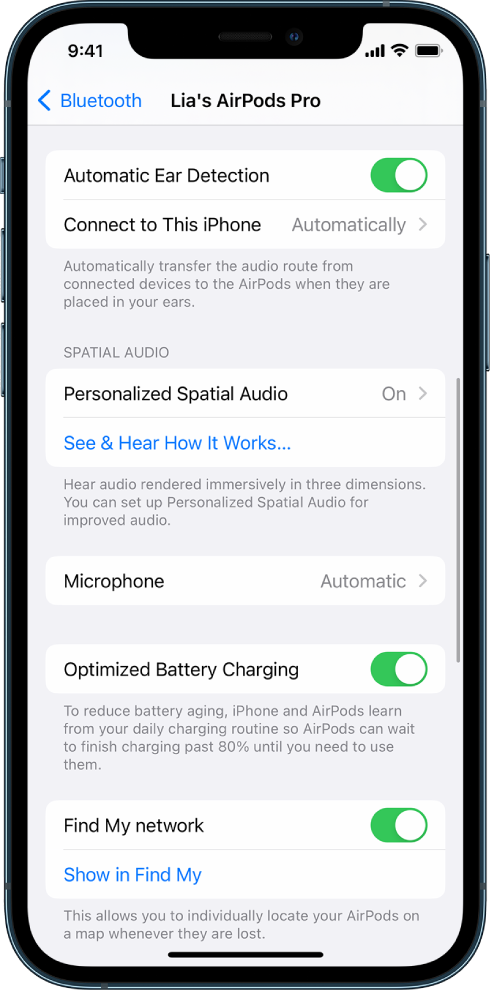
If you have AirPods Pro (2nd generation), you need iOS 16, iPadOS 16.1, macOS Ventura, or later to use the Find My network.
Important: To use the Find My app to locate AirPods when they’re offline, the Find My network must be on before they’re lost.
Bluetooth settings on an iPhone showing options for AirPods Pro (all generations). The “Find My network” option is on, which allows AirPods to be located individually on a map whenever they're lost.
1. Wear your AirPods, and make sure they’re connected to your device.
2. Go to Settings , then tap the name of your AirPods near the top of the screen.
3. Scroll down, then turn on Find My Network.

This info is located in the AirPods User Guide: Turn on the Find My network - Apple Support


Take Care!


This thread has been closed by the system or the community team. You may vote for any posts you find helpful, or search the Community for additional answers.

Can't add Airpods Pro to Devices in Find My

Welcome to Apple Support Community
A forum where Apple customers help each other with their products. Get started with your Apple Account.