HomePods do not reliably show up as Airplay targets

Doesn’t matter how long I wait or how many forums I read, how much I mess with wifi settings, I always have zero or a random number of HomePod minis showing up as Airplay devices. And there’s a million unhelpful forum question posts. Looks like another abandoned promise by Apple. Been a long time since “it just works” mattered to them.

Posted on Mar 20, 2023 6:36 AM

Reply
6 replies

Mar 28, 2023 7:12 AM in response to sakhfd

Hello sakhfd,


You mentioned in your first post that this happens no matter how much you “mess” with your home’s Wi-Fi settings. These are the Apple-recommended settings for using Apple devices: Recommended settings for Wi-Fi routers and access points - Apple Support


Also, since it seems you own multiple HomePods, check for Wi-Fi interference using the steps here: Resolve Wi-Fi and Bluetooth issues caused by wireless interference - Apple Support


Both can have a hand in the issue you’re facing with your HomePods.


Please let us know the results when you're able.


All the best.

Mar 21, 2023 2:54 PM in response to sakhfd

Hello sakhfd,


Thank you for reaching out to Apple Support Communities, and we'll be happy to help in any way we can. We understand you're having issues with AirPlay to your HomePod minis. Try the steps here to see if they resolve the issue: If screen mirroring or streaming isn't working on your AirPlay-compatible device - Apple Support


"Learn what to do if you can't stream content with AirPlay, mirror the screen on your iOS device or Mac to your Apple TV or smart TV, or have another issue using AirPlay.


Try these steps first

After each step, see if you still need help. 

  1. Make sure that your AirPlay-compatible devices are turned on and near each other.
  2. Check that the devices are updated to the latest software and are on the same Wi-Fi network. 
  3. Restart the devices that you want to use with AirPlay or screen mirroring.

If you're prompted to enter a password, you might have restrictions turned on, or you might need to adjust your AirPlay password settings.


Still need help?

If you have another issue using AirPlay, learn what to do.

If your music unexpectedly stops

If your music stops playing unexpectedly, use your device or Siri to start playing music again. In some situations, the Home app might be using your HomePod,* Apple TV, or AirPlay-compatible speaker as the main audio source for streaming music (even if your HomePod* or Apple TV isn’t currently playing music). Using Siri on that device or performing another task might cause playback to stop everywhere. You can also use an iOS device or computer with iTunes as an audio source to manually stream music instead.
 

If you see video but don't hear audio

If you don't hear audio when streaming video from your iOS device or Mac to your Apple TV, make sure that the volume is turned up and not muted on both your iOS device and your television or receiver. 

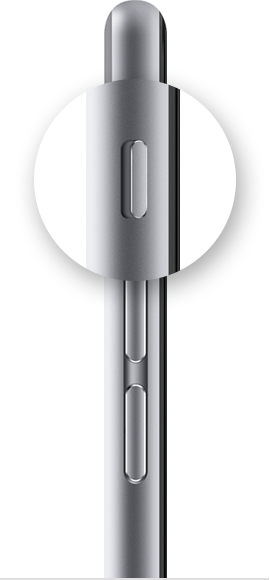
If you're streaming video from an iPhone or iPad, check the Ring/Silent switch. If it's set to silent, you'll see an orange line. Toggle the switch to turn on the ringer.

 

If you still can’t use AirPlay after trying these steps, contact Apple Support."


We hope this helps.


Cheers!


Mar 28, 2023 8:11 AM in response to SnickZ.

My settings are all in line with Apple recommendations. Also all other Apple devices (macs, laptops, iPads, iPhones, Apple Watches) have zero issues remaining connected.


also the number of HomePods that show up as Airplay targets is random. Sometimes 0 like this morning or a handful. And it’s always changing. Whereas my wifi settings are stable.


i have gone through Apple forums, Reddit, and my networking (Ubiquiti) forums. And nothing gets the HomePods stable or even the number of reliable Airplay targets trending upward.


i borrowed a friends Alexa devices to test last week and they work fine with my wifi settings. This is a long standing Apple problem that rebooting doesn’t fix and I’m tired of Apple kicking the blame to wifi and networking. If your devices were so reliant on networking you shouldn’t have exited the router/AP market.


Any other tips that aren’t the basic crap?

This thread has been closed by the system or the community team. You may vote for any posts you find helpful, or search the Community for additional answers.

HomePods do not reliably show up as Airplay targets

Welcome to Apple Support Community
A forum where Apple customers help each other with their products. Get started with your Apple Account.