Setting up legacy contact. I selected my person. Then what? I haven’t received an access code and I’m stuck on the contact info.

Setting up legacy contact. I selected my person. Then what? I haven’t received an access code and I’m stuck on the contact info.

iPhone 14 Pro Max, iOS 16

Posted on Mar 22, 2023 7:27 AM

Reply
Question marked as Top-ranking reply

Posted on Mar 23, 2023 10:57 AM

Hello Pjhbh22,


Thanks for choosing the Apple Support Communities. We see you have ran into confusion about what to do next when adding a legacy contact on your Apple ID. We have a few steps from the resource you found that can explain what happens next. Check those out below and let us know if you have additional questions.


How to add a Legacy Contact for your Apple ID - Apple Support


"Share the access key with your Legacy Contact

The access key is extremely important—your Legacy Contact must have both the access key and your death certificate to request access after you pass away. Then they'll need the access key again to set up a legacy contact Apple ID and access your data.
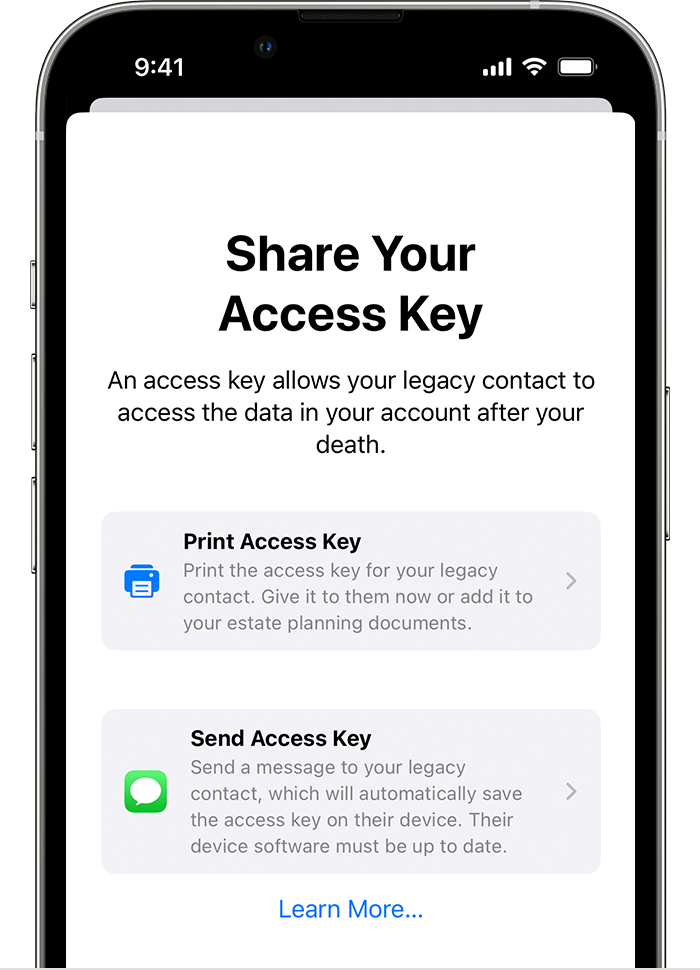
Share your access key with your Legacy Contact

  • If your Legacy Contact is using a device with iOS 15.2, iPadOS 15.2, or macOS Monterey 12.1 or later, you can notify them via Messages when you add them, and if they accept, they automatically store a copy of the access key in their Apple ID settings. You’ll receive a notification if they decline your Legacy Contact request, and you can choose someone else.
  • If your Legacy Contact is using an Apple device with older software, you can ask them to update to iOS 15.2, iPadOS 15.2, or macOS Monterey 12.1. Then you can use the Send a Message option to allow them to receive and store the access key on their device. Or you can print out and give them a copy of the access key. 
  • If you add someone who doesn’t have an Apple device or can't access Legacy Contact settings on their device, you'll need to give them a physical copy of the access key. You can print a copy of the access key and give it to them, send them a PDF or screenshot of the page, or save a copy with your estate planning documents.

Note: If you use Send a Message to share the access key, it's a good idea to confirm that your Legacy Contact received it. However you share the access key, you may also want to print and save a copy of their access key with your estate planning documents.

Learn what to do if a Legacy Contact you recently added is unexpectedly removed"


We hope this helps.


Cheers!


1 reply
Question marked as Top-ranking reply

Mar 23, 2023 10:57 AM in response to Pjhbh22

Hello Pjhbh22,


Thanks for choosing the Apple Support Communities. We see you have ran into confusion about what to do next when adding a legacy contact on your Apple ID. We have a few steps from the resource you found that can explain what happens next. Check those out below and let us know if you have additional questions.


How to add a Legacy Contact for your Apple ID - Apple Support


"Share the access key with your Legacy Contact

The access key is extremely important—your Legacy Contact must have both the access key and your death certificate to request access after you pass away. Then they'll need the access key again to set up a legacy contact Apple ID and access your data.

Share your access key with your Legacy Contact

  • If your Legacy Contact is using a device with iOS 15.2, iPadOS 15.2, or macOS Monterey 12.1 or later, you can notify them via Messages when you add them, and if they accept, they automatically store a copy of the access key in their Apple ID settings. You’ll receive a notification if they decline your Legacy Contact request, and you can choose someone else.
  • If your Legacy Contact is using an Apple device with older software, you can ask them to update to iOS 15.2, iPadOS 15.2, or macOS Monterey 12.1. Then you can use the Send a Message option to allow them to receive and store the access key on their device. Or you can print out and give them a copy of the access key. 
  • If you add someone who doesn’t have an Apple device or can't access Legacy Contact settings on their device, you'll need to give them a physical copy of the access key. You can print a copy of the access key and give it to them, send them a PDF or screenshot of the page, or save a copy with your estate planning documents.

Note: If you use Send a Message to share the access key, it's a good idea to confirm that your Legacy Contact received it. However you share the access key, you may also want to print and save a copy of their access key with your estate planning documents.

Learn what to do if a Legacy Contact you recently added is unexpectedly removed"


We hope this helps.


Cheers!


This thread has been closed by the system or the community team. You may vote for any posts you find helpful, or search the Community for additional answers.

Setting up legacy contact. I selected my person. Then what? I haven’t received an access code and I’m stuck on the contact info.

Welcome to Apple Support Community
A forum where Apple customers help each other with their products. Get started with your Apple Account.