airpods won't stay connected to new ipad

I didn't run into this issue until I started using my airpods with my new ipad pro and now my airpods pro won't stay connected to any of my devices. The issue is as follows.


  1. I will add my airpods to my ipad for the first time.
  2. My airpods will connect and will work fine.
  3. I put my airpods back in the case or remove them from my ears for 5 minutes.
  4. I put my airpods back in my ears and they don't automatically connect to my ipad.
  5. I go to bluetooth settings and my select my airpods.
  6. I receive a message stating "make sure airpods is turned on and in range."
  7. This error message persists across all of my devices (iphone, macbook pro, ipad)
  8. The only way to add airpods back to my device is to forget the device and reconnect to device from scratch.


I don't know what is causing the issue but it only appeared when I received my new ipad 1 week ago.

iPad Pro (6th generation)

Posted on Mar 23, 2023 2:25 PM

Reply
Question marked as Top-ranking reply

Posted on Mar 25, 2023 8:29 AM

Hi awip07,


Thanks for reaching out to Apple Support Communities.


It sounds like you’re having an issue with connecting your AirPods to your new iPad Pro.


We’re happy to assist.


We recommend checking out the steps in the section titled "If you can't connect to your iPhone, iPad, or iPod touch" from the article here: If your AirPods won't connect - Apple Support


1. Make sure that your iPhone or iPod touch has the latest version of iOS or that your iPad has the latest version of iPadOS.
2. Put both AirPods in the charging case and make sure that both AirPods are charging.
3. To make sure that Bluetooth is on, go to Settings > Bluetooth.
4. If your AirPods are connected, make sure that they're selected as your audio device. If your AirPods appear in the list of devices but they don't connect, go to the next step.
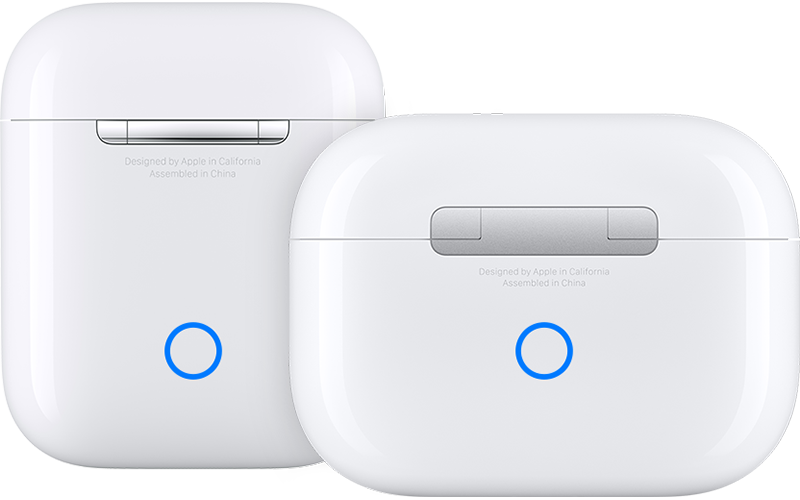
5. Close the lid, wait 15 seconds, then open the lid. Press and hold the setup button on the back of the charging case for up to 10 seconds. The status light on the front of the charging case should flash white, which means that your AirPods are ready to connect.
AirPods charging cases
6. Hold the charging case, with your AirPods inside and the lid open, next to your iPhone, iPad, or iPod touch.
7. Follow the steps on the screen of your iPhone, iPad, or iPod touch.
8. Test your AirPods. If you still can't connect, reset your AirPods.


The reason why we’re recommending the steps above is because they directly address the issue you initially posted about: you're having difficulty getting your AirPods to stay connected to your iPad Pro.


Please let us know the outcome after giving the above steps a try.


Cheers!

Similar questions

3 replies
Question marked as Top-ranking reply

Mar 25, 2023 8:29 AM in response to awip07

Hi awip07,


Thanks for reaching out to Apple Support Communities.


It sounds like you’re having an issue with connecting your AirPods to your new iPad Pro.


We’re happy to assist.


We recommend checking out the steps in the section titled "If you can't connect to your iPhone, iPad, or iPod touch" from the article here: If your AirPods won't connect - Apple Support


1. Make sure that your iPhone or iPod touch has the latest version of iOS or that your iPad has the latest version of iPadOS.
2. Put both AirPods in the charging case and make sure that both AirPods are charging.
3. To make sure that Bluetooth is on, go to Settings > Bluetooth.
4. If your AirPods are connected, make sure that they're selected as your audio device. If your AirPods appear in the list of devices but they don't connect, go to the next step.
5. Close the lid, wait 15 seconds, then open the lid. Press and hold the setup button on the back of the charging case for up to 10 seconds. The status light on the front of the charging case should flash white, which means that your AirPods are ready to connect.
AirPods charging cases
6. Hold the charging case, with your AirPods inside and the lid open, next to your iPhone, iPad, or iPod touch.
7. Follow the steps on the screen of your iPhone, iPad, or iPod touch.
8. Test your AirPods. If you still can't connect, reset your AirPods.


The reason why we’re recommending the steps above is because they directly address the issue you initially posted about: you're having difficulty getting your AirPods to stay connected to your iPad Pro.


Please let us know the outcome after giving the above steps a try.


Cheers!

Mar 28, 2023 1:55 PM in response to J_Johnnyboy

I don't have a problem with connecting my airpods with my devices. The issue is once they are connected they won't automatically reconnect back to my devices unless I completely reset them.


  • My devices are all running the most recent OS.
  • All of the steps you provided above work fine and after forgetting and reconnecting my airpods to my device for the first time it connects without issue. But if I put my airpods back in the case and then place them back in my ears they will not reconnect unless I reset them by forgetting device in the bluetooth settings.

This thread has been closed by the system or the community team. You may vote for any posts you find helpful, or search the Community for additional answers.

airpods won't stay connected to new ipad

Welcome to Apple Support Community
A forum where Apple customers help each other with their products. Get started with your Apple Account.