Enable intelligent tracking prevention debug mode

Hi, what can I do to keep this enabled? If I restart my MacBook, I have to remember to re-enable. I use private mode. Would appreciate knowing if there is something I can tweak. Thanks!


MacBook Air (2018 – 2020)

Posted on Mar 25, 2023 11:43 AM

Reply
2 replies

Mar 26, 2023 4:26 PM in response to honeycrisp11

Hey there, honeycrisp11,


Thanks so much for using Apple Support Communities. Being able to protect your privacy is super important, we want to help make sure it's working as expected. To start, can you check if your Mac is running the latest version of macOS available? You can do that by following the steps here: Update macOS on Mac - Apple Support. Updating a Mac can often resolve these types of issues which is why we recommend starting there.


If the issue continues to occur, can you double check if it happens outside of a private browsing window in Safari? This would help isolate the issue which can help in resolving the issue. And it sounds like you already are, but we want to be sure to cover all our bases and recommend making sure that you are following all of the steps in this article when enabling the cross-site tracking prevention feature in Safari: Prevent cross-site tracking in Safari on Mac - Apple Support


We hope that this information is helpful.


​Have a great day!


Mar 27, 2023 2:37 AM in response to honeycrisp11

Browse privately in Safari on Mac


When you browse privately, the details of your browsing aren’t saved, and the websites you visit aren’t shared with your other Apple devices.

Open Safari for me

Browse privately one time

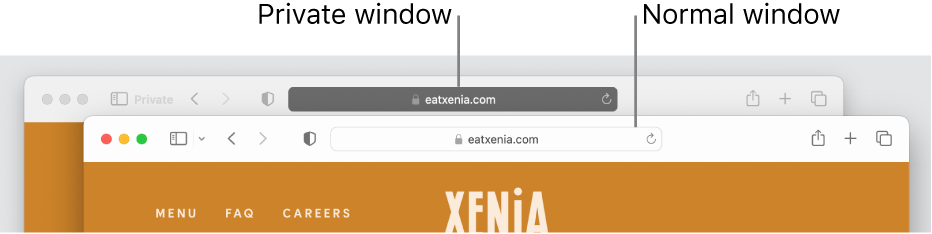
  1. In the Safari app on your Mac, choose File > New Private Window, or switch to a private window that’s already open.
  2. A private window has a dark Smart Search field with white text.
  3. Browse as you normally would.
  4. When you use a private window:
    • Browsing initiated in one tab is isolated from browsing initiated in another tab, so websites you visit can’t track your browsing across multiple sessions.
    • Webpages you visit and your AutoFill information aren’t saved.
    • Your open webpages aren’t stored in iCloud, so they aren’t shown when you view all your open tabs from other Apple devices.
    • Your recent searches aren’t included in the results list when you use the Smart Search field.
    • Items you download aren’t included in the downloads list. (The items do remain on your computer.)
    • If you use Handoff, private windows aren’t handed off to your iPhone, iPad, iPod touch, or other Mac computers.
    • Changes to your cookies and website data aren’t saved.
  1. Websites can’t modify information stored on your Mac, so services normally available at such sites may work differently until you use a non-private window.
  2. Note: None of the above applies in non-private Safari windows you may have open.

Always browse privately

  1. In the Safari app on your Mac, choose Safari > Settings, then click General.
  2. Click the “Safari opens with” pop-up menu, then choose “A new private window.”
  3. If you don’t see this option, choose Apple menu  > System Settings, click Desktop & Dock in the sidebar, then turn on “Close windows when quitting an app” on the right. (You may need to scroll down.)
  4. Open Desktop & Dock settings for me

Stop browsing privately

  1. In the Safari app on your Mac, close the private window, switch to a non-private Safari window, or choose File > New Window to open a non-private window.
  2. Do any of the following to further enhance privacy:
    • Delete any items you downloaded while using private windows.
    • Close any other private windows that are still open, to prevent other people from using the Back and Forward buttons to see webpages you visited in those windows.


This thread has been closed by the system or the community team. You may vote for any posts you find helpful, or search the Community for additional answers.

Enable intelligent tracking prevention debug mode

Welcome to Apple Support Community
A forum where Apple customers help each other with their products. Get started with your Apple Account.