Hi VRajram,
We'll be glad to go over this with you further. If it's stating it's having trouble connecting to the internet, there's likely an issue with the Wi-Fi network you're connected to. Either the HomePod isn't connected at all, or is connected and is unable to access the Internet.
The steps outlined in If HomePod or HomePod mini isn't responding - Apple Support should help you out.
Specifically, "Check your Wi-Fi connection
HomePod and HomePod mini automatically connect to the same Wi-Fi network as your iPhone or iPad. To check your Wi-Fi signal strength:
- Open the Home app on your iPhone, iPad, or Mac.
- Tap or click HomePod.
- Scroll down, or tap or click the Settings icon
 and scroll down to Wi-Fi Network. The Wi-Fi signal strength indicator
  appears next to your network name.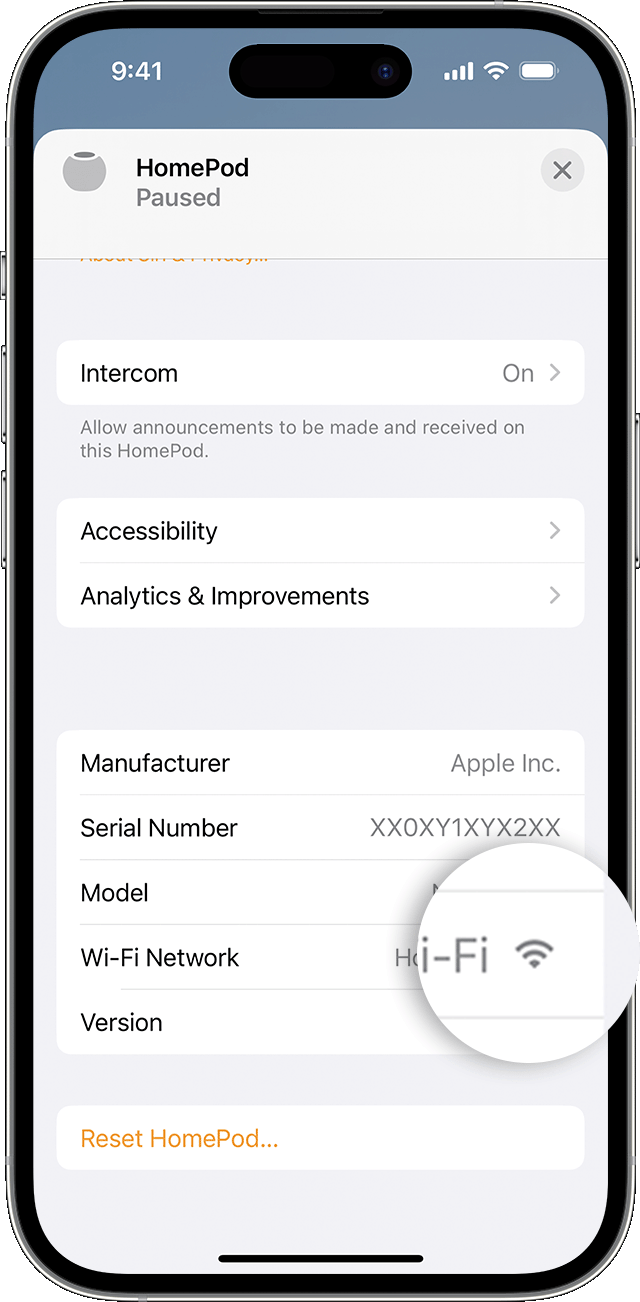
- If the signal strength indicator shows two bars or fewer
 , your Wi-Fi signal strength is weak. Try moving your HomePod speaker closer to your router and remove potential sources of wireless interference.
 - If the signal strength indicator shows an exclamation point
 , learn what to do.
Learn what to do if Siri on your HomePod says it can't connect to the internet"
Cheers.


