New HomeKit Architecture upgrade

Hi;


I updated all my iDevices to iOS 16.4 today but for

some reason I cannot find the New HomeKit Architecture upgrade

anywhere!

One of my HomePod mini's acting as my Home Hub and the other

HomePod mini, iPad Pro & my ATV 4K are all on standby.

I've done all I can to remedy this to no avail!

Any help/solution is much appreciated.


Device Detail: iPhone 12 Pro Max


iPhone 12 Pro Max

Posted on Mar 28, 2023 1:09 PM

Reply
Question marked as Top-ranking reply

Posted on Mar 31, 2023 1:57 PM

Hey johnteeee,


One thing that we wanted to do is share the steps for how exactly you locate this setting, simply because it could be a case of us just missing it in the Home app. Here is exactly where you can find that upgrade option:


  1. "Open the Home app on your iPhone or iPad running the latest version of iOS or iPadOS, or Mac running the latest version of macOS.
  2. Tap or click the More button .
  3. Select Home Settings . If you own multiple homes, choose one, then select Home Settings 
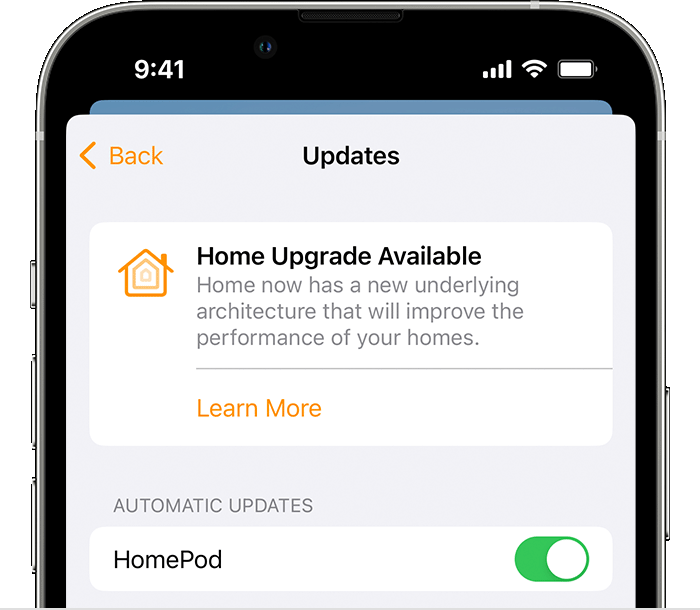
  4. Select Software Update.
  5. Tap or click Learn More under Home Upgrade Available, then follow the prompts to upgrade."


Home Upgrade Available banner appears on the Updates screen in the Home app


Can you double check that you've navigated to the correct location based on those instructions? That will make sure all our bases are covered. Those steps can also be found here, along with some other good info: Upgrade to the new Home architecture - Apple Support


We hope this does the trick for you!


Cheers.


Similar questions

18 replies
Question marked as Top-ranking reply

Mar 31, 2023 1:57 PM in response to johnteeee

Hey johnteeee,


One thing that we wanted to do is share the steps for how exactly you locate this setting, simply because it could be a case of us just missing it in the Home app. Here is exactly where you can find that upgrade option:


  1. "Open the Home app on your iPhone or iPad running the latest version of iOS or iPadOS, or Mac running the latest version of macOS.
  2. Tap or click the More button .
  3. Select Home Settings . If you own multiple homes, choose one, then select Home Settings 
  4. Select Software Update.
  5. Tap or click Learn More under Home Upgrade Available, then follow the prompts to upgrade."


Home Upgrade Available banner appears on the Updates screen in the Home app


Can you double check that you've navigated to the correct location based on those instructions? That will make sure all our bases are covered. Those steps can also be found here, along with some other good info: Upgrade to the new Home architecture - Apple Support


We hope this does the trick for you!


Cheers.


Mar 31, 2023 11:36 AM in response to johnteeee

Hi johnteeee,


Thanks for posting in Apple Support Communities.


We understand that all your HomeKits devices are in standby. There are few things you can do to address this behavior. Start by checking that all devices are connected to the same network and that Bluetooth is enabled on all.


Restart all your devices. This will refresh running processes on all devices.


Regards.


Mar 31, 2023 8:41 PM in response to johnteeee

Perhaps you have upgraded? If you recently redid the Home set up. Take a look in your iPad Pro in Settings, in the left pane scroll down to Home, tap on it to see if it has the option to be a hub. iPads can no longer be Hubs in the new architecture.


I disabled it being a Home Hub to see if I can fix some issues I’m having. I’ve not upgraded yet and that’s why the option is still there.

May 7, 2023 12:09 AM in response to robfreeman

robfreeman wrote:

Hi - is anyone having a similar issue but with their MacBook Pro please? All my other iOS devices have done their update but my MBP says all software is up to date... I go to the Home app and no devices are responsive, yet fine with all the other iOS things - help!

If you can view your home app with your devices in it on the MacBook, then you have the upgrade.

try force quitting Home App & restarting your Mac to see if it refreshes. Otherwise if everything is functioning you can ignore “no response”.

This thread has been closed by the system or the community team. You may vote for any posts you find helpful, or search the Community for additional answers.

New HomeKit Architecture upgrade

Welcome to Apple Support Community
A forum where Apple customers help each other with their products. Get started with your Apple Account.

