​​ ​

The Apple Support Community will permanently close on November 20, 2026. Starting today, the site will no longer accept new posts and is available in a read-only state.


You can continue to find trusted guidance and support on the official Apple Support site. 


We want to thank the community members who have contributed their time and expertise to help others with their Apple products.


Mail keep asking for admin name and password every time I try to send an email

Why is the happening suddenly? I cannot send any emails?

The only thing I have done differently is installed a digital certificate recently on my Mac.

But... on all other devices I can send an receive mail easily, just not on my Mac.

How can I change this, it keeps looking for the admin name and password continuously?

I even tried uninstalling and reinstalling my internet mail accounts

MacBook Air (M1, 2020)

Posted on Apr 2, 2023 4:18 AM

Question marked as Top-ranking reply

Posted on Apr 5, 2023 3:38 PM

Hello tufcookie2000,


We would like to see how we can help you with the Mail app not working as expected. Have you tried removing the certificate to see if the issue persists? Check out the steps in this link as well, and get back to us with your results: If you can’t send or receive email on your Mac - Apple Support


"Check for status messages

You might see a status icon such as a lightning bolt  or warning symbol  next to your account's inbox in the Mail sidebar, or in the upper-right corner of the Mail window. Click it to learn more.
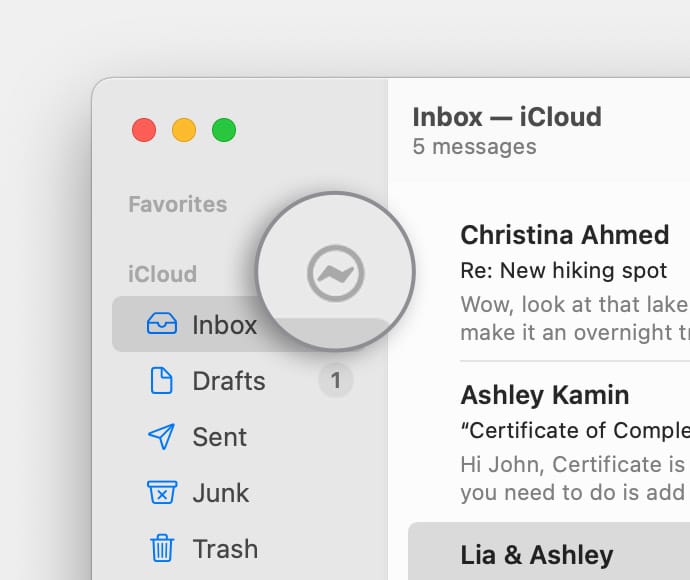
iCloud account in Mail sidebar with lightning bolt icon shown

  • If the status is Network Offline, make sure that your Mac is connected to the internet, then try again.
  • If the status is Login Failed, check with your email service provider (ESP) to be sure that your account is set up correctly on your Mac.
  • If Mail asks for your password, but entering the password doesn't help, find out why your email provider is rejecting your password.
  • If your email service is experiencing a temporary outage, your email provider might have a status message on their website. For example, Apple's system status page shows the status of iCloud Mail. Status pages are also available for other email services, such as Gmail and Outlook. Some brief service outages might not appear on a system status page, so you might want to wait a few hours and try again.


Test using webmail

Many email providers offer webmail, which is a way to use email with a web browser such as Safari, instead of with an email app such as Mail. For example, if you're using an iCloud Mail account, you can use iCloud.com to send and receive email.

Webmail is a good way to verify that your account is valid, but it doesn't mean that your account is set up correctly in Mail. Your email provider can help you verify your email settings and check for other issues that affect sending or receiving email.


Remove your email account, then add it back

If no other solutions work, follow these steps:

  1. Remove your email account in Mail.
  2. Add your email account in Mail again.
  3. Try to send and receive email."


Cheers!


Similar questions

1 reply
Question marked as Top-ranking reply

Apr 5, 2023 3:38 PM in response to tufcookie2000

Hello tufcookie2000,


We would like to see how we can help you with the Mail app not working as expected. Have you tried removing the certificate to see if the issue persists? Check out the steps in this link as well, and get back to us with your results: If you can’t send or receive email on your Mac - Apple Support


"Check for status messages

You might see a status icon such as a lightning bolt  or warning symbol  next to your account's inbox in the Mail sidebar, or in the upper-right corner of the Mail window. Click it to learn more.

iCloud account in Mail sidebar with lightning bolt icon shown

  • If the status is Network Offline, make sure that your Mac is connected to the internet, then try again.
  • If the status is Login Failed, check with your email service provider (ESP) to be sure that your account is set up correctly on your Mac.
  • If Mail asks for your password, but entering the password doesn't help, find out why your email provider is rejecting your password.
  • If your email service is experiencing a temporary outage, your email provider might have a status message on their website. For example, Apple's system status page shows the status of iCloud Mail. Status pages are also available for other email services, such as Gmail and Outlook. Some brief service outages might not appear on a system status page, so you might want to wait a few hours and try again.


Test using webmail

Many email providers offer webmail, which is a way to use email with a web browser such as Safari, instead of with an email app such as Mail. For example, if you're using an iCloud Mail account, you can use iCloud.com to send and receive email.

Webmail is a good way to verify that your account is valid, but it doesn't mean that your account is set up correctly in Mail. Your email provider can help you verify your email settings and check for other issues that affect sending or receiving email.


Remove your email account, then add it back

If no other solutions work, follow these steps:

  1. Remove your email account in Mail.
  2. Add your email account in Mail again.
  3. Try to send and receive email."


Cheers!


This thread has been closed by the system or the community team. You may vote for any posts you find helpful, or search the Community for additional answers.

Mail keep asking for admin name and password every time I try to send an email

Welcome to Apple Support Community
A forum where Apple customers help each other with their products. Get started with your Apple Account.