App clips

#1 - What is an app clip? And how do stop it from asking yo access my applications.

I says you can rent a scooter with it.


# 2- when I go to settings > Wi-Fi the edit in the upper right it shows “ managed networks. (IPhone14)

who is managing them? My cellular service (Verizon) has given me 3 answers from 3 different agents. From I don’t know, I’ll get back to you, to VPN. I deleted my VPN and they’re still there. I select the information icon to the right of each network and there is no option to delete/forget.

thoughts/solutions?

iPhone 14, iOS 16

Posted on Apr 2, 2023 12:36 PM

Reply

Similar questions

3 replies

Apr 6, 2023 9:25 AM in response to NoTinFoilHatJustCurious

Hi there!


You can learn more about App Clips and how they are used with this information from Use App Clips on iPhone:

Use App Clips on iPhone
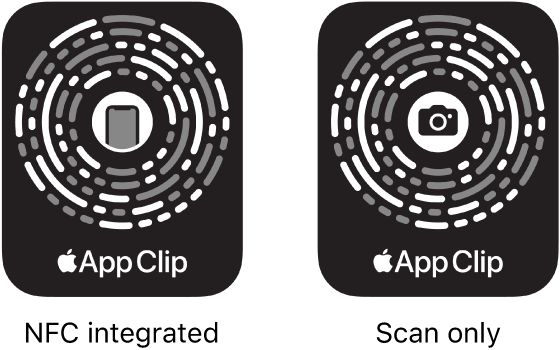
An App Clip is a small part of an app that lets you do a task quickly, like rent a bike, pay for parking, or order food. You can discover App Clips in Safari, Maps, and Messages, or in the real world through NFC tags, QR codes, and App Clip Codes—unique markers that take you to specific App Clips.
On the left, an NFC-integrated App Clip Code with an iPhone icon in the center. On the right, a scan-only App Clip Code with a camera icon in the center.

Get and use an App Clip
1. Get an App Clip from any of the following:
* App Clip Code or QR code: Scan the code using the iPhone camera or Code Scanner in Control Center.
* NFC-integrated App Clip Code or NFC tag: Hold iPhone (supported models) near the NFC tag.
* Maps: Tap the App Clip link on the information card (for supported locations).
* Safari or Messages: Tap the App Clip link.

2. When the App Clip appears on the screen, tap Open or Play.
In supported App Clips, you can use Sign in with Apple, then make a payment using Apple Pay.
With some App Clips, you can tap the banner at the top of the screen to see the full app.


As far as managed networks, this usually refers to networks that are managed by your wireless carrier. The managed networks that you see in this area are related to your cellular data connection and are the networks you connect to when you are not connected to Wi-Fi. If you are having issues with your cellular data, reach back out to your wireless carrier as they would be the best suited to assist further.


Cheers!

This thread has been closed by the system or the community team. You may vote for any posts you find helpful, or search the Community for additional answers.

App clips

Welcome to Apple Support Community
A forum where Apple customers help each other with their products. Get started with your Apple Account.