My iPod worked great for a trip then when i went to turn it on for the return trip it just showed a red x and wouldn’t play
iPod shows a red x when i turn it on now.... how do i fix it?
iPod Classic
iPod shows a red x when i turn it on now.... how do i fix it?
iPod Classic
Hi scooter257,
Thanks for posting in Apple Support Communities.
With the red "X" icon on your iPod Classic, you will need to put iPod into Disk Mode to restore it. Make sure that your computer and iTunes are running both running the most recent software.
iPod with a Click Wheel
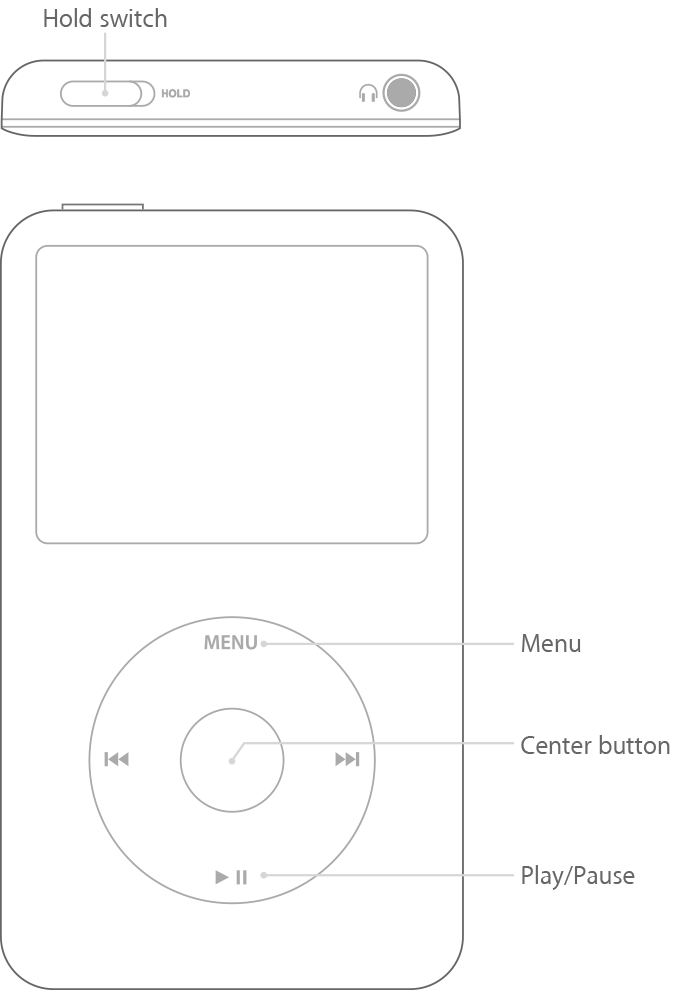
If your iPod has a Click Wheel, the controls are on the wheel: Menu at the top, Play/Pause at the bottom, and Prev/Next on the left and right. This includes iPod classic, iPod with Video, iPod photo, iPod nano (5th generation and earlier), and iPod mini.
To use disk mode:
1. Set your iPod on a flat surface and make sure that your iPod has a battery charge.
2. Slide the Hold switch on and off.
3. Press and hold the Menu and Center buttons until you see the Apple logo. Make sure that the finger pressing the Center button isn't touching the Click Wheel.
4. When you see the Apple logo, release the Menu and Center buttons.
5. Press and hold the Center and Play/Pause buttons until you see the disk mode screen. Make sure that you press the Play/Pause buttons toward the outside of the Click Wheel and not near the center.
6. Connect your iPod to your computer. The screen on your iPod should display Do not disconnect. Make sure that you eject your iPod in iTunes before you disconnect it from your computer.
To exit disk mode, press the Center and Menu buttons at the same time until you see the Apple logo.
You can find these steps in How to use disk mode on your iPod - Apple Support.
iPod will need to be serviced if the behavior continues after restore. You can contact Apple Support for options.
Contact - Official Apple Support
Regards.
Hi scooter257,
Thanks for posting in Apple Support Communities.
With the red "X" icon on your iPod Classic, you will need to put iPod into Disk Mode to restore it. Make sure that your computer and iTunes are running both running the most recent software.
iPod with a Click Wheel
If your iPod has a Click Wheel, the controls are on the wheel: Menu at the top, Play/Pause at the bottom, and Prev/Next on the left and right. This includes iPod classic, iPod with Video, iPod photo, iPod nano (5th generation and earlier), and iPod mini.
To use disk mode:
1. Set your iPod on a flat surface and make sure that your iPod has a battery charge.
2. Slide the Hold switch on and off.
3. Press and hold the Menu and Center buttons until you see the Apple logo. Make sure that the finger pressing the Center button isn't touching the Click Wheel.
4. When you see the Apple logo, release the Menu and Center buttons.
5. Press and hold the Center and Play/Pause buttons until you see the disk mode screen. Make sure that you press the Play/Pause buttons toward the outside of the Click Wheel and not near the center.
6. Connect your iPod to your computer. The screen on your iPod should display Do not disconnect. Make sure that you eject your iPod in iTunes before you disconnect it from your computer.
To exit disk mode, press the Center and Menu buttons at the same time until you see the Apple logo.
You can find these steps in How to use disk mode on your iPod - Apple Support.
iPod will need to be serviced if the behavior continues after restore. You can contact Apple Support for options.
Contact - Official Apple Support
Regards.
My iPod worked great for a trip then when i went to turn it on for the return trip it just showed a red x and wouldn’t play