Reaction emojis for Apple email

I want to add the reaction “HA HA” emoji to the emojis selection list in Apple email. So far I am unable to find the words “HA HA” in any of the available emojis. Is there a way to do this when composing an Apple email?

iPad, iOS 9

Posted on Apr 6, 2023 7:33 AM

Reply
Question marked as Top-ranking reply

Posted on Apr 6, 2023 8:13 AM

Mfunsten wrote:

So are you saying the Apple “HA HA” reaction emoji is not an emoji?


IdrisSeabright is correct. That’s not an emoji.


The Emojis are available from the Emoji keyboard; in the Emoji picker.


The reactions images and animations over in Messages are not that; not Emojis.


Here? You can embed an image of whatever you want in a mail message, of course.


Emoji picker looks like this on recent iPadOS (you’re on a very old version and where the picker will look different:


And inserting an image into mail (and here showing how to select which size, after having tapped the image insert tool and selected a photo) using iPadOS 16:
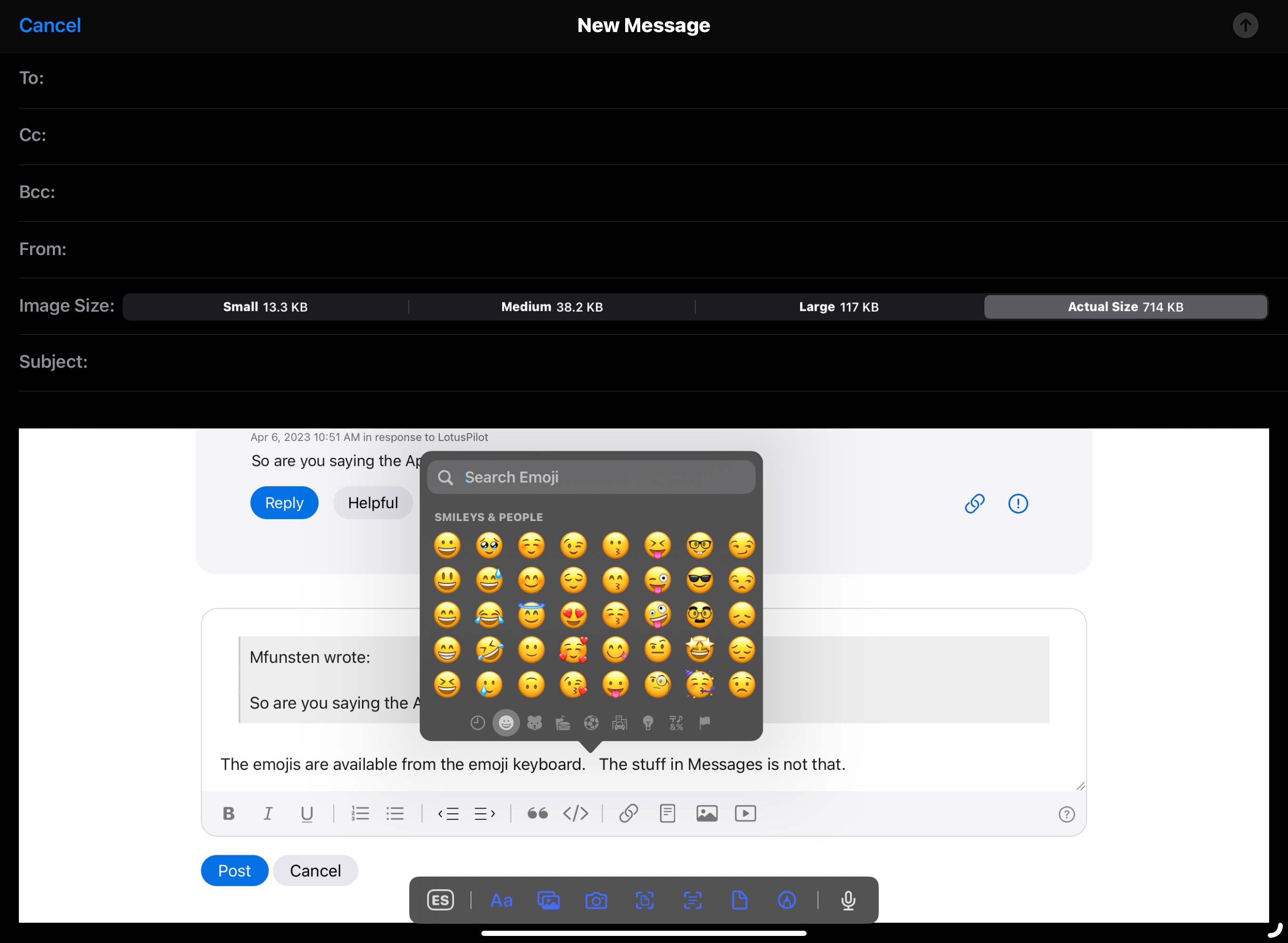


If you’d like Messages-like reactions added to Mail, send Apple feedback: Product Feedback - Apple



8 replies
Question marked as Top-ranking reply

Apr 6, 2023 8:13 AM in response to Mfunsten

Mfunsten wrote:

So are you saying the Apple “HA HA” reaction emoji is not an emoji?


IdrisSeabright is correct. That’s not an emoji.


The Emojis are available from the Emoji keyboard; in the Emoji picker.


The reactions images and animations over in Messages are not that; not Emojis.


Here? You can embed an image of whatever you want in a mail message, of course.


Emoji picker looks like this on recent iPadOS (you’re on a very old version and where the picker will look different:


And inserting an image into mail (and here showing how to select which size, after having tapped the image insert tool and selected a photo) using iPadOS 16:


If you’d like Messages-like reactions added to Mail, send Apple feedback: Product Feedback - Apple


Apr 6, 2023 8:06 AM in response to Mfunsten

I’m saying that the available emojis are determined by Unicode - not Apple.


That said, the graphic associated with each standard Unicode emoji may stylistically differ between OS platforms and device manufacturers - i.e., the picture/graphic may appear different between different devices and OS platforms.


Unicode is just one set of standards to which computer Operating Systems will comply.


The custom Apple-specific animations that you can use with iMessage are not emojis. These graphics are Apple-proprietary - and used only between users of Apple devices using the iMessage service.


I hope this clarification helps with understanding the fundamental differences between emojis and system-proprietary features.

This thread has been closed by the system or the community team. You may vote for any posts you find helpful, or search the Community for additional answers.

Reaction emojis for Apple email

Welcome to Apple Support Community
A forum where Apple customers help each other with their products. Get started with your Apple Account.