iMessage messes up when I try and edit text messages before sending

For a few months now, iMessage (I'm running Monterey on a 2021 MacBook Pro) has been messing up text when I try and type a text message, especially if I go back and try to edit part of the text I've already typed. It will delete text I wasn't trying to change, and jump my cursor around so text gets added to the wrong spots and the wrong bits of text get deleted. I can't figure out what to do about it. I've updated the system a few times since this started but it hasn't gone away. Obviously, I have also tried restarting the computer. This annoying behavior persists whether I use a bluetooth keyboard or the built-in keyboard. I've only found one other person talking about it in this forum, but in a post from a few years ago. Is anyone else still experiencing this? Any way to get it to stop?

MacBook Pro 16″

Posted on Apr 7, 2023 1:00 PM

Reply
3 replies

Apr 14, 2023 8:42 AM in response to interrowhimper

Hi interrowhimper,


We appreciate that clarification. So that we can continue to isolate this behavior, does this only occur when typing in the Messages app or with every app that you type in or use?


Also, let's ensure that your Mac is fully updated. This installs feature improvements and bug fixes that can resolve unexpected issues like this. These steps from Update macOS on Mac show how to back up and update:

Before following these steps, it's a good idea to back up your Mac.
1. From the Apple menu  in the corner of your screen, choose System Settings or System Preferences.
* If you chose System Settings, click General on the left side of the window. Then click Software Update on the right.
* If you chose System Preferences, click Software Update in the window.

2. Software Update then checks for new software. 
* If Software Update finds new software, click the button to install it. The button might be named Update Now, Upgrade Now, Install Now, or Restart Now, for example. You might then be asked to enter your administrator password.
* If Software Update says that your Mac is up to date, then no new software is currently available for your Mac model. Software Update shows only software that is compatible with your Mac.


Cheers!

Apr 10, 2023 12:04 PM in response to interrowhimper

Hello interrowhimper,


Our understand of the issue is that when you try and edit a message it adds text, delete text, and the cursor jumps around.


Let's try the steps below for help with editing a message. Be sure to follow the steps in the order given.


"You can edit a sent message up to five times within 15 minutes after sending it. 

  1. Control-click the message that you want to edit.
  2. From the shortcut menu that opens, choose Edit. 
  3. Make your edits, then press Return to send, or click outside of the message bubble to cancel.
  4. Here's what recipients see:
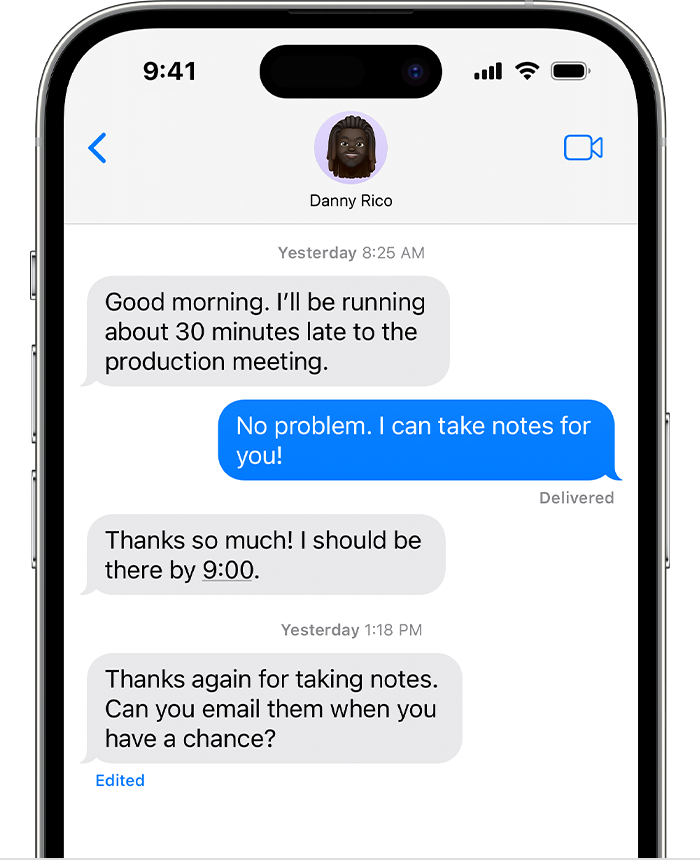
    • If they are using macOS Ventura or later, iOS 16 or later, or iPadOS 16.1 or later, they see your edited message with the word Edited under the message. They can click Edited to see the original message as well, then click Hide Edits to show only the edited message.
    • If they are using any other operating system, they see your edited message as an additional message preceded by "Edited to".


You can undo a sent message within 2 minutes after sending it.

  1. Control-click the message that you want to unsend.
  2. From the shortcut menu that opens, choose Undo Send.
  3. Here's what recipients see:
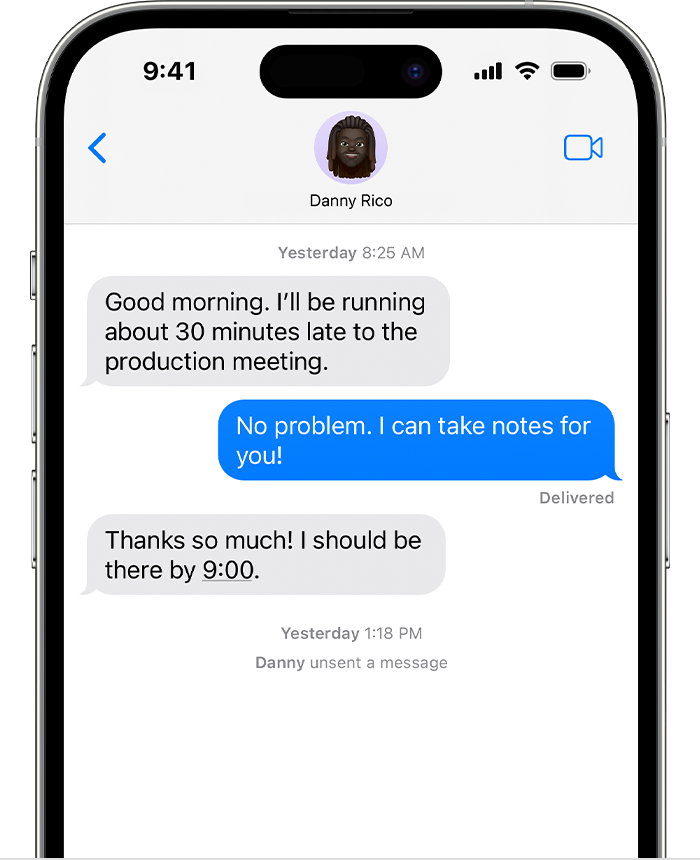
    • If they are using macOS Ventura or later, iOS 16 or later, or iPadOS 16.1 or later, they see that you unsent a message, but no longer see the message itself.
    • If they are using any other operating system, they might still see your message.

"


Use Messages on your Mac - Apple Support


Let us know if you have any questions.

Thank you for using Apple Support Communities.

Take care!


This thread has been closed by the system or the community team. You may vote for any posts you find helpful, or search the Community for additional answers.

iMessage messes up when I try and edit text messages before sending

Welcome to Apple Support Community
A forum where Apple customers help each other with their products. Get started with your Apple Account.