Greetings rkkee7,
It sounds like you are having an issue with iCloud storage. We know how important this is for you, and we will help get you to the right place for answers.
The first thing to confirm is your iCloud storage plan. You can simply go to Settings > [Your Name]. Under iCloud, it will tell you which storage you have.
Store your photos and videos in iCloud
By default, your photos and videos are stored on your device in their original, high-resolution version. This means that they use a lot of space on your iPhone, iPad, and iPod touch. With iCloud Photos, you can make more space available on your device and still have access to your entire full-resolution collection wherever you go.
Get started with iCloud Photos:
1. Tap Settings > [your name] > iCloud > Photos.
2. Tap Sync this iPhone. In iOS 15 or earlier, tap to turn on iCloud Photos.
3. Select Optimize iPhone Storage to save space on your device.
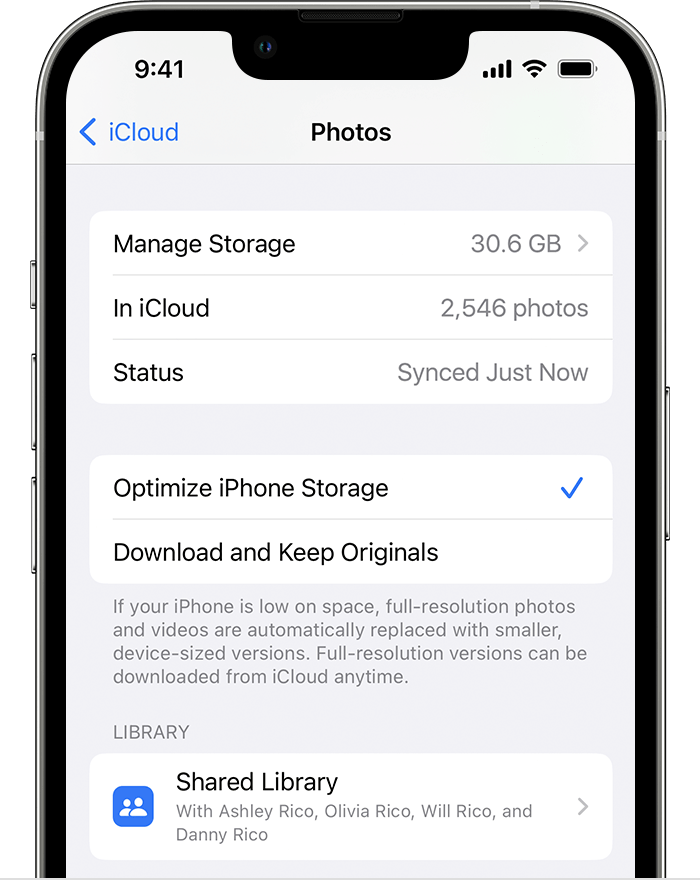
When Optimize Storage is turned on, full-resolution photos and videos are stored in iCloud, and, when needed, space-saving copies are stored on your device. And as long as you have enough space in iCloud, you can store as many photos and videos as you want.
This info located in this support article: Manage your photo and video storage - Apple Support
Cheers!


