AirPods have been stolen. I put them into lost mode - can they still be used or reset?

They have been in lost mode and I was able to track them until the battery presumably died.


I know how to use lost mode but my question is - if they are in lost mode, can someone reset them? Can someone connect to them? If they can reset them, will they no longer update on “Find My”?


I can’t seem to find this answer anywhere.

Posted on Apr 16, 2023 5:51 AM

Reply
Question marked as Top-ranking reply

Posted on Apr 16, 2023 8:07 AM

To clarify, only the original owner can clear the Lost Mode setting. the Apple tech is correct, It can't be reset by a finder. However, as described in the HT document linked by camy_0533, Lost Mode is only available on certain versions of AirPods and might also be unsupported on older iPhone software. It allows you to set a message to let the finder contact you, but it doesn't lock the AirPods if they are found by a dishonest person.


To be clear, Lost Mode is about finding the missing device. It is not the same as Activation Lock or other locking methods which prevent re-use by anyone else. Both functions are "owned" by the original user who set them and can't be removed by anyone else - not even Apple.


There is a lot of info about AirPods which exists in the brains of regular users here because we have tested to prove answers for others needing help. For example, I tested what a thief would see with my AirPods Pro, by trying to pair with my work iPhone (different Apple ID). That showed me the warning they would see:
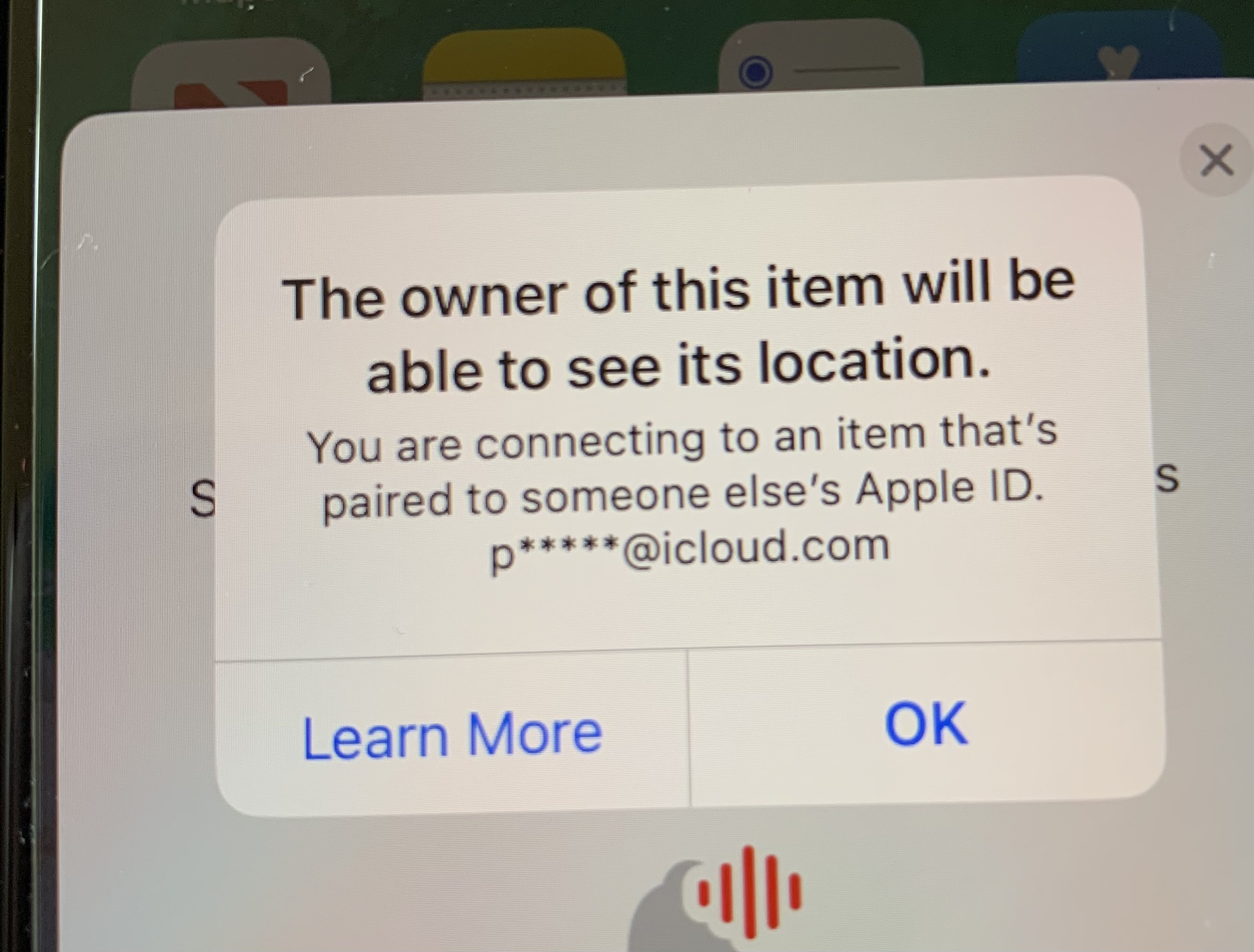

It was clearly completing the pairing process. I didn't push it to the limit and finish the pairing to risk messing up my new work phone, but I have no doubt it would work and probably produce working audio. It would probably look OK for a quick check by an unsuspecting buyer in a pub, until they got home and tried pairing to their own device 😠


Update:

Your other question - Find My should continue to update when both conditions are true:

  1. The missing AirPods are within Bluetooth range of a recent Apple device like iPhone or iPad with current network connectivity. (Apple has crowd sourced some functions of the FindMy system)
  2. The battery in the missing AirPods still has power to be seen by a passing iPhone.


That means the AirPods may go offline if the thief is an Android user without nearby iPhones, or until the thief recharges the Airpod batteries. However, they could reappear unexpectedly.


5 replies
Question marked as Top-ranking reply

Apr 16, 2023 8:07 AM in response to paigefrombethesda

To clarify, only the original owner can clear the Lost Mode setting. the Apple tech is correct, It can't be reset by a finder. However, as described in the HT document linked by camy_0533, Lost Mode is only available on certain versions of AirPods and might also be unsupported on older iPhone software. It allows you to set a message to let the finder contact you, but it doesn't lock the AirPods if they are found by a dishonest person.


To be clear, Lost Mode is about finding the missing device. It is not the same as Activation Lock or other locking methods which prevent re-use by anyone else. Both functions are "owned" by the original user who set them and can't be removed by anyone else - not even Apple.


There is a lot of info about AirPods which exists in the brains of regular users here because we have tested to prove answers for others needing help. For example, I tested what a thief would see with my AirPods Pro, by trying to pair with my work iPhone (different Apple ID). That showed me the warning they would see:


It was clearly completing the pairing process. I didn't push it to the limit and finish the pairing to risk messing up my new work phone, but I have no doubt it would work and probably produce working audio. It would probably look OK for a quick check by an unsuspecting buyer in a pub, until they got home and tried pairing to their own device 😠


Update:

Your other question - Find My should continue to update when both conditions are true:

  1. The missing AirPods are within Bluetooth range of a recent Apple device like iPhone or iPad with current network connectivity. (Apple has crowd sourced some functions of the FindMy system)
  2. The battery in the missing AirPods still has power to be seen by a passing iPhone.


That means the AirPods may go offline if the thief is an Android user without nearby iPhones, or until the thief recharges the Airpod batteries. However, they could reappear unexpectedly.


Apr 16, 2023 6:32 AM in response to paigefrombethesda

You can't lock the AirPods to prevent use by a thief or finder, but they should continue to update on your Find My provided you don't remove the missing device from your Apple ID and your Find My. The thief/finder will see a warning message when they try to pair and setup the missing AirPods, that you (owner) will be able to see their location.


With that in mind, don't remove or delete from your Apple ID because that creates a permanent nagging message about guilt and dishonesty, and prevents the thief from having an easy sale for the stolen property.

Apr 16, 2023 6:15 AM in response to paigefrombethesda

While you can lock devices like your iPhone or Mac remotely with Lost Mode, you can't do the same with AirPods. That said, anyone can easily use stolen AirPods when they find them. Unfortunately, Apple Warranty or AppleCare+ do not cover lost and stolen AirPods.


HOWEVER!! You when setting up Lost Mode, you can add your information in there so that the person can contact you about your lost AirPods. (If the person is nice enough.) 😭


Here is a Apple Support document that talks about Finding Your Lost AirPods: Find your lost AirPods - Apple Support (IE)


Apr 16, 2023 7:34 AM in response to camy_0533

Thanks! I think where I’m confused is where that information is that states they can reset AirPods on lost mode - I see the article you sent, but it doesn’t specifically address that question. Additionally, I asked an Apple agent via chat and they insisted that not only can lost mode AirPods not be reset, but that they can’t even be connected to phone (other than to display the lost message). I just can’t find that written anywhere - I see lots of replies like yours but I don’t know where the information is coming from.

This thread has been closed by the system or the community team. You may vote for any posts you find helpful, or search the Community for additional answers.

AirPods have been stolen. I put them into lost mode - can they still be used or reset?

Welcome to Apple Support Community
A forum where Apple customers help each other with their products. Get started with your Apple Account.