iphone 11 is not recognizing usb hifi audio
iPhone 11 is not switching to usb hifi audio when connected to dac/amp
iPhone 11 is not switching to usb hifi audio when connected to dac/amp
Hi FB-111A,
Thanks for posting in Apple Support Communities.
If USB isn't being recognized, make sure that iPhone connects with other devices properly. You may have to manually allow access to iPhone from within the settings.
Allow access to USB, Thunderbolt, and other accessories
You can allow your iPhone, iPad, or iPod touch to always access accessories. For example, if you use a USB assistive device to enter your passcode on your locked iPhone, many assistive devices automatically turn on the setting to allow USB devices the first time they're connected.
If you don't connect to accessories regularly, you might need to turn on this setting manually.
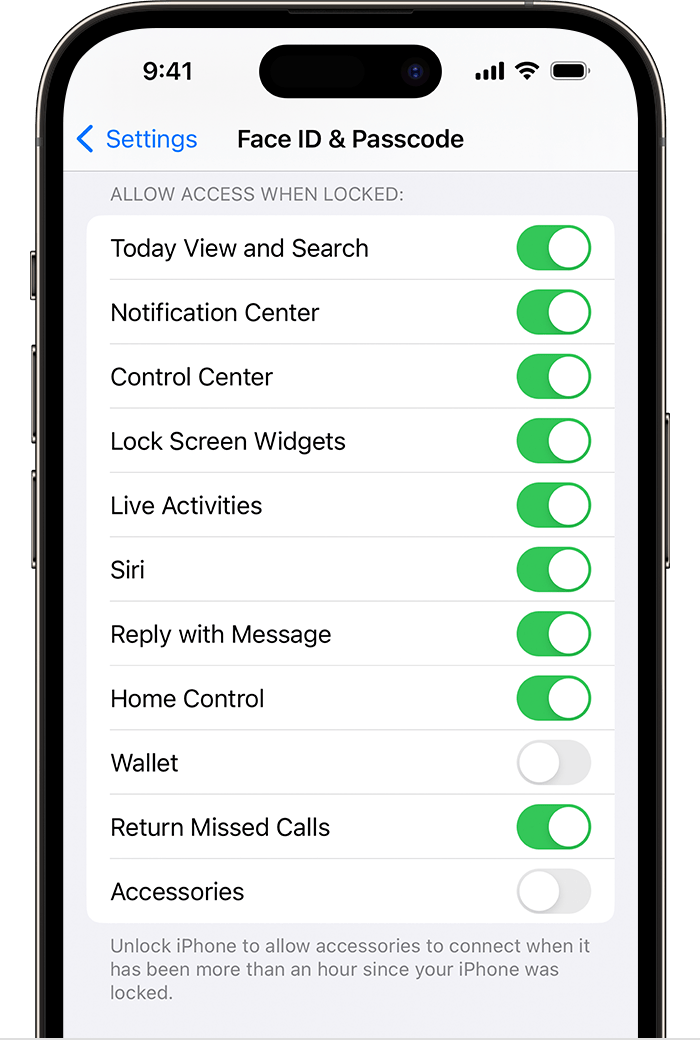
In Settings, go to Face ID & Passcode or Touch ID & Passcode, and turn on Accessories under Allow Access When Locked.
When the Accessories setting is off, you might need to unlock your device to connect accessories.
Administrators can control the Accessories setting on supervised devices using Apple Configurator or mobile device management.
You can find these steps in Allow USB and other accessories to connect to your iPhone, iPad, or iPod touch - Apple Support.
Regards.
Hi FB-111A,
Thanks for posting in Apple Support Communities.
If USB isn't being recognized, make sure that iPhone connects with other devices properly. You may have to manually allow access to iPhone from within the settings.
Allow access to USB, Thunderbolt, and other accessories
You can allow your iPhone, iPad, or iPod touch to always access accessories. For example, if you use a USB assistive device to enter your passcode on your locked iPhone, many assistive devices automatically turn on the setting to allow USB devices the first time they're connected.
If you don't connect to accessories regularly, you might need to turn on this setting manually.
In Settings, go to Face ID & Passcode or Touch ID & Passcode, and turn on Accessories under Allow Access When Locked.
When the Accessories setting is off, you might need to unlock your device to connect accessories.
Administrators can control the Accessories setting on supervised devices using Apple Configurator or mobile device management.
You can find these steps in Allow USB and other accessories to connect to your iPhone, iPad, or iPod touch - Apple Support.
Regards.
Hi FB-111A,
We would suggest updating your iOS software. iOS updates contain fixes that can address unexpected behaviors such as this:
Update your iPhone or iPad - Apple Support
If the issue persists after updating, contacting Apple Support would be the best path forward to resolve this issue. They will be best equipped to investigate this further for you:
Cheers!
My iPhone 11 is not recognizing usb hifi audio in a timely manner. Sometimes it takes several minutes and I can see it jumping to usb and right back to iPhone and the music shuts off. My daughters iPhone 11 connects instantly to usb when the headphone amp is turned on. Her software version is 15.6.1 and mine is 16.3.1. “Access Accessories” is turned on on my phone. Is there a way to manually turn on usb hifi audio? Should I reset my phone to the original settings (and what would I loose if I did that)? I’m not sure what is causing the delay. I used the camera adapter connection to my phone with the USB cable that came with my dac/amp and when it didn’t work right away I went and purchased a USB cable with the lightning connector. Both versions take a while for the phone to switch. When it finally connects it generally stays connected.
iphone 11 is not recognizing usb hifi audio