
How to install profile in my service
How to install profile in my iPhone setting
Windows, Windows 10
How to install profile in my iPhone setting
Windows, Windows 10
Hello Teesiokhui,
Thank you for reaching out to Apple Support Communities, and we'll be happy to help in any way we can. We understand you'd like to install a profile on your iPhone. Follow the steps here to install a profile: Install a configuration profile on your iPhone or iPad - Apple Support
"Install a profile
After you download a profile,* you’ll see the message Profile Downloaded or Enroll in [organization name]. To install the profile, follow these steps:
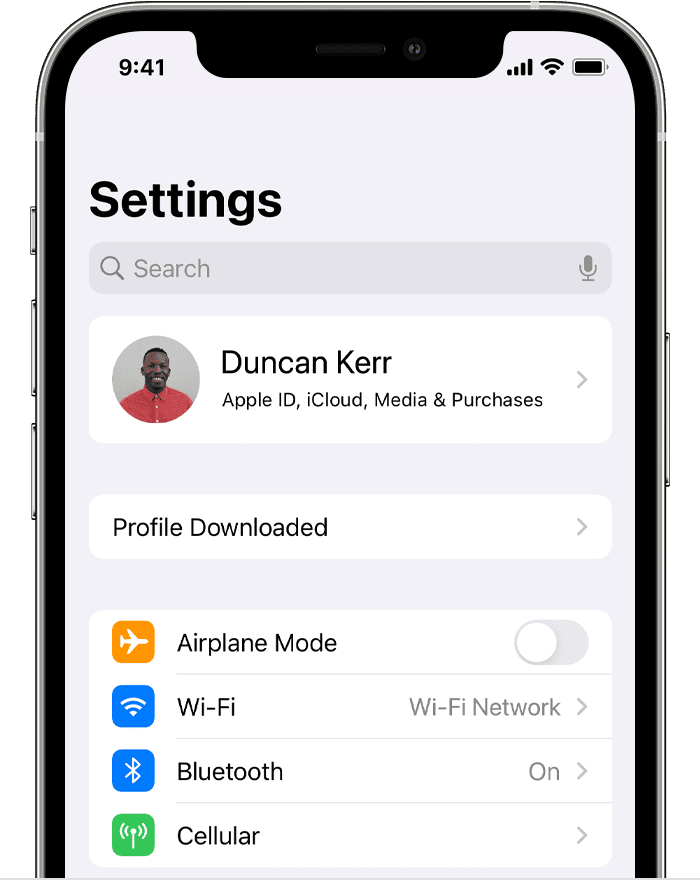
* You can have only one profile ready to install at a time. For example, if you download a profile and don't install it, and then download a second profile, only the second profile is available to be installed.
About profiles installed by Mobile Device Management
If you're a system administrator, you can install profiles without any interaction from the user on devices enrolled in Mobile Device Management (MDM). To enroll a device in MDM, use Apple School Manager or Apple Business Manager, or manually install an enrollment profile."
We hope this helps.
Cheers!
Hello Teesiokhui,
Thank you for reaching out to Apple Support Communities, and we'll be happy to help in any way we can. We understand you'd like to install a profile on your iPhone. Follow the steps here to install a profile: Install a configuration profile on your iPhone or iPad - Apple Support
"Install a profile
After you download a profile,* you’ll see the message Profile Downloaded or Enroll in [organization name]. To install the profile, follow these steps:
* You can have only one profile ready to install at a time. For example, if you download a profile and don't install it, and then download a second profile, only the second profile is available to be installed.
About profiles installed by Mobile Device Management
If you're a system administrator, you can install profiles without any interaction from the user on devices enrolled in Mobile Device Management (MDM). To enroll a device in MDM, use Apple School Manager or Apple Business Manager, or manually install an enrollment profile."
We hope this helps.
Cheers!
How to install profile in my service

