
Unable to block scam texts

My husband’s phone got lost/stolen and we used my number in the Find My leave a message notification as the one to contact if someone found it. Stupid we know, we don’t know why we thought someone honest would have picked it up. Husband received the email from Apple saying the device had been found (legit email as we checked with them) but now I’m constantly getting these texts. Every time I block them I go back to info and see the block this contact keeps appearing. Is there anyway to block these? Thanks!


[Image Edited by Moderator]


Posted on May 8, 2023 3:03 AM

Reply
Question marked as Top-ranking reply

Posted on May 10, 2023 6:49 PM

Hi rg1002,


For the best results, you'll want to make sure you are following these instructions to block the contact. However, if they spoof Apple's number or message you from a different number every time, your block may be unsuccessful.


Block phone numbers, contacts, and emails on your iPhone or iPad - Apple Support

Messages
From the Messages app, open the conversation, tap the contact at the top of the conversation. Tap the info blue info button with person icon inside button, scroll down, then tap Block this Caller.
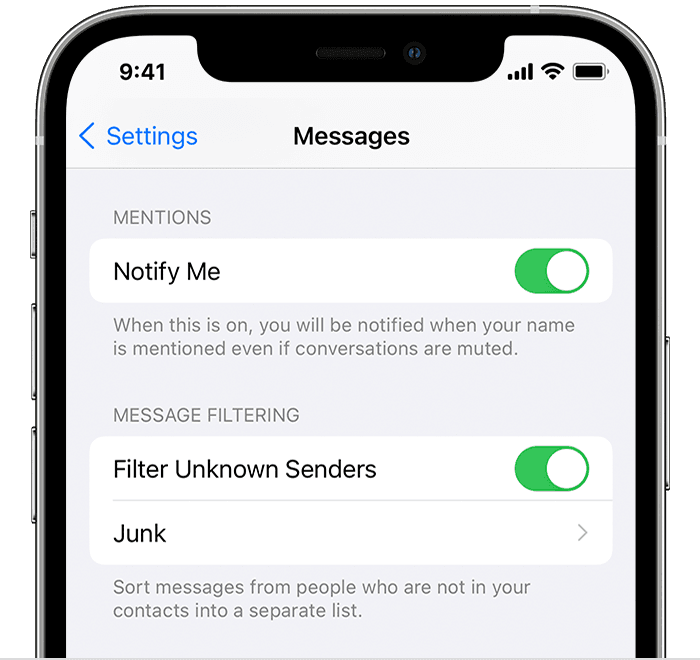

In this case, Filter Unknown Senders may be helpful. Note that you will need to remove that APPLE contact from Contacts for this to work.


You can filter messages from people who aren't saved in your Contacts.

iPhone showing how to filter Unknown Senders

To filter messages, go to Settings > Messages, scroll down and turn on Filter Unknown Senders.
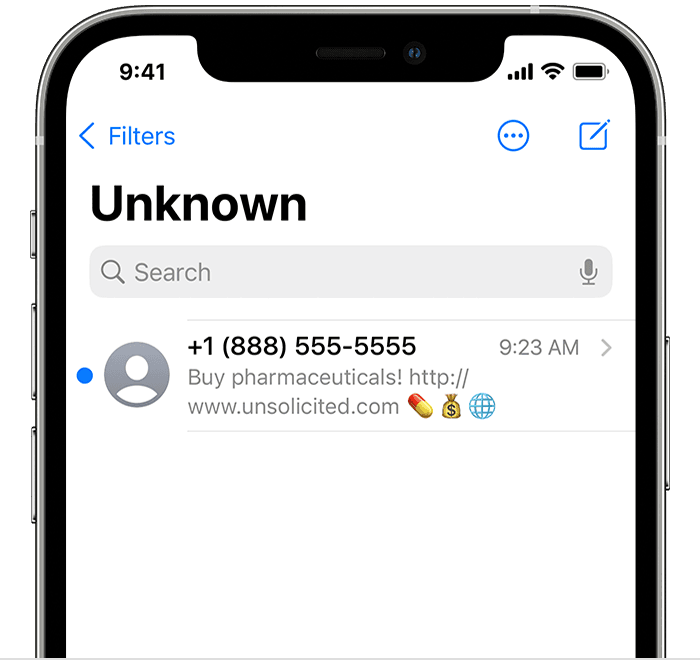
iPhone showing a filtered message

In Messages, tap  Filters, then tap Unknown Senders. You won't get notifications for these messages.

Kindest Regards.


Similar questions

2 replies
Question marked as Top-ranking reply

May 10, 2023 6:49 PM in response to rg1002

Hi rg1002,


For the best results, you'll want to make sure you are following these instructions to block the contact. However, if they spoof Apple's number or message you from a different number every time, your block may be unsuccessful.


Block phone numbers, contacts, and emails on your iPhone or iPad - Apple Support

Messages
From the Messages app, open the conversation, tap the contact at the top of the conversation. Tap the info blue info button with person icon inside button, scroll down, then tap Block this Caller.


In this case, Filter Unknown Senders may be helpful. Note that you will need to remove that APPLE contact from Contacts for this to work.


You can filter messages from people who aren't saved in your Contacts.

iPhone showing how to filter Unknown Senders

To filter messages, go to Settings > Messages, scroll down and turn on Filter Unknown Senders.
iPhone showing a filtered message

In Messages, tap  Filters, then tap Unknown Senders. You won't get notifications for these messages.

Kindest Regards.


May 10, 2023 6:53 PM in response to rg1002

Apple NEVER, NEVER sends emails saying a lost device has been found. If you get a text or email from “Apple” or “Apple Security” (or sometimes “Police”) saying your phone has been found and to click on a link to see its location, it is a SCAM. This is NEVER from Apple or from law enforcement; it is from the thief or fence to steal your Apple ID and identity. Delete any such message without responding to it. Apple never gets involved in lost or stolen devices→Avoid phishing emails, fake ‘virus‘ alerts, phony support calls, and other scams


If you responded to the scam and logged in the thief now has enough information to remove activation lock, and also to steal all of the private information in your Apple ID account, and also to lock you out of the account. If you DID respond change your Apple ID password immediately, and contact Apple’s account security team→Apple ID: Contacting Apple for help with Apple ID account security

This thread has been closed by the system or the community team. You may vote for any posts you find helpful, or search the Community for additional answers.

Unable to block scam texts

Welcome to Apple Support Community
A forum where Apple customers help each other with their products. Get started with your Apple Account.