Apple Pay
I’m trying to enable Apple Cash to receive money?
I’m trying to enable Apple Cash to receive money?
Thanks for reaching out Mistygg,
It sounds like you're looking to use Apple Cash to send and receive money. We can help.
Before we get started, it is important to make sure you meet the requirements for using this service on your iPhone. You can check out what you need to Send and receive money with Apple Cash here:
You and the person that you're sending money to or receiving the money from must:
* Have a compatible device with the latest iOS or watchOS.
* Use two-factor authentication with your Apple ID and sign in to iCloud and iMessage with the same Apple ID on any device that you want to use to send or receive money.
* Make sure that there's enough money on your Apple Cash card or that you have an eligible debit card in Wallet if you're sending money to someone.
To send and receive money with Apple Cash, you must be at least 18 years old and a resident of the United States. If you're under 18 years old in the United States, your family organizer can set up Apple Cash for you as part of Apple Cash Family. Then, you can send and receive money with Apple Cash. Apple Cash services are provided by Green Dot Bank, Member FDIC. Learn more about the Terms and Conditions.
If you meet those requirements, you or the person sending money can take these steps on iPhone to send funds:
How to send money in the Wallet app using Apple Cash
1. On your iPhone, open the Wallet app. Then tap your Apple Cash card.
2. Tap Send or Request, then select or add the person you want to send money to.
3. Tap Next, then enter the amount you want to send.
4. Tap Send, then tap the Send buttonto review or cancel the payment.
5. Confirm your payment with Face ID, Touch ID, or your passcode.
If the person you sent money to has not accepted the money yet, you can cancel the payment.
On the other hand, if you need to initiate a request for a transfer, you can check out these steps as well:
How to send a request for payment
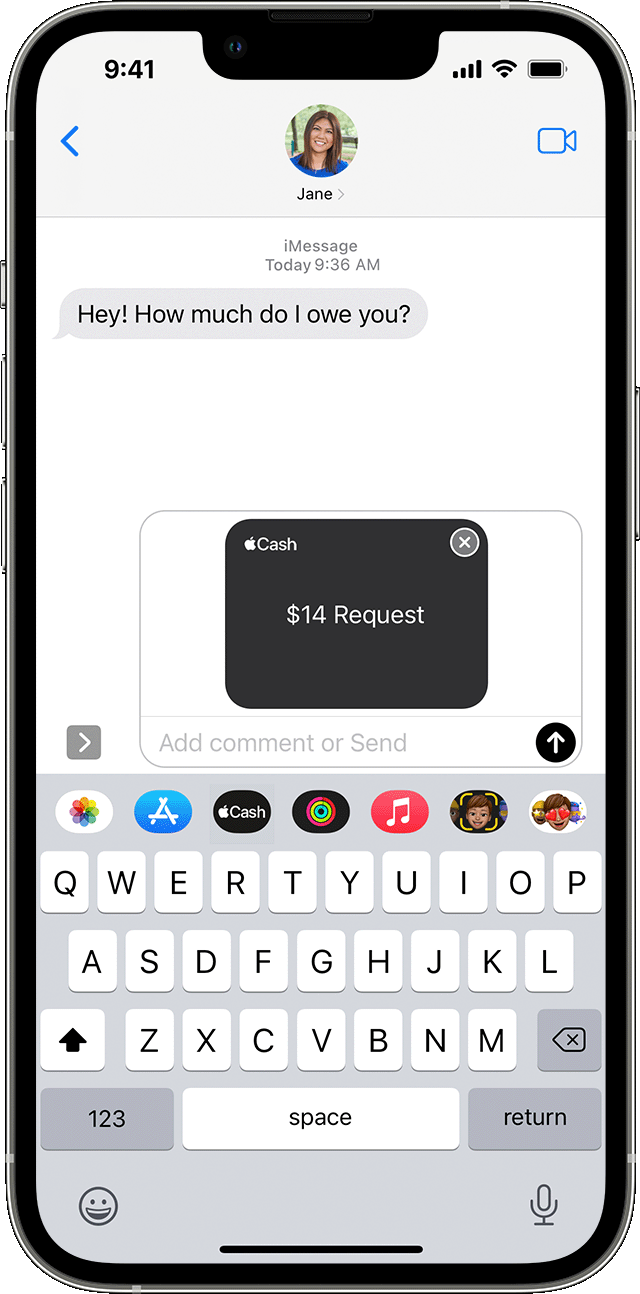
When you send someone a payment request using Apple Cash, they can change or confirm the amount that they want to send.
On your iPhone or iPad
1. Open a conversation in the Messages app or start a new conversation.
2. Tap the Apple Cash button. If you don't see the Apple Cash button, tap the App Store button
first.
3. Enter an amount, then tap Request.
4. Tap the Send button
Also, it is important to keep in mind the first time you use Apple Cash, there are some additional considerations:
The first time that you use Apple Cash, you have 7 days to accept the money that you've been sent. After you accept the terms and conditions, payments are automatically accepted and added to your Apple Cash card. You might be asked to verify your identity.
When someone sends you money, it's securely received and kept in Apple Cash. You can use the money right away1 to send to someone, spend with Apple Pay, or transfer the money to your bank account or eligible debit card.
Hope that helps.
Take care.
Thanks for reaching out Mistygg,
It sounds like you're looking to use Apple Cash to send and receive money. We can help.
Before we get started, it is important to make sure you meet the requirements for using this service on your iPhone. You can check out what you need to Send and receive money with Apple Cash here:
You and the person that you're sending money to or receiving the money from must:
* Have a compatible device with the latest iOS or watchOS.
* Use two-factor authentication with your Apple ID and sign in to iCloud and iMessage with the same Apple ID on any device that you want to use to send or receive money.
* Make sure that there's enough money on your Apple Cash card or that you have an eligible debit card in Wallet if you're sending money to someone.
To send and receive money with Apple Cash, you must be at least 18 years old and a resident of the United States. If you're under 18 years old in the United States, your family organizer can set up Apple Cash for you as part of Apple Cash Family. Then, you can send and receive money with Apple Cash. Apple Cash services are provided by Green Dot Bank, Member FDIC. Learn more about the Terms and Conditions.
If you meet those requirements, you or the person sending money can take these steps on iPhone to send funds:
How to send money in the Wallet app using Apple Cash
1. On your iPhone, open the Wallet app. Then tap your Apple Cash card.
2. Tap Send or Request, then select or add the person you want to send money to.
3. Tap Next, then enter the amount you want to send.
4. Tap Send, then tap the Send button
5. Confirm your payment with Face ID, Touch ID, or your passcode.
If the person you sent money to has not accepted the money yet, you can cancel the payment.
On the other hand, if you need to initiate a request for a transfer, you can check out these steps as well:
How to send a request for payment
When you send someone a payment request using Apple Cash, they can change or confirm the amount that they want to send.
On your iPhone or iPad
1. Open a conversation in the Messages app or start a new conversation.
2. Tap the Apple Cash button
3. Enter an amount, then tap Request.
4. Tap the Send button
Also, it is important to keep in mind the first time you use Apple Cash, there are some additional considerations:
The first time that you use Apple Cash, you have 7 days to accept the money that you've been sent. After you accept the terms and conditions, payments are automatically accepted and added to your Apple Cash card. You might be asked to verify your identity.
When someone sends you money, it's securely received and kept in Apple Cash. You can use the money right away1 to send to someone, spend with Apple Pay, or transfer the money to your bank account or eligible debit card.
Hope that helps.
Take care.
Apple Pay