Left earbud of Powerbeats headset never charges or charges very little, but then loses the charge as it is plugged in.

I receive the Apple Powerbeats earbuds for Christmas 2022. I’m so frustrated with this expensive as they worked great for about a month and then one of the earbuds never charges properly resetting the case etc. Any suggestions?

Apple Watch, watchOS 4

Posted on May 14, 2023 10:05 AM

Reply
Question marked as Top-ranking reply

Posted on May 16, 2023 2:53 PM

Hello charlesfromlittleton,


When you reset them, make sure you are following these directions specifically. The reset sequence is different by device, and a reset can resolve many issues like Bluetooth or charging inconsistencies.

Reset Powerbeats Pro
1. Place both earbuds in the case. Leave the case open.
2. Press and hold the system button on the case for 15 seconds or until the LED indicator light flashes red and white.
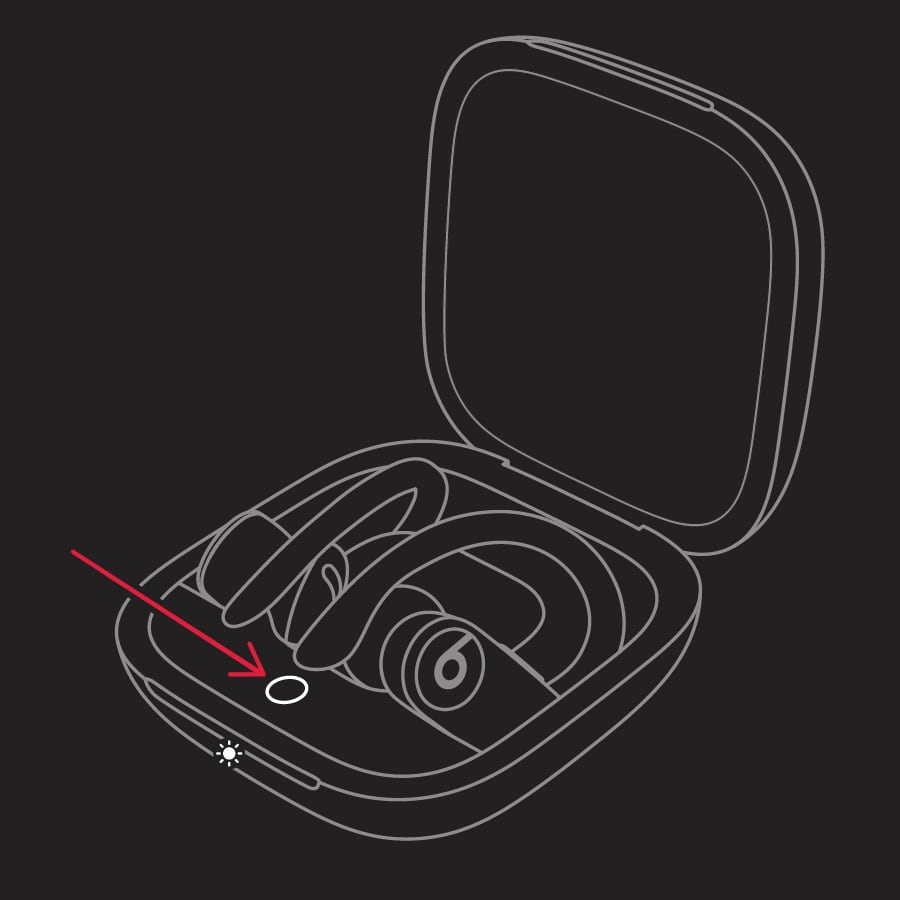
Powerbeats Pro indicator light
3. Release the system button.

The LED indicator light will continue to flash white, which means that you can pair your Powerbeats Pro with your iPhone, Mac, Android device, or other device again.

Reset your Beats earphones - Apple Support


If you're still not able to get the one side to charge or connect, you may need to look into service options for your Powerbeats Pro. You can find those at Beats Repair & Service.


All Our Best.


1 reply
Question marked as Top-ranking reply

May 16, 2023 2:53 PM in response to charlesfromlittleton

Hello charlesfromlittleton,


When you reset them, make sure you are following these directions specifically. The reset sequence is different by device, and a reset can resolve many issues like Bluetooth or charging inconsistencies.

Reset Powerbeats Pro
1. Place both earbuds in the case. Leave the case open.
2. Press and hold the system button on the case for 15 seconds or until the LED indicator light flashes red and white.
Powerbeats Pro indicator light
3. Release the system button.

The LED indicator light will continue to flash white, which means that you can pair your Powerbeats Pro with your iPhone, Mac, Android device, or other device again.

Reset your Beats earphones - Apple Support


If you're still not able to get the one side to charge or connect, you may need to look into service options for your Powerbeats Pro. You can find those at Beats Repair & Service.


All Our Best.


This thread has been closed by the system or the community team. You may vote for any posts you find helpful, or search the Community for additional answers.

Left earbud of Powerbeats headset never charges or charges very little, but then loses the charge as it is plugged in.

Welcome to Apple Support Community
A forum where Apple customers help each other with their products. Get started with your Apple Account.