Hi there cao911,
If the left side of your PowerBeats Pro is turning off unexpectedly, resetting them is definitely the best place to start since this refreshes the firmware and can resolve unexpected issues like this. To confirm, did you follow these steps from Reset your Beats earphones to reset them?
Reset Powerbeats Pro
1. Place both earbuds in the case. Leave the case open.
2. Press and hold the system button on the case for 15 seconds or until the LED indicator light flashes red and white.
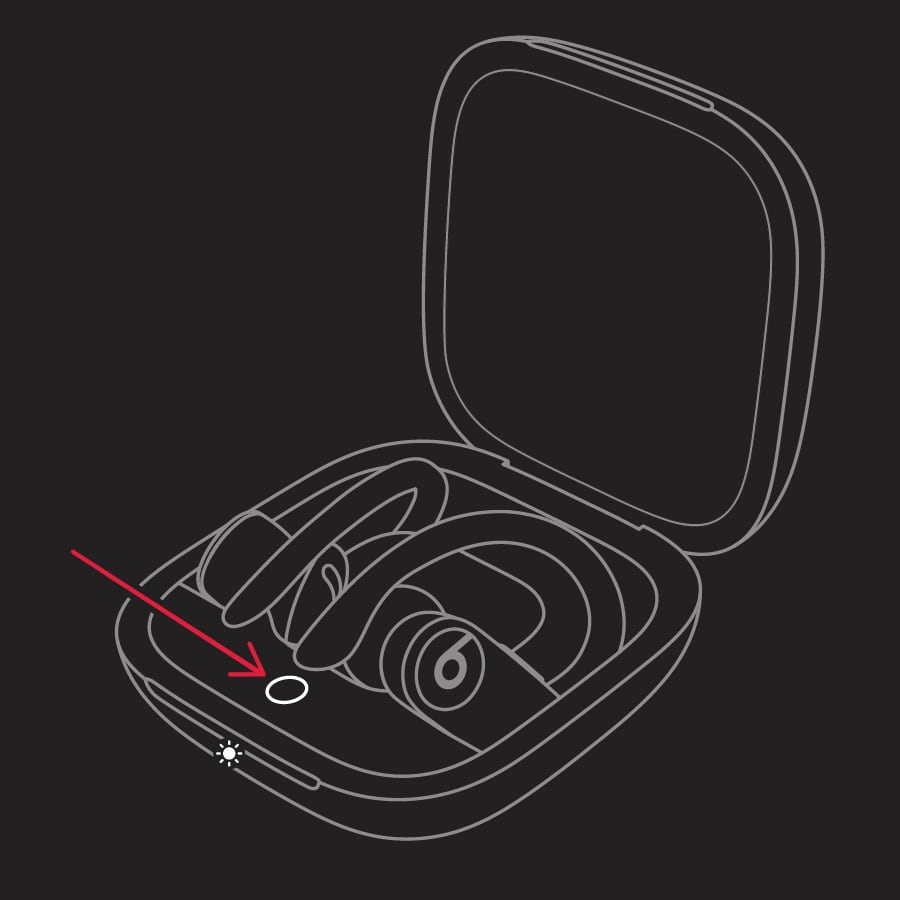
3. Release the system button.
The LED indicator light will continue to flash white, which means that you can pair your Powerbeats Pro with your iPhone, Mac, Android device, or other device again.
If those are the steps you followed and this continues while the Beats are connected to multiple devices, then reach out to Apple Support next. They would be the best equipped to look into your available options going forward. Contact them here: Get Support
Cheers!


