I am still having trouble wit my password . It said the the password to in lock my phone could be used to reset my new password. Also I can’t get a credit card accepted
Do not know my Apple ID
iPhone 7 Plus, iOS 15
Do not know my Apple ID
iPhone 7 Plus, iOS 15
Hey Minutebyminute,
Thanks for using Apple Support Communities. We understand you're having an issue with the password of your Apple ID, as well as seem to have declined payment methods.
The following steps are best equipped to assist with resetting your password:
Reset your Apple ID password on your iPhone or other trusted Apple device
1. Go to Settings.
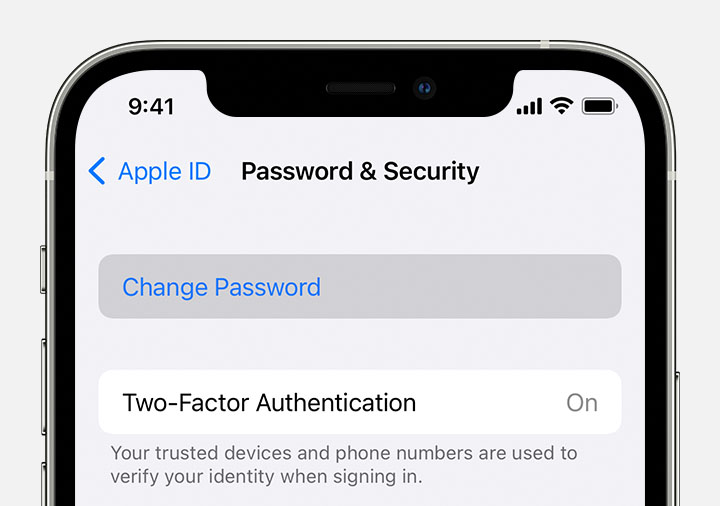
2. Tap your name > Password & Security > Change Password.
3. Follow the onscreen instructions to reset your password.
You can also follow this process on a trusted iPad, iPod touch, or Apple Watch.
To reset your password on your trusted Mac, choose Apple menu > System Settings (or System Preferences) > Sign in with your Apple ID (or Apple ID). Then click Password & Security, Change Password, and follow the onscreen instructions.
This is outlined further here: If you forgot your Apple ID password - Apple Support
Once regaining access to your Apple ID account, check out this resource, as it can help you determine how best to address the declined payment methods: If your payment method is declined in the App Store or iTunes Store - Apple Support
Take care!
Hey Minutebyminute,
Thanks for using Apple Support Communities. We understand you're having an issue with the password of your Apple ID, as well as seem to have declined payment methods.
The following steps are best equipped to assist with resetting your password:
Reset your Apple ID password on your iPhone or other trusted Apple device
1. Go to Settings.
2. Tap your name > Password & Security > Change Password.
3. Follow the onscreen instructions to reset your password.
You can also follow this process on a trusted iPad, iPod touch, or Apple Watch.
To reset your password on your trusted Mac, choose Apple menu > System Settings (or System Preferences) > Sign in with your Apple ID (or Apple ID). Then click Password & Security, Change Password, and follow the onscreen instructions.
This is outlined further here: If you forgot your Apple ID password - Apple Support
Once regaining access to your Apple ID account, check out this resource, as it can help you determine how best to address the declined payment methods: If your payment method is declined in the App Store or iTunes Store - Apple Support
Take care!
I am still having trouble wit my password . It said the the password to in lock my phone could be used to reset my new password. Also I can’t get a credit card accepted