Minor but annoying issue -- NSIRD_lockoutagent_xxxxxx\Enable folder/file in Trash

I cannot completely empty the trash folder because of the following folder/file that is "in use" apparently by the lockout agent. How do I get rid of this or get the lockout agent to create this folder/file in a proper location?(note: I can move these outside of trash folder. where they "should" be?)

MacBook Pro 14″, macOS 13.4

Posted on Jun 1, 2023 9:21 AM

Reply

Similar questions

14 replies

Jun 9, 2023 7:23 AM in response to mickeyfromny

When you purchased this used Mac did you perform a clean install of macOS by first erasing the drive before reinstalling macOS? If not, then you have inherited someone else's mess. This is why every device you acquire used should have a clean install before using it for yourself. Plus a clean install may reveal other possible issues such as the device having a lock or still being managed by a previous owner.


Here is what the previous owner should have done prior to selling the Mac:

What to do before you sell, give away, or trade in your Mac - Apple Support


While you cannot do all those steps, you can at least perform the clean reinstall of macOS.


Make sure to backup your data before proceeding with a clean install since erasing the SSD will destroy all data on the laptop.

Jun 9, 2023 9:00 AM in response to mickeyfromny

Reinstalling Ventura from Recovery Mode should lay down a New " APFS Snapshot com.apple.os.update ...9.1 GB " that would place the " NSIRD_lockoutagent_xxxxxx\Enable folder " back where it should be.


Or at least insure it is where it ought to be in the Sealed and Read Only Volume


   2:              APFS Snapshot com.apple.os.update-... 9.1 GB     disk3s1s1


Then, using the SIP from suppled link may allow the Problematic " NSIRD_lockoutagent_xxxxxx\Enable folder " that " I can move these outside of trash folder. where they "should" be?) to be removed hopefully from the Trash


Long way round but worth a try 🤞 ?


Q - " enable SIP (I understand this is to restore proper system protection going forward) "


A - Definitively Yes . One should never run the computer without SIP Enabled


A - It can be used expressly for certain unique situation like your computer and once done Enable it for sure

Jun 3, 2023 6:38 AM in response to AdvisorMP

Quit honestly, I cannot say how or when this data ended up in my trash bin. My current Mac is a recent purchase and its data was migrated from a previous Mac dating back to 2021.


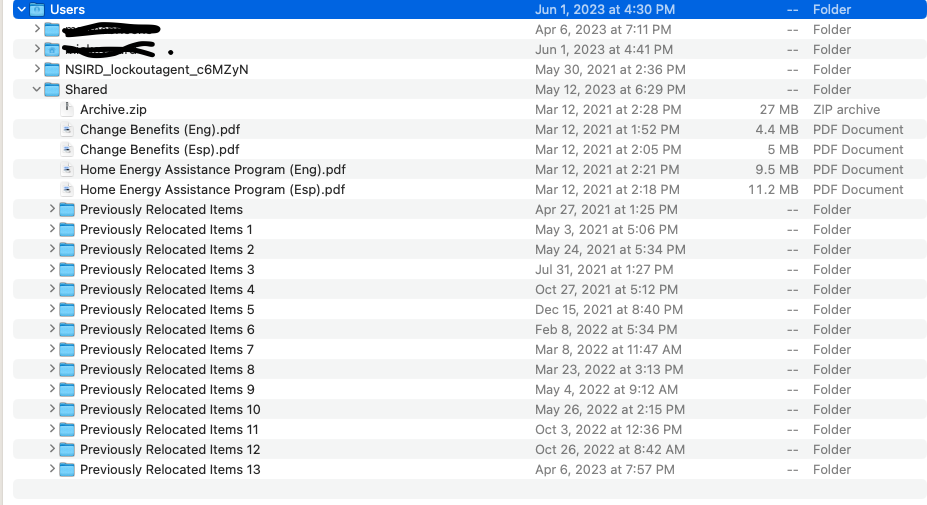
Given the system-related function of these files, I would have no interest or reason seeking them out of their proper system location and deleting them. I was able to "Put Back" the folder and file from trash, but they are now placed under the Users folder, on peer with two users and the Shared folders, obviously not their intended location if they are such critical system infrastructure.


Note that I contacted Apple support on the issue, but they were not very helpful. Like you, they seemed to take a defensive position as if to suggest that I did something wrong and should not be tampering with these files.


I explained that I was only interested in restoring my system to its proper configuration, and asked if they could at least guide me to the proper location of these system files, where they are less prone to inadvertent deletion. Judging by the content (folder with zero byte "Enable " file), I assumed it to serve as some sort of system Mutex that could be easily reproduced by the lock agent if it were possible to delete.


However, Apple support would not tell me where they should go (saying they would not be responsible), only to suggest a re-install of the OS or a clean install. Because of the amount of data and configuration, I am not willing to do a clean install. But I had my doubts about a re-install cleaning this issue up because I had performed a number of re-installs on the last machine prior to the ultimate migration to this one. However, I did perform a re-install a day ago to no avail. The folder/file remain under the Users folder. Note, a "Safe" mode reboot does not help in relieving the "in use" lock on this file either.


Speaking of garbage files, I notice another series of mysterious "Previously Relocated..." folders under the Shared users folder too.


Jun 8, 2023 7:29 AM in response to mickeyfromny

Related question pertaining to " lockout agent " /System/Library/CoreServices/lockoutagent - Apple Community


It is part of the Operating System which is contained  in Sealed and Read Only Volume that can not be opened by the User nor by Third Party Applications.


The only Entity that can open and modify or alter this Volume is Apple.


That would occur when a update or UpGrade is performed.


How this was moved or relocated to the Trash is a good question which I do not have a specific answer


Jun 2, 2023 3:08 PM in response to mickeyfromny

Thanks for reaching out mickeyfromny,


It sounds like you are trying to empty the Trash on your Mac, but you are getting an alert that the file is in use. We can help.


The "lockoutagent" process is a normal part of macOS, so our concern is why you are trying to remove part of the macOS operating system, as removing system processes could potentially cause issues up to and including your Mac no longer working.


For reference, this resource provides some great information to View information about Mac processes in Activity Monitor.


If there is a particular reason you want to remove this file, let us know, otherwise our recommendation would be to restore the file to where it belongs, and not try to remove it.


Hope that helps.


Take care.


Jun 8, 2023 7:10 AM in response to AdvisorMP

Ping... (in case you haven't seen my reply above)


Re: your comment above: "...our recommendation would be to restore the file to where it belongs"


I would very much like to do this. However, as I stated above, after "putting back" this folder/file from trash, it wound up under the "Users" folder. I can't imagine that this is "where it belongs."


Can you please advise on the proper location?

Jun 8, 2023 9:25 AM in response to Owl-53

Thank you for the reply. That is the first intelligent, meaningful response I have received on this issue so far.


If, as you say, the folder/file is normally contained within this protected system area that cannot be opened by the end user or 3rd party apps, then it can be concluded that I did not do this myself as the first response and Apple support have implied (i.e. dumb/malicious user error).


Therefore, I can only conclude that this event must be the result of some Apple system software defect (bug). As I indicated, a system re-install does not resolve the issue, so I am skeptical about updates/upgrades doing so, unless they include specific fixes targeting this issue. I would assume that a clean install would set things right. But that is not a practical solution for most issues (i.e. to wipe the machine clean and start from scratch).


I believe that a software defect request should be opened that both eliminates the root cause of the problem (if it can be identified) and addresses the negative outcome that I am faced with (trashed/misplaced agent file).

Jun 9, 2023 8:53 AM in response to Owl-53

Thanks. But I am not quite clear on the sequence and objective. For one thing, these files are not currently in the trash bin. So I am not sure if you are suggesting they be deleted and then emptied from the trash after following the disabling/enabling of SIP, with the objective that lock agent will re-create them? The "Enable" file is the primary obstacle as far as deletion is concerned since I have "no known access rights."


So perhaps you could explain what you expect each of these steps to achieve, and if I have the sequence correct:


  1. reinstall in recovery mode (already done; what will this accomplish?)
  2. disable SIP (will this allow me to empty the trash after deleting these files? will the "in use" condition not occur? lock agent will not be running?)
  3. enable SIP (I understand this is to restore proper system protection going forward)


Thanks

Jun 9, 2023 8:49 AM in response to HWTech

I think you have a misunderstanding. This is not a "used" Mac. It is a brand new M2 MacBook Pro.


During first time system setup, I used Migration Assistant (as documented in link below) to transfer data from my previous M1 Mac mini from 2021, also a brand new purchase. However, that machine was set up clean. I did not use migration assistant to transfer data from my older MacBook Pro (early 2011, I believe) since I didn't want to carry over the cumulative garbage it had collected over time.


Transfer to a new Mac with Migration Assistant - Apple Support


This thread has been closed by the system or the community team. You may vote for any posts you find helpful, or search the Community for additional answers.

Minor but annoying issue -- NSIRD_lockoutagent_xxxxxx\Enable folder/file in Trash

Welcome to Apple Support Community
A forum where Apple customers help each other with their products. Get started with your Apple Account.