IOS Mail: Events notifications work, mail notifications NOT?

Hi there,

I have a problem with my corporate Exchange account: in order to see the email I received I need to open the Mail app and receive them manually - instead, any meeting through mail is working perfectly.

I deleted and reinstalled mail, deleted and set up again my Exchange account. Everything is on push, and my colleagues do not have this issue, any idea?

I also check the notifications menu for mail, and everything is up.

IOS is 16.5


Thank you,

iPhone SE (3rd generation)

Posted on Jun 12, 2023 9:09 AM

Reply

Similar questions

3 replies

Jun 12, 2023 9:11 AM in response to CarloPro87

Have you enabled Scheduled Summary?


Settings > Notifications > [Select the App that you are having trouble receiving immediate notifications]


See the pic below for a few examples. Please select immediate delivery.
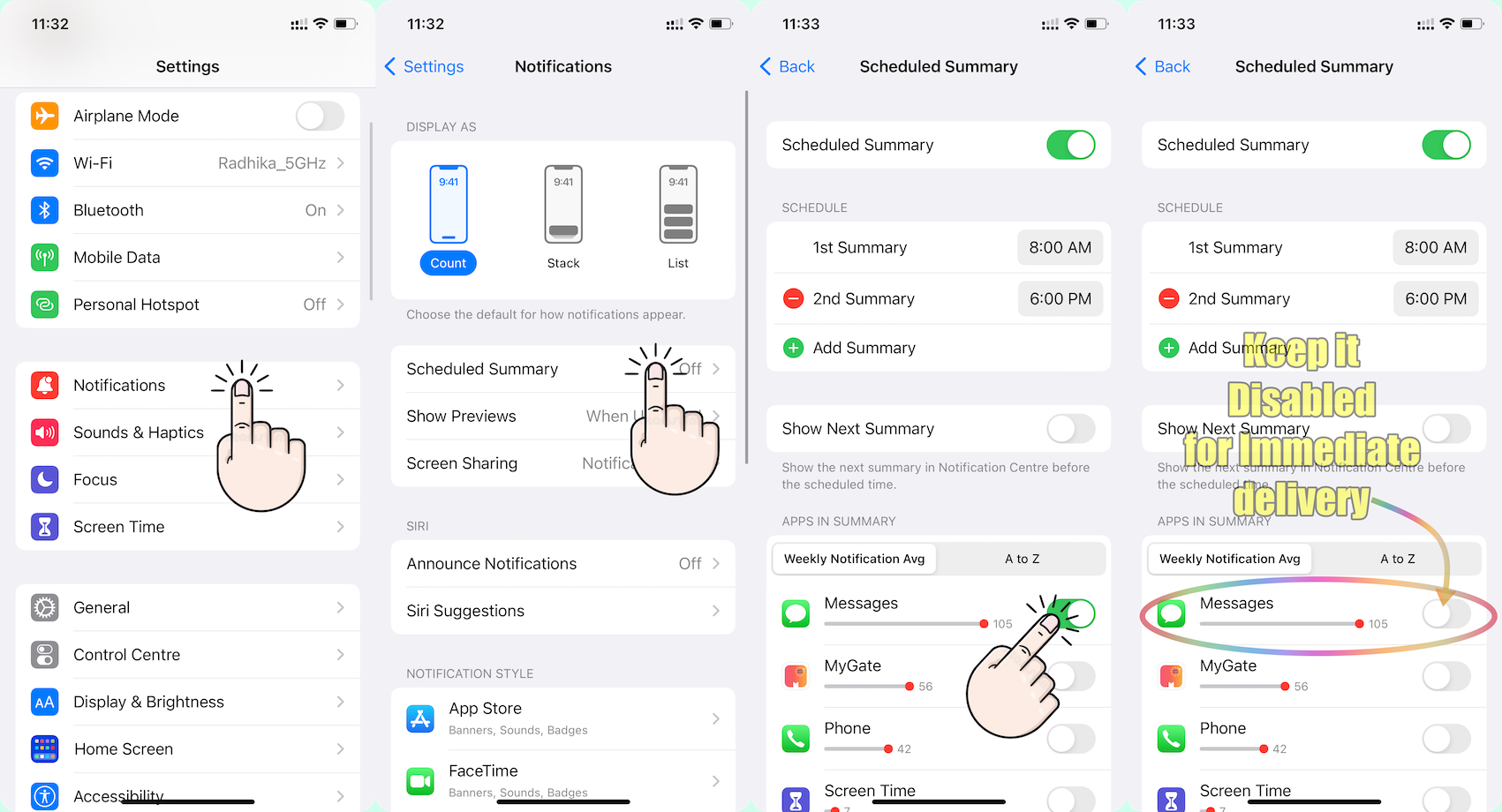


Go to Settings and tap Notifications. Select an app under Notification Style. Under Alerts, choose the alert style that you want. If you turn on Allow Notifications, choose when you want the notifications delivered — immediately or in the scheduled notification summary.


Use notifications on your iPhone, iPad, and iPod touch


Change notification settings on iPhone

  1. Go to Settings > Notifications.
  2. To schedule a notifications summary, tap Scheduled Summary, then turn on Scheduled Summary. ... 
  3. To choose when you want most notification previews to appear, tap Show Previews, select an option—Always, When Unlocked, or Never—then tap.

More items...


Change notification settings on iPhone - Apple Support (IN)


You can allow access to Notification Center on the Lock Screen. Go to Settings > Face ID & Passcode (on an iPhone with Face ID) or Touch ID & Passcode (on other iPhone models). Enter your passcode. Scroll down and turn on Notification Center (below Allow Access When Locked).


View and respond to notifications on iPhone - Apple Support (IN)


Jun 12, 2023 9:11 AM in response to CarloPro87

  1. Is this your corporate iPhone? Then please contact the system administrator of your corporate
  2. If it is your personal device, in that case, do you have any profile installed by your corporate/organisation/enterprise/School Management?
    1. Erase the profile added by you If you have installed a profile on your own --> Install or remove configuration profiles on iPhone - Apple ...
    2. Or please contact the system administrator of the organisation who provided the profile to you


This thread has been closed by the system or the community team. You may vote for any posts you find helpful, or search the Community for additional answers.

IOS Mail: Events notifications work, mail notifications NOT?

Welcome to Apple Support Community
A forum where Apple customers help each other with their products. Get started with your Apple Account.

