This is brilliant! I have been playing around with this and I discovered a flaw, though: the regex can trigger a false error. If there is a value in Column A and a value in Column B in the row below that, the regex will incorrectly result in an error, thinking there are two adjacent blanks. This is because, for example, A1=has_value, B1=blank, A2=blank, B2=has_value. Thus, the regex finds two blanks consecutively, thinking they're adjacent. However, if there is a value in Column B and two adjacent blank cells in the row below that, then a value in Column A in the row below those two blanks, the regex would also result in "~~~" which correctly identifies two blanks.
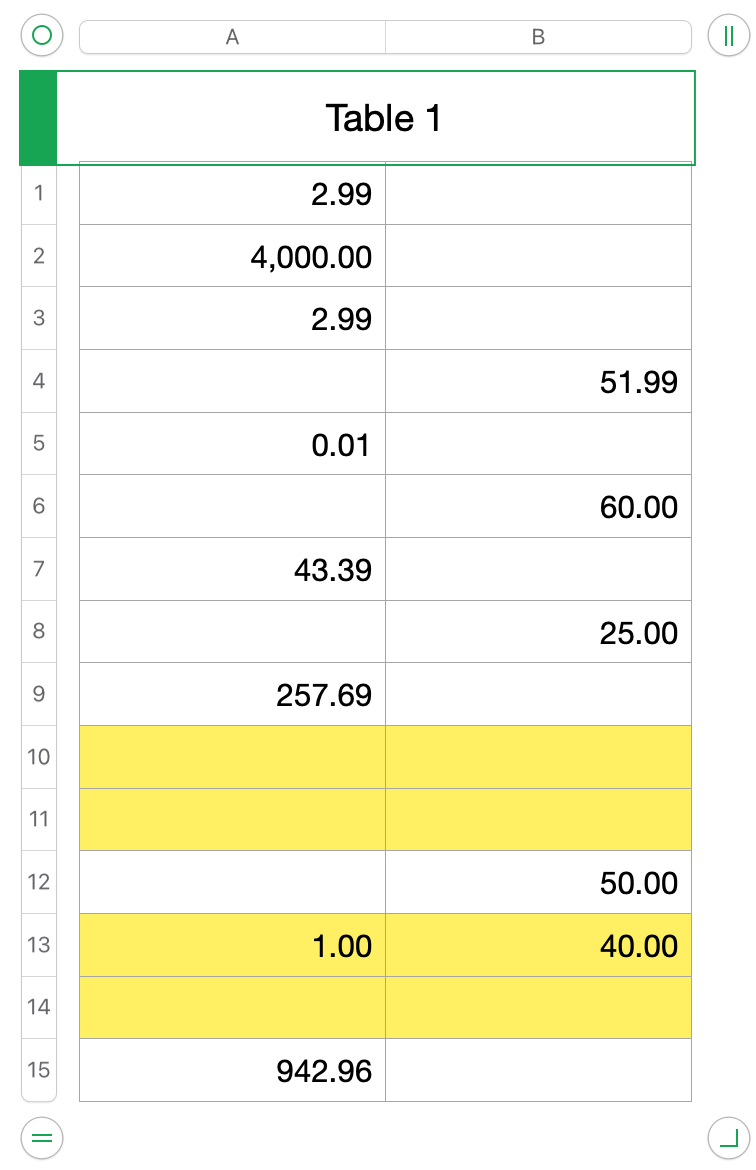
The formula used on the table above:
=TEXTJOIN("~",0,Table 1::A:B)
which results in:
2.99~~4,000.00~~2.99~~~51.99~0.01~~~60.00~43.39~~~25.00~257.69~~~~~~~50.00~1.00~40.00~~~942.96~
In the table above, the two blank cells in B3 & A4 will result in "~~~" which would incorrectly trigger an error:
2.99~~4,000.00~~2.99~~~51.99~0.01~~~60.00~43.39~~~25.00~257.69~~~~~~~50.00~1.00~40.00~~~942.96~
From B13-A15, though, the regex would correctly trigger an error from the two adjacent blanks:
2.99~~4,000.00~~2.99~~~51.99~0.01~~~60.00~43.39~~~25.00~257.69~~~~~~~50.00~1.00~40.00~~~942.96~
So I have been playing around with different ways of trying to fix this.
I tried creating a regex that knows where each row ends- in this case, every second "~". I came up with the following (bulky but working) regex:
(?:\d{1,3}(?:(?:\,\d{3})+)*\.\d{2})?~(?:\d{1,3}(?:(?:\,\d{3})+)*\.\d{2})?(~)
I should specify that the numerical data in my table will always have the same format: 1.00 / 100.00 / 1,000.00 / etc. - hence why I am using "(?:\d{1,3}(?:(?:\,\d{3})+)*\.\d{2})" in my regex to match the number values. Anyways, the regex matches every 2nd "~" and groups them into Group 1. I'd like to try to replace all the matched "~"s in Group 1 with a comma, so that I could ultimately have a joined text that joins the two values in every row in the table with a "~" between them but a comma that separates each row. It would look like this: "[A1]~[B1],[A2]~[B2]," etc... From there, I can use a regex to easily check if there are two adjacent blanks in the same row, since the regex would know where the rows begin and end. This is where I got stumped and couldn't figure out how to achieve that, whether through regex or formulas...
I also tried using TEXTJOIN on the individual columns to get two separate strings:
For Column A: 2.99~4,000.00~2.99~~0.01~~43.39~~257.69~~~~1.00~~942.96
For Column B: ~~~51.99~~60.00~~25.00~~~~50.00~40.00~~
From there, I was thinking I could somehow group together the Nth value from each, with each row separated by a comma. Effectively trying to achieve the same thing as above but by a different means. Again, I was stumped by this as well.
I also tried some other methods that I don't think will lead to a solution, so I will spare you the reading time lol. All in all, I'm not sure if I'm approaching this problem correctly but here is where I'm at.


