Badunit wrote:
I'm not sure there is a function that can determine if two adjacent cells are totally blank (those where ISBLANK would return TRUE). A formula that checks for "" (null string) will work for cells that are blank or have the formula result of "".
IF(COUNTIFS(B,"",C,"")>0,"Adjacent Blanks","No Adjacent Blanks")
I'm going to be honest, I don't know why I didn't try this when you posted it... I believe this is exactly what I'm looking for. I think I just didn't understand how it worked. Does it essentially act like an AND function, counting only if ALL conditions are met?
Badunit wrote:
Also, as with the COUNTIFS formula I provided, TEXTJOIN with the FALSE parameter gives the same result for "" or blank cells. If you need them to be absolutely blank, you may need to use a column of formulas to check each row individually with AND(ISBLANK(A),ISBLANK(B)).
I notice that TEXTJOIN with the TRUE parameter will skip over blank cells but will include cells with "".
This is an interesting observation. I was playing around with this and one way I found to be able to detect this and prevent this confusion in results would be to use a combination of =COUNTA and =COUNTIFS with regex to 'check' the data.
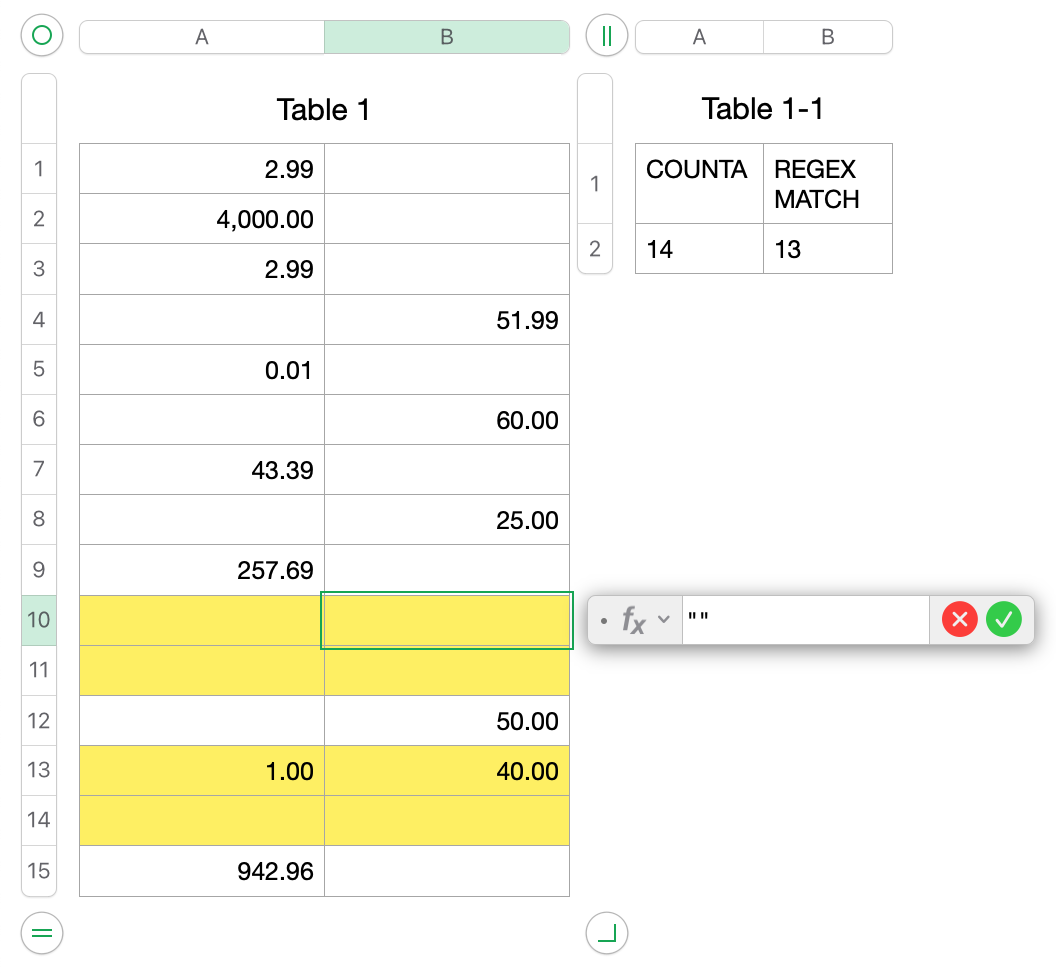
As a test, I input "" in cell B10. If I use your initial suggestion with the formula: "COUNTIFS(Table 1::A,"",Table 1::B,"")" I only get a result of 3 double blanks instead of 4 (since cell B10 is technically not blank), as you pointed out would happen. However, if I use "COUNTA(Table 1::A:B)" (which is the formula under "COUNTA") and "COUNTIFS(Table 1::A:B,REGEX("\d{1,3}((\,\d{3})+)*\.\d{2}",case-sensitive))" (which is the formula under "REGEX MATCH"), I can have another formula that checks those two numbers to make sure they are the same number. If so, there should be no cells with ""(null strings/fake blanks). It is essentially making sure the total number of cells that are not blank = all the cells that are formatted as they're supposed to be for my needs (as defined by my regex). (For anyone else, I suppose the regex could be changed to fit your needs or a different function might be used to compare to COUNTA).
Please correct me if I'm wrong but from here, by using this in addition to "COUNTIFS(Table 1::A,"",Table 1::B,"")" this should work flawlessly to detect two adjacent blanks while also making sure that null strings ("") do not throw off the data, correct?


