my air tag doesn't change places in the find my app....it is always at my house

I have set up an airtag, but it doesn't seem to move when the airtag moves. It is with my daughter, but it stays at our house, on the find my app, when our daughter has taken it to the pool, two blocks away.

Posted on Jun 18, 2023 8:47 AM

Reply
Question marked as Top-ranking reply

Posted on Jul 11, 2023 5:15 AM

Hello Caragrimaldi,


Because I have the same problem I discover some airtags have a bug. At least 3 of my 4 airtags had this bug (not sure for the last because I think I apply the "solution" before detecting was buggy).


Even if my airtags were detected by an iphone 10 kilometers away I was still notify that the airtag is "at home, now, 0 kilometer".


The solution provided by the support is to remove the airtag from your account and add it again. After that, miracle, if my airtag is not detected by anybody i have at least the date and his last known position (and not always now and 0 km) and if my airtag is detected at the swimming pool it appears at the swimming pool.


Unfortunately I am unlucky because I discover this bug after struggling to understand why my lost cat appears to be at home. And because it is lost I could only be able to remove the airtag but could not add it again to my account to solve the bug.


So every day I have notifications that my cat is detected but I don't have the location to go checking if my cat is stuck somewhere, kidnapped, or dead... And support can't help. They can't know the position of the airtag, they can't know if is detected by the same device, they can't simulate a remove/re-add on my account, they can't ask a developper to correct what might be an error in a database to make my airtag work correctly. They can't do nothing except explaining me how to use a not bugged airtag. :-(


My only hope is when I seek my cat early in the morning, some day the notification I will have means that it is MY IPHONE that detected the airtag 10 meter near me.


But a day the battery will be empty and I will not receive notification for my cat anymore...


To lost an airtag, incredible...

4 replies
Question marked as Top-ranking reply

Jul 11, 2023 5:15 AM in response to caragrimaldi

Hello Caragrimaldi,


Because I have the same problem I discover some airtags have a bug. At least 3 of my 4 airtags had this bug (not sure for the last because I think I apply the "solution" before detecting was buggy).


Even if my airtags were detected by an iphone 10 kilometers away I was still notify that the airtag is "at home, now, 0 kilometer".


The solution provided by the support is to remove the airtag from your account and add it again. After that, miracle, if my airtag is not detected by anybody i have at least the date and his last known position (and not always now and 0 km) and if my airtag is detected at the swimming pool it appears at the swimming pool.


Unfortunately I am unlucky because I discover this bug after struggling to understand why my lost cat appears to be at home. And because it is lost I could only be able to remove the airtag but could not add it again to my account to solve the bug.


So every day I have notifications that my cat is detected but I don't have the location to go checking if my cat is stuck somewhere, kidnapped, or dead... And support can't help. They can't know the position of the airtag, they can't know if is detected by the same device, they can't simulate a remove/re-add on my account, they can't ask a developper to correct what might be an error in a database to make my airtag work correctly. They can't do nothing except explaining me how to use a not bugged airtag. :-(


My only hope is when I seek my cat early in the morning, some day the notification I will have means that it is MY IPHONE that detected the airtag 10 meter near me.


But a day the battery will be empty and I will not receive notification for my cat anymore...


To lost an airtag, incredible...

Jun 19, 2023 2:49 PM in response to caragrimaldi

Find My with the AirTag is only going to work if there are other iPhones powered on within about 25 feet to pick up the signal from the AirTag.


If those iPhones are buried inside bags, etc, it is going to be difficult for the AirTag signal to reach another iPhone. And, if the AirTag itself is buried inside a bag or purse, that will cut down on the effective pickup range as well.


That being said, I will say that I was able to pick up a "lost" bag on a trip to Europe last year. We arrived at Heathrow, but one of our bags did not. When I checked Find My, it "found" the bag.......at DFW AirPort about 5,000 miles away.


Jun 19, 2023 2:35 PM in response to caragrimaldi

Hello caragrimaldi,


Since she is only moving a couple of blocks, the AirTags may not be finding the Find My network which would be needed to track the AirTag.


This information about Precision Finding may help resolve this problem: Find your keys, backpack, and more with AirTag - Apple Support


Use Precision Finding to pinpoint the location of your item
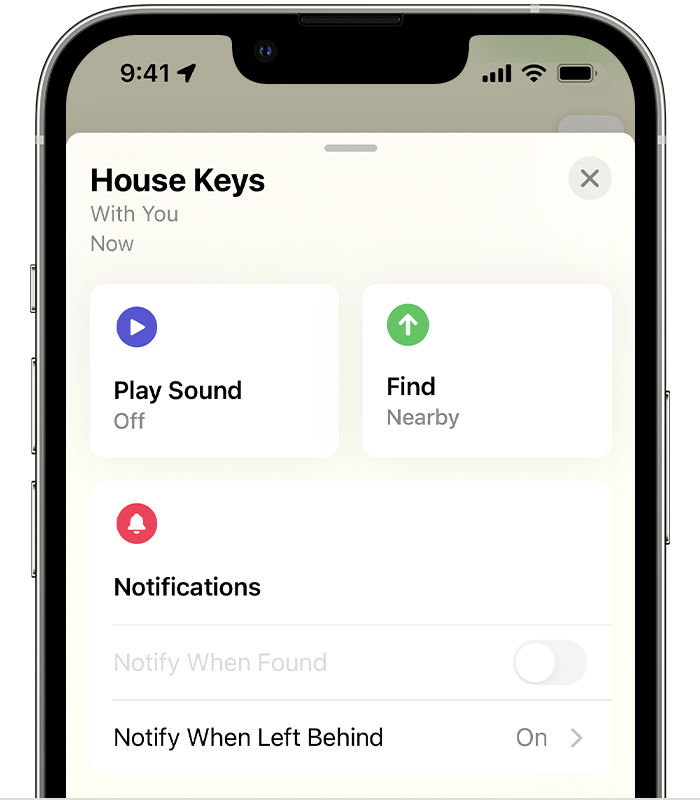
If you have a supported iPhone model with Ultra Wideband and your AirTag is nearby,1 you can tap Find Nearby to help find it, even if it's stuck between couch cushions or hiding under a stack of mail.

Find a nearby item
1. Open the Find My app, then tap the Items tab.
2. Choose your AirTag, then tap Find Nearby.1 Don't see Find Nearby
Screenshot showing Play Sound and Find Nearby buttons
3. Follow the onscreen instructions and move around the space until your iPhone connects to your AirTag.
4. Your iPhone displays the distance and direction to your AirTag. Use that information to get closer to your AirTag until you find your lost item.
• When your AirTag is within Bluetooth range of your connected device, you can play a sound on your AirTag by tapping the Play Sound button 
• If your iPhone says that more light is required, tap the Turn Flashlight On button .
5. Tap the Done button  when you're done. 


There is also additional information if it is not working as it should.


Have a good day.

May 22, 2024 9:48 AM in response to ninajuvi

This is exactly my issue as well. I bought air tags for all of my cats, but this one keeps saying the cat and the air tag are in the middle of the street in front of my house. They are decidely not. Yes I checked for bodies too. I receive notifications that the air tag has come back home, but mysteriously there is no cat on any of my cameras. Hope cat comes back home so I can uninstall/reinstall . . .

This thread has been closed by the system or the community team. You may vote for any posts you find helpful, or search the Community for additional answers.

my air tag doesn't change places in the find my app....it is always at my house

Welcome to Apple Support Community
A forum where Apple customers help each other with their products. Get started with your Apple Account.