iPhone 13 Overheating after iOS Update

Anyone else experiencing overheating since last update to iOS 16.5.1?


My iPhone 13 max has been mostly perfect. It has the basic issues that all phones have however I noticed two issues since this last update to 16.5.1.


1) my battery dies fast

2) my phone overheats while just sitting there.


I turned off my phone and turned it back on. Not using it and it not plugged in, it overheated.


if I plug it in while on, I get… charging will resume later, your device is too hot. (But I just plugged it it)


[Re-Titled by Moderator]

Posted on Jul 3, 2023 8:08 AM

Reply
Question marked as Top-ranking reply

Posted on Jul 3, 2023 8:31 AM

What I did is given below

  1. Took a backup on iCloud (Which I do regularly)
  2. Logged out of the Apple ID
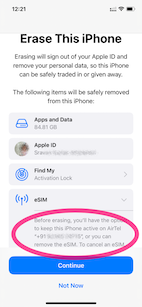
  3. Erase --> Erase iPhone - Apple Support (IN)
    1. Keep eSIM Data was the option I chose (See the pic)
    2. .
  4. Set up my iPhone and restored it from iCloud Backup
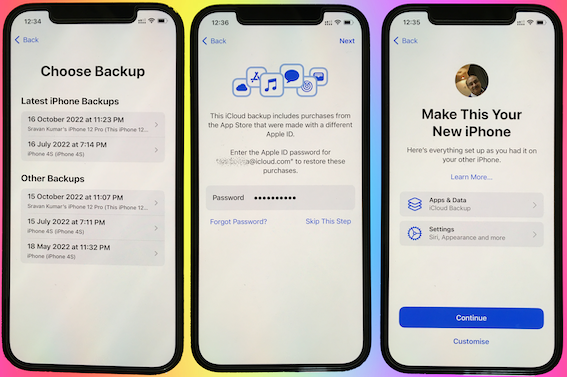

I continued to have the same issue with the heating.


I repeated the above steps but this time I did not restore from the iCloud Backup. I set it up as a new iPhone.


Waited for 3 days. There is no heating issue, now.


Conclusion.:

  • There is no hardware issue!
  • This is not an iOS 16.0.3 issue
  • Some Apps or iPhone storage and some settings may be heating up the device.


Action Plan:

  • I will now slowly get my all data back one by one.
  • Using the elimination process I will try to find out which app or settings were causing this...


Now the heating issue isn't there anymore. I am adding apps one by one and keeping tab on the heating issue.



My experience says this is purely caused by some third-party app that you may have installed.


I am not aware of the ambient temperature in which you are using the iPhone. However --> Keeping iPhone, iPad, and iPod touch within acceptable ...


Store the device where the temperature is between -20º and 45º C (-4º to 113º F). Don’t leave the device in your car, because temperatures in parked cars can exceed this range.


Use iOS devices where the ambient temperature is between 0º and 35º C (32º to 95º F). Low- or high-temperature conditions might cause the device to change its behavior to regulate its temperature. Using an iOS device in very cold conditions outside of its operating range might temporarily shorten battery life and could cause the device to turn off. Battery life will return to normal when you bring the device back to higher ambient temperatures. Using an iOS device in very hot conditions can permanently shorten battery life.


92 replies
Question marked as Top-ranking reply

Jul 3, 2023 8:31 AM in response to Northstarbrian

What I did is given below

  1. Took a backup on iCloud (Which I do regularly)
  2. Logged out of the Apple ID
  3. Erase --> Erase iPhone - Apple Support (IN)
    1. Keep eSIM Data was the option I chose (See the pic)
    2. .
  4. Set up my iPhone and restored it from iCloud Backup


I continued to have the same issue with the heating.


I repeated the above steps but this time I did not restore from the iCloud Backup. I set it up as a new iPhone.


Waited for 3 days. There is no heating issue, now.


Conclusion.:

  • There is no hardware issue!
  • This is not an iOS 16.0.3 issue
  • Some Apps or iPhone storage and some settings may be heating up the device.


Action Plan:

  • I will now slowly get my all data back one by one.
  • Using the elimination process I will try to find out which app or settings were causing this...


Now the heating issue isn't there anymore. I am adding apps one by one and keeping tab on the heating issue.


My experience says this is purely caused by some third-party app that you may have installed.


I am not aware of the ambient temperature in which you are using the iPhone. However --> Keeping iPhone, iPad, and iPod touch within acceptable ...


Store the device where the temperature is between -20º and 45º C (-4º to 113º F). Don’t leave the device in your car, because temperatures in parked cars can exceed this range.


Use iOS devices where the ambient temperature is between 0º and 35º C (32º to 95º F). Low- or high-temperature conditions might cause the device to change its behavior to regulate its temperature. Using an iOS device in very cold conditions outside of its operating range might temporarily shorten battery life and could cause the device to turn off. Battery life will return to normal when you bring the device back to higher ambient temperatures. Using an iOS device in very hot conditions can permanently shorten battery life.



Jul 19, 2023 6:42 PM in response to Northstarbrian

Hello!


Have you tried to backup and restore?


The links to do this appear below:


Link for how to Back up and Restore: Back up and restore your iPhone, iPad, or iPod touch to your Mac or to iCloud - Apple Support


Link for putting iPhone in DFU Mode: If you can't update or restore your iPhone or iPod touch - Apple Support


Note: The above material is not my work. Any credit should go to Michael Brooks1  who originally posted it here: Jun 27, 2023 8:55 AM in response to Jubalub. 


Please report back wether performing the above process made the battery drainage worse, fixed it, or if you noticed no change at all. 


Aug 4, 2023 1:53 PM in response to Northstarbrian

yes, overheating to the point i could not hold iphone13pro- I knew something was wrong for months on this, I tried everything everybody else was trying-and the northern Michigan this should not ever overheat. Magically, today when I did the new 16.6 update, same phone with same charger in the same house and on the same property has felt cool as a cucumber like it did before. Hopefully for those of us who are not on extended care any longer will get a big break from Apple when our phones burn up in our pocket or our batteries prematurely die. I hate to see what peoples phones were doing below the 45th!

Jul 19, 2023 6:15 PM in response to mystelladog

mystelladog Said:

[…]I use the same cable and charger since I purchased this phone. I didn't add an app or change settings. It now overheats when charging and I get about 4 hours when using mail and text only. Just 4 or 5 emails and maybe 5 texts.[…]

———-


Troubleshooting an Overheating iPhone:

Try the following:


I. Cool Down the iPhone:

For a few hours, perform the following...

  • Power Off: the iPhone for a bit
  • Unplug: any Cables
  • Place it Atop: Laptop Cooler
  • Keep it in: an open space
  • Keep it Out of: direct sunlight


II. Close All Open Apps:

An app is accessing your audio. So, close all apps. Hold you finger down as you swipe up from the bottom-left corner of the screen. Then, close all of these open apps, by swiping up quickly for each apps.


III. Clear Space Using my User Tips:

See if you need to clear lots of space. System resources may be using up too much services, making it overheat. Internal storage cannot be upgraded. It is what it is. So, the maximum internal storage capacity never increases, even if you upgraded your iCloud plan. Learn More here: What's the Difference Between Device Storage and iCloud Storage? Apple Support

So, what to do...

Clear Space, Using my User Tips:

Jul 4, 2023 9:05 PM in response to Northstarbrian

Northstarbrian Said:

"Overheating issue since update 16.5.1: Anyone else experiencing overheating since last update to iOS 16.5.1? My iPhone 13 max has been mostly perfect. It has the basic issues that all phones have however I noticed two issues since this last update to 16.5.1. 1) my battery dies fast 2) my phone overheats while just sitting there.[...]"

-------


Troubleshooting an Overheating iPhone:

Perform the following:


I. Cool Down the iPhone:

For a few hours, perform the following...

  • Power Off: the iPhone for a bit
  • Unplug: any Cables
  • Place it Atop: Laptop Cooler
  • Keep it in: an open space
  • Keep it Out of: direct sunlight


then...


2. Clear Space Using my User Tips:

See if you need to clear lots of space. System resources may be using up too much services, making it overheat. Internal storage cannot be upgraded. It is what it is. So, the maximum internal storage capacity never increases, even if you upgraded your iCloud plan. Learn More here: What's the Difference Between Device Storage and iCloud Storage? Apple Support

So, what to do...

Clear Space, Using my User Tips:

Apr 17, 2024 12:49 PM in response to SravanKrA

I agree. I tried this method. Just set the phone as a new phone and I can see the changes. The phone was so hot before, but now things changed. It is not that hot anymore. And also, it works much smoother, much faster than before. Try NOT to download the full “back up” from iCloud. The apps will still get updates (app notes, reminders, journal app, etc); don’t worry about this (of course, if they were updated before by using iCloud).

Jul 4, 2023 9:08 PM in response to SravanKrA


Northstarbrian Said:

"Overheating issue since update 16.5.1: Anyone else experiencing overheating since last update to iOS 16.5.1? My iPhone 13 max has been mostly perfect. It has the basic issues that all phones have however I noticed two issues since this last update to 16.5.1. 1) my battery dies fast 2) my phone overheats while just sitting there.[...]"

-------


Overheating iPhone After an Update:

Sure it's been mentioned plenty of times on these forums. Question is, "Just, how many people have actually reported it, directly to Apple?" Apple will not know of this if you do not spread the word to them. So, provide them with feedback...


Report this to Apple:

Do your Part: Provide Apple with feedback on this. Apple wont get back to you directly, but the more they hear of this, the more they will know what is going on, and what needs to be fixed.

To Provide Feedback:

  1. Go Here: Feedback - iPhone - Apple
  2. Select: "Bug Report" for the "Feedback Type"
  3. Comment: that this all started after installing the latest update. Include the URL of this thread.
  4. Proceed from there as necessary

Nov 17, 2023 1:52 PM in response to DRinTX

DRinTX wrote:

Lawrence, please don’t insult our intelligence. When our phone never gets hot and after an update it heats up just from charging that’s a problem. And when the battery which is fully charged is drained in a matter of several hours, THAT’S also a problem. Obviously it has to do with the recent update, not our hardware… and it’s not our imagination either. 🙄 Verification of this is after the next IOS update the problem was gone. So don’t be condescending or rude. We don’t need a lecture. Just a solution. The solution is the update sucked and we had to wait for the next IOS and HOPE it was better.


If charging and draining in hours, then the battery has likely failed. Health may be 80% or lower, but batteries can fail with other estimates. Contact Apple.

Jul 29, 2023 12:45 PM in response to Momididit

Momididit wrote:

me too. turned it off. let it cool. turned it back on and immediately started heating up. not in direct light. took off the cover. battery at 85%. No apps open.

There is a difference between overheating and getting warm in use. If the phone’s internal temperature exceeds a safe limit the phone shuts down and displays a message saying that it has shut down and cannot be restarted until it cools off. If this happens regularly your phone has a hardware problem and needs to be fixed.


If you DO NOT see this message your phone has not overheated, no matter how warm it feels. If the phone says that charging has paused to allow the phone to cool, that is NOT overheating. That is NORMAL when you fast charge.


iPhones have always paused at 80% when fast charged to allow the battery to cool down, but they didn’t display a message; they just paused until the phone's temperature stabilized.  Users have sometimes asked in ASC why it has “stopped charging at 80%,” and this is the answer; that it has to cool down, and will resume after a pause. 


With iOS 16.5 and later Apple has added a message SAYING why it has paused. But if you had never noticed that it paused at 80%, then this sounds like the update broke something. It's normal, just more information about why it paused.

Nov 17, 2023 1:45 PM in response to Lawrence Finch

Lawrence, please don’t insult our intelligence. When our phone never gets hot and after an update it heats up just from charging that’s a problem. And when the battery which is fully charged is drained in a matter of several hours, THAT’S also a problem. Obviously it has to do with the recent update, not our hardware… and it’s not our imagination either. 🙄 Verification of this is after the next IOS update the problem was gone. So don’t be condescending or rude. We don’t need a lecture. Just a solution. The solution is the update sucked and we had to wait for the next IOS and HOPE it was better.

This thread has been closed by the system or the community team. You may vote for any posts you find helpful, or search the Community for additional answers.

iPhone 13 Overheating after iOS Update

Welcome to Apple Support Community
A forum where Apple customers help each other with their products. Get started with your Apple Account.