Why won't Messages accept my new password on iPad?

This is concerning messages on my iPad. It tells me to login using my password. I use my password and it tells me it’s not valid. I changed my password and tried again and still nothing. What an I do? Currently I can’t view message on my iPad.


[Re-Titled by Moderator]

iPad, iPadOS 16

Posted on Jul 8, 2023 1:30 PM

Reply
Question marked as Top-ranking reply

Posted on Jul 9, 2023 2:43 PM

Hi GWramp,


The first thing to check is that you're using the correct email address and password combination for that service. You can attempt to sign in at iCloud or Manage your Apple ID to verify the combination you're trying to use is valid.


Then, review the steps and options at If you can’t turn on or sign in to iMessage or FaceTime for the most common solutions to signing in on an iPad:


"Check your device settings


  1. Make sure that you’re connected to a cellular data or Wi-Fi network. 
  2. If you're using an iPhone, you need SMS messaging to activate your phone number with iMessage and FaceTime. Depending on your carrier, you might be charged for this SMS.

3. Go to Settings > General > Date & Time and make sure that your time zone is set correctly.


Turn off and restart iMessage and FaceTime


  1. Go to Settings > Messages and turn off iMessage.
  2. Go to Settings > FaceTime and turn off FaceTime.
  3. Restart your device:

4. Turn iMessage and FaceTime back on."


Regards.

4 replies
Question marked as Top-ranking reply

Jul 9, 2023 2:43 PM in response to GWramp

Hi GWramp,


The first thing to check is that you're using the correct email address and password combination for that service. You can attempt to sign in at iCloud or Manage your Apple ID to verify the combination you're trying to use is valid.


Then, review the steps and options at If you can’t turn on or sign in to iMessage or FaceTime for the most common solutions to signing in on an iPad:


"Check your device settings


  1. Make sure that you’re connected to a cellular data or Wi-Fi network. 
  2. If you're using an iPhone, you need SMS messaging to activate your phone number with iMessage and FaceTime. Depending on your carrier, you might be charged for this SMS.

3. Go to Settings > General > Date & Time and make sure that your time zone is set correctly.


Turn off and restart iMessage and FaceTime


  1. Go to Settings > Messages and turn off iMessage.
  2. Go to Settings > FaceTime and turn off FaceTime.
  3. Restart your device:

4. Turn iMessage and FaceTime back on."


Regards.

Jul 9, 2023 5:19 PM in response to GWramp

GWramp,


Were you able to successfully sign in to the Apple ID and/or iCloud websites using the most recent Apple ID and password combination? Testing this out can help to confirm if the password and Apple ID are working well, or if there may be a broader issue.


The iCloud website may be found here: iCloud


If you're able to sign in successfully on the above link, try connecting the iPad to a different Wi-Fi network if possible, or try via cellular data if it's equipped with this. That'll help to rule out a network-related conflict.


Once signed in, be sure to check and see if text message forwarding is set up, which helps the iPad to send and receive the SMS/MMS (green bubble) messages. This page will cover the needed steps for that: Forward SMS/MMS text messages from your iPhone to your Mac or iPad - Apple Support


Automatically forward texts to your other devices
1. Make sure that you're signed in to iMessage with the same Apple ID on each device:
• iPhone or iPad: Check the Apple ID shown in Settings > Messages > Send & Receive.
• Mac: Open the Messages app, choose Messages > Settings (or Preferences), then click iMessage. Check the Apple ID shown.
2. On your iPhone, go to Settings > Messages > Text Message Forwarding.
If you don't see Text Message Forwarding, go to Settings > Messages. Turn off iMessage, then turn it back on. Tap Send & Receive, tap Use Your Apple ID for iMessage, then sign in with the same Apple ID used on your other devices.
3. Choose which devices can send and receive text messages from your iPhone:
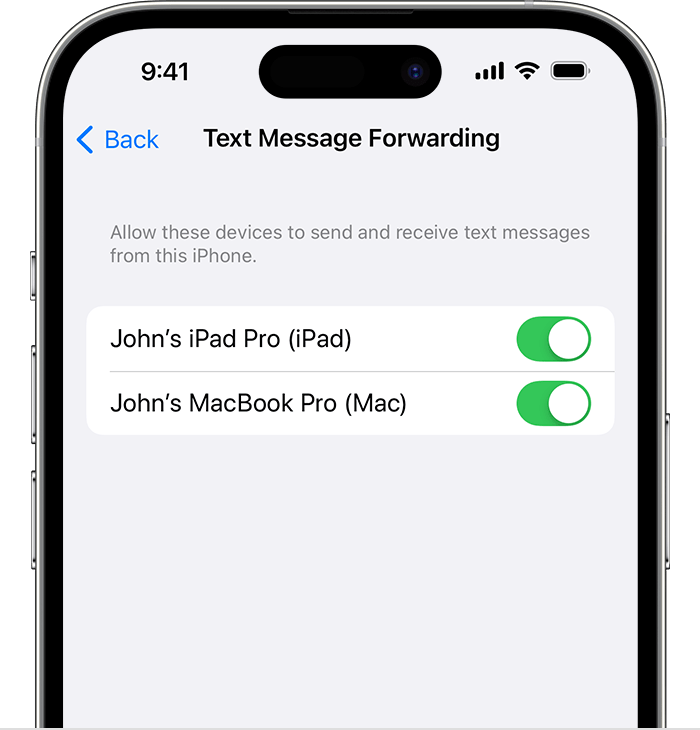
The Text Message Forwarding settting on iPhone
4. If you choose a device that isn't using two-factor authentication for your Apple ID, a verification code appears on each of your other devices: enter that code on your iPhone.


Cheers.

This thread has been closed by the system or the community team. You may vote for any posts you find helpful, or search the Community for additional answers.

Why won't Messages accept my new password on iPad?

Welcome to Apple Support Community
A forum where Apple customers help each other with their products. Get started with your Apple Account.
