“This update requires a WiFi network connection to download.” message when I try to update my iPad

My wife's iPad mini 6 hasn't loaded the last 2 ipadOS updates with this message being the explanation. The iPad has a strong Wi-Fi Connection.


[Re-Titled by Moderator]

iPad mini (6th generation)

Posted on Jul 15, 2023 7:27 AM

Reply
Question marked as Top-ranking reply

Posted on Jul 15, 2023 8:52 AM

WiFi/Internet connection difficulties are usually an indication that your device does not have a routable IP Address - your IP Address usually being assigned by DHCP. When problems occur, your iPad may only have a self-assigned link-local IP address that begins 169.254.x.x.


You can verify your DHCP-assigned IP Address from settings:

Settings > WiFi > [Your WiFi Network / SSID] - tap the blue “i” icon - [IPv4 Address] IP Address


If you have a VPN App or profiles installed, or a security App such as Norton, these may be interfering with DHCP and preventing your device from obtaining a valid IP Address for the WiFi network to which you are attempting to connect. The resolution is usually simple; if installed, you may only need to temporarily disable or remove the Security App and/or VPN.


DHCP is frequently used to automatically obtain an IP Address. Until your iPad has a valid IP Address to connect to your network, you will not have an internet connection. Disabling or removing VPN and/or the offending security App should allow DHCP to operate normally - allowing connection to your network and the internet.


If this resolves your issue, the VPN and/or security App can be reinstated after the connectivity problem has been resolved.


If some Apps are working as expected, while others are not - or other devices can connect to your WiFi network - you may have a routing problem that may be resolved with a restart of your WiFi Router, followed by a restart of your iPad….


To restart your router, disconnect power from the router for at least 30 seconds - then reconnect power to restart. After your router reboots (which may take several minutes), force restart your iPad:


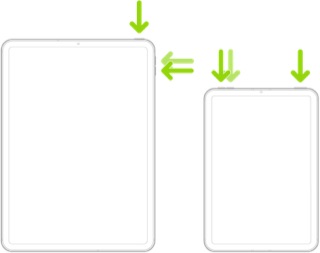
Force restart iPad (models with Face ID or with Touch ID in the top button)

If your iPad doesn’t have the Home button, do the following:

  1. Press and quickly release the volume button nearest to the top button.
  2. Press and quickly release the volume button farthest from the top button.
  3. Press and hold the top button.
  4. When the Apple logo appears, release the top button.


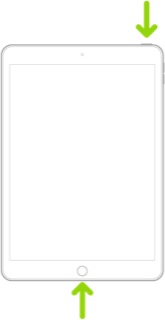
Force restart iPad (models with the Home button)

Press and hold the top button and the Home button at the same time. When the Apple logo appears, release both buttons.


If you continue to have difficulties, check to see if your iPad is using the WiFi Private Address feature. This feature is intended to provide additional privacy and security when using “public” (untrusted) WiFi networks.

Settings > WiFi > [Your WiFi Network / SSID] - tap the “i” icon - Private Address


The Private Address feature is largely unnecessary for your home WiFi network; if enabled, Private Addressing can cause issues if specific MAC addresses are expected by your WiFi Router. You may need to disable this feature - and can be enabled or disabled for each individual network.


Use private Wi-Fi addresses in iOS 14, iPadOS 14, and watchOS 7 - Apple Support


22 replies

Jul 18, 2023 9:52 PM in response to LotusPilot

Am I crazy or did Apple Customer Support not address the issue. The update says it can’t install with out a Wi-Fi connection even though you have one. And all they can do is first ramble on about how to fix your Wi-Fi connection. Then they give you a possible workaround. Never once did they even mention the actual problem (which my son has on his iPhone 13 and I have on my iPad 11).

Jul 19, 2023 4:05 AM in response to SlowTorque

I wasn't aware that LotusPilot was a member of Apple Support. I don't expect any help from Apple. Big companies don't do that anymore.


Sorry to hear that you are in the same boat. I will be sure to post a solution if I ever find one.


I plan to hook the iPad Mini 6 back up to the computer again to see if it will do the 16.5.1 (c) update one of these days.

Jul 19, 2023 4:17 AM in response to TheResortKeeper

TheResortKeeper wrote:

I wasn't aware that LotusPilot was a member of Apple Support. I don't expect any help from Apple. Big companies don't do that anymore.


With limited exceptions, contributors within the Apple Support Community (ASC) are all end-users, just like you. Other than the site Moderators, Apple neither monitor nor participate within the Support Community.


ASC is a user-to-user technical community. Contributors can offer advice with operation of your devices - and guidance/help if you are experiencing difficulties. We can also direct you to technical resources and appropriate contact-points for Apple support. Contributors have absolutely no influence with Apple, Apple Support, or its Development Team.


For information, Apple staff are identified as Community Specialists.

Nov 8, 2023 10:13 AM in response to TheResortKeeper

I think it’s a shady marketing strategy from Apple that they do every 2 years to get people to buy a new iPhone. The same thing happened to me and my gf when we updated our phones to IOS 17.1.1 and this is not the first time this happened, it’s happened with my old phone as well. Apple is really sketchy and something is going on and Apple support don’t help at all.

This thread has been closed by the system or the community team. You may vote for any posts you find helpful, or search the Community for additional answers.

“This update requires a WiFi network connection to download.” message when I try to update my iPad

Welcome to Apple Support Community
A forum where Apple customers help each other with their products. Get started with your Apple Account.

