My watch is not parting with my phone
My watch is not getting calls
iPhone 13 Pro, iOS 16
My watch is not getting calls
iPhone 13 Pro, iOS 16
Hello Jennyfaye1,
Welcome to Apple Support Communities. We understand the importance of being able to receive calls on your Apple Watch, and we'd be happy to look into this with you. To better understand the situation, we'd like to gather some information:
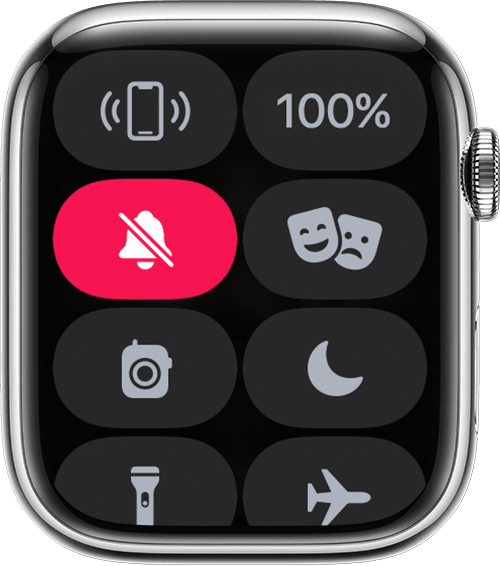
Also, make sure your Apple Watch is not muted as shown here:
Mute your Apple Watch
1. Touch and hold the bottom of the watch face. Wait for Control Center to show, then swipe up.
2. Tap the Silent Mode button. This turns on Silent Mode. You can still receive haptic notifications.
3.
To silence an alert or notification as it sounds, rest your palm on the display for at least three seconds or until you feel a tap. If it doesn't work, make sure that the Cover to Mute setting is on: On your iPhone, open the Apple Watch app, go to the My Watch tab, then tap Sounds & Haptics.
With watchOS 9.4, wake-up alarms are not silenced with the cover to mute gesture to avoid accidental cancellations during sleep.
Change the audio and notification settings on your Apple Watch
We hope this information is useful. Kind regards.
Hello Jennyfaye1,
Welcome to Apple Support Communities. We understand the importance of being able to receive calls on your Apple Watch, and we'd be happy to look into this with you. To better understand the situation, we'd like to gather some information:
Also, make sure your Apple Watch is not muted as shown here:
Mute your Apple Watch
1. Touch and hold the bottom of the watch face. Wait for Control Center to show, then swipe up.
2. Tap the Silent Mode button
3.
To silence an alert or notification as it sounds, rest your palm on the display for at least three seconds or until you feel a tap. If it doesn't work, make sure that the Cover to Mute setting is on: On your iPhone, open the Apple Watch app, go to the My Watch tab, then tap Sounds & Haptics.
With watchOS 9.4, wake-up alarms are not silenced with the cover to mute gesture to avoid accidental cancellations during sleep.
Change the audio and notification settings on your Apple Watch
We hope this information is useful. Kind regards.
My watch is not parting with my phone