I bought this AirPod off Amazon but I can activate the ‘find me” app how do I clear the previous owner infoe

Hello I just bought this AirPod off Amazon am trying to pair it to my “find me app “ just in case but it’s saying it’s under someone else’s name how do I remove this previous buyer so I can use it properly and in case it get misplaced I can recover it? Thanks in advance

Posted on Jul 20, 2023 4:13 PM

Reply
Question marked as Top-ranking reply

Posted on Jul 21, 2023 6:21 PM

The AirPods are not new, they have been pre-owned and returned. Reject the AirPods and return to Amazon for a refund. If they are still locked to the previous buyer's Apple ID you will never get them working because Amazon will not have a clue who has locked them.


The other consideration is that if they are still locked the return checking was clearly deficient, and you can be pretty sure the AirPods were not cleaned in any way. I wouldn't be putting second hand AirPods in my ears...

2 replies
Question marked as Top-ranking reply

Jul 21, 2023 6:21 PM in response to Nickylee83

The AirPods are not new, they have been pre-owned and returned. Reject the AirPods and return to Amazon for a refund. If they are still locked to the previous buyer's Apple ID you will never get them working because Amazon will not have a clue who has locked them.


The other consideration is that if they are still locked the return checking was clearly deficient, and you can be pretty sure the AirPods were not cleaned in any way. I wouldn't be putting second hand AirPods in my ears...

Jul 21, 2023 1:39 PM in response to Nickylee83

Hello Nickylee83,


It seems like the AirPod is connected to another Apple ID, is that correct? If so, please check out this link, which will help guide you through what to do next: If an item or device is connected to another Apple ID


If an item or device is connected to another Apple ID

If you try to set up an Apple device such as AirPods, an item such as AirTag, or another Find My network accessory and see a message that it's paired to another Apple ID, the device or item needs to be removed from that Apple ID before you can pair it with a new Apple ID. The previous owner might have to follow the steps to unpair.

Remove a Find My network accessory or device from an Apple ID

Use these steps to remove devices such as AirPods (3rd generation), AirPods Pro, AirPods Max, and iPhone Leather Wallet, Apple items such as AirTag, or Find My network accessories from an Apple ID.

These steps also unpair the device or item from an Apple ID. When you unpair the device or item from the Apple ID, you also remove Find My Lock, which is the association of the device or item with an Apple ID. Find My Lock needs to be removed before you can pair the device or item with a different Apple ID.

* If the device or item is paired with the Apple ID of the previous owner, the previous owner needs to follow these steps to remove the device or item from their Apple ID.
* The device or item doesn't have to be connected via Bluetooth to the iPhone or other Apple device that is used to remove it from an Apple ID — but the process might happen more quickly if it's Bluetooth-connected and within Bluetooth range.

These steps are the only way to remove and unpair a device or item from an Apple ID, and remove Find My Lock. They can be performed from any iPhone, iPad, or iPod touch, or Mac that's signed in with the same Apple ID. Apple can't remove Find My Lock for you.

How to remove AirPods, AirTag, or another Find My network accessory or device from an Apple ID on iPhone, iPad, or iPod touch

1. Open the Find My app, then tap the Items tab or Devices tab.
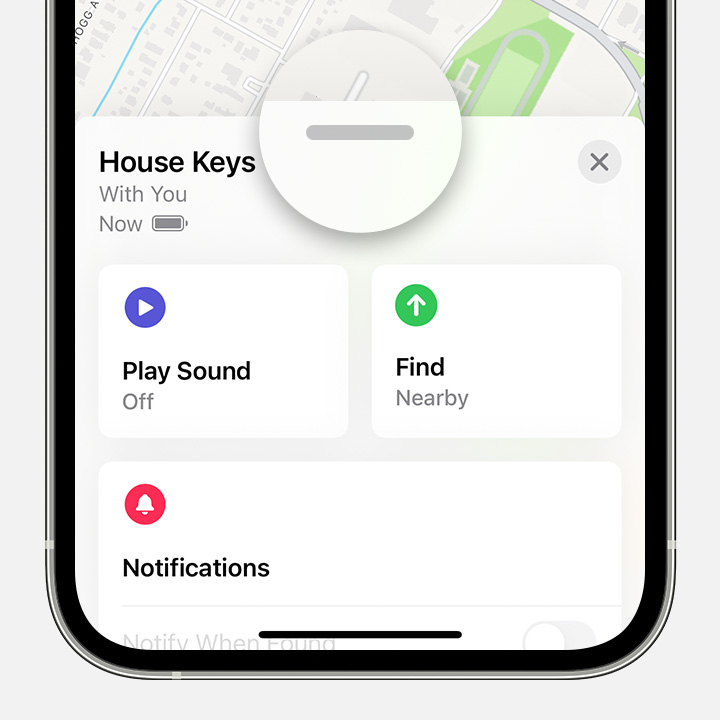
2. Tap the item or device you want to remove, then swipe up on the handle.
After you tap an item or device in the Find My app, swipe up to see more options.
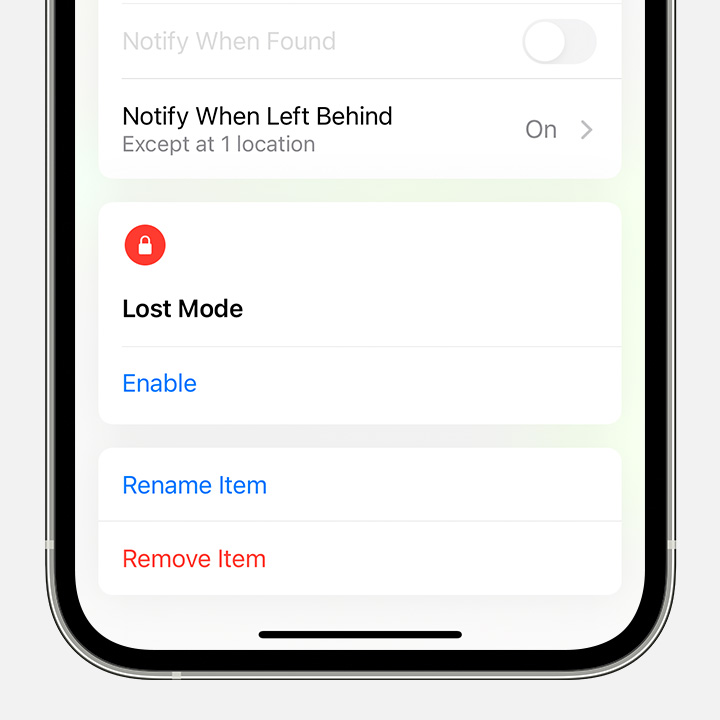
3. Tap Remove Item or Remove This Device, then tap Remove to confirm.
Tap Remove Item to remove an time from Find My and remove Find My Lock.


Thanks!

This thread has been closed by the system or the community team. You may vote for any posts you find helpful, or search the Community for additional answers.

I bought this AirPod off Amazon but I can activate the ‘find me” app how do I clear the previous owner infoe

Welcome to Apple Support Community
A forum where Apple customers help each other with their products. Get started with your Apple Account.