Disk too low or System overload

I've been receiving this disk too low or system overload from garage band. My 2017 iMac has 186gb of 2tb being used, with 64gb of memory. I also have Premier Pro, After Effects, and Photoshop on this iMac, but I assumed with this amount of space that I wouldn't have a problem. These other softwares other than garageband are turned off completely while I'm using garage band and I still recieve the "this disk too low or system overload" notification from garage band. Please help me fix this issue. This is very inconvenient and it recently is becoming more of a pattern.

Posted on Jul 22, 2023 2:21 PM

Reply
1 reply

Jul 23, 2023 1:07 PM in response to jfelix47

Hello jfelix47,


This page can help to assist with issues where GarageBand isn't working as expected on the Mac: If GarageBand isn't working on your Mac - Apple Support


This has some general steps such as restarting the Mac, checking for updates to GarageBand, and checking any external audio devices/interfaces, storage (if third-party one is used), or third-party plug-ins for compatibility with GarageBand.


Use built-in audio with GarageBand
If you’re using an external audio interface, try using the built-in audio on your Mac instead of the interface.
1. Unplug your external audio interface from your Mac.
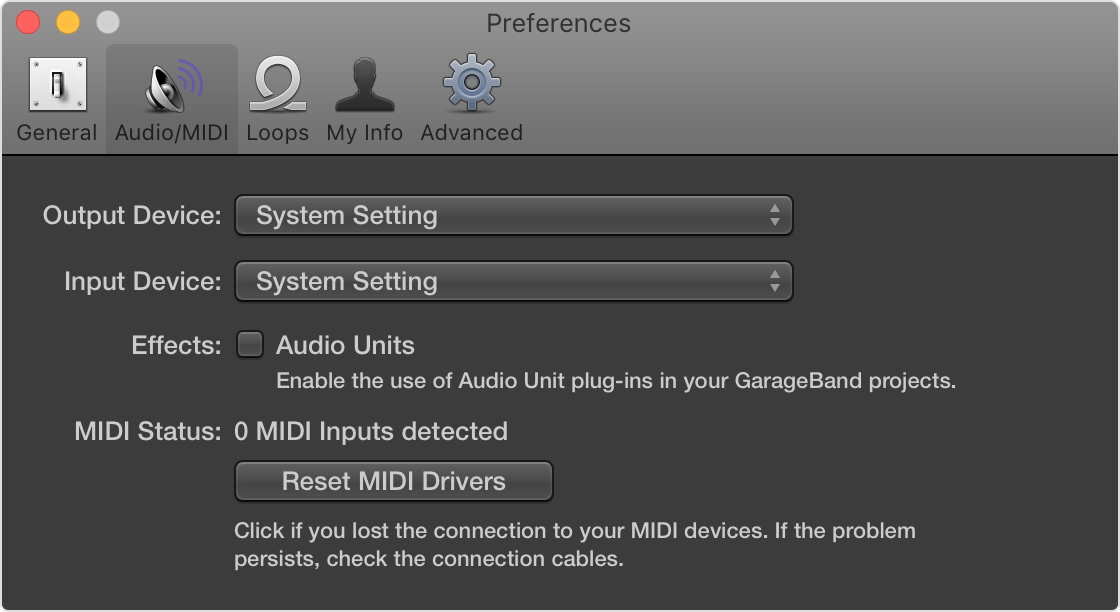
2. Open GarageBand, then choose GarageBand > Preferences > Audio/MIDI.
3. Choose Built-in Output from the Output Device pop-up menu.
4. Choose Built-in Microphone (or Built-in Input, depending on your computer) from the Input Device pop-up menu.
5. Open and play back a project that has been experiencing issues. 
If the project opens and plays back properly, you might need to update or service your audio interface. Contact the manufacturer for support.


If nothing in the link has helped you may also explore reaching out to Apple Support's Advisors that specialize in GarageBand here: Get Support


Cheers.

This thread has been closed by the system or the community team. You may vote for any posts you find helpful, or search the Community for additional answers.

Disk too low or System overload

Welcome to Apple Support Community
A forum where Apple customers help each other with their products. Get started with your Apple Account.