
About my music
Where did all of my music that I had go I payed for apple music to get all of my songs back and there gone almost all of my songs are gone. Where are they and how can I get them back.
Where did all of my music that I had go I payed for apple music to get all of my songs back and there gone almost all of my songs are gone. Where are they and how can I get them back.
Greetings DavidBryant18,
We understand that you missing songs in your Apple Music Library. To clarify, is your music library stored on your computer? If so, follow these steps to resolve this issue:
"First, check these things
Check the cloud status of songs on your Mac or PC
Look for the following statuses next to your songs to learn what to do.
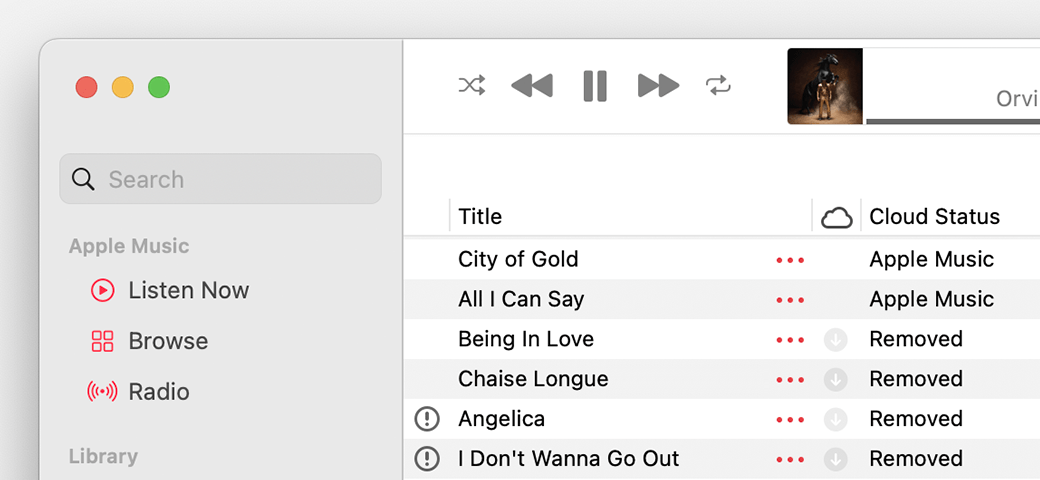
Waiting
The song won’t appear on your other devices because it’s waiting to upload. Choose File > Library > Update Cloud Library. Then check if the song appears on your other devices.
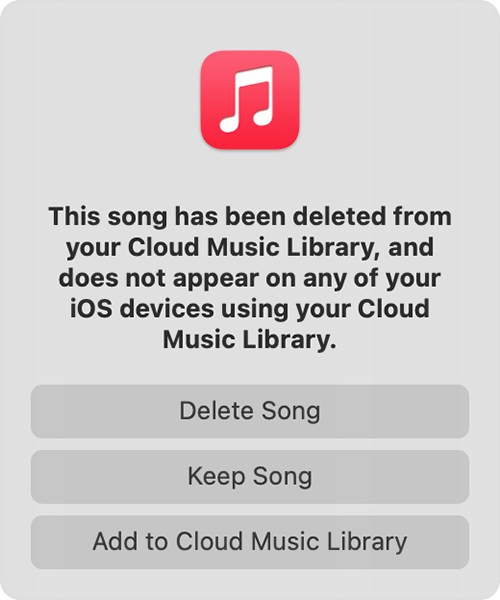
Removed
The song was deleted from another device that has Sync Library turned on. If you want the song to appear on your other devices, click the arrow  next to the song, then click Add to Cloud Music Library.
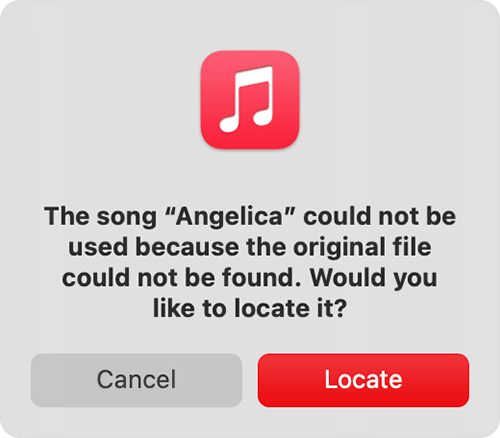
An exclamation point
The song can't be played or synced across your devices until the original file is located. Click the exclamation point  , then click Locate.
If the song is located, you'll be asked to use the location to find other missing songs in your library. If you see this message, click Find Files.
If a song is grayed out
If you see No Longer Available next to a song that's grayed out, the song was added from Apple Music and was removed from the Apple Music catalog.
Learn what the different cloud icons and symbols next to your songs mean in the Apple Music app
Learn what the different cloud icons and symbols next to your songs mean in iTunes
Search for the missing song on your computer
Follow this resource for additional steps and details:
If songs are missing from your music library after you turn on Sync Library
We hope this helps.
Have a wonderful day!
Greetings DavidBryant18,
We understand that you missing songs in your Apple Music Library. To clarify, is your music library stored on your computer? If so, follow these steps to resolve this issue:
"First, check these things
Check the cloud status of songs on your Mac or PC
Look for the following statuses next to your songs to learn what to do.
Waiting
The song won’t appear on your other devices because it’s waiting to upload. Choose File > Library > Update Cloud Library. Then check if the song appears on your other devices.
Removed
The song was deleted from another device that has Sync Library turned on. If you want the song to appear on your other devices, click the arrow next to the song, then click Add to Cloud Music Library.
An exclamation point
The song can't be played or synced across your devices until the original file is located. Click the exclamation point , then click Locate.
If the song is located, you'll be asked to use the location to find other missing songs in your library. If you see this message, click Find Files.
If a song is grayed out
If you see No Longer Available next to a song that's grayed out, the song was added from Apple Music and was removed from the Apple Music catalog.
Learn what the different cloud icons and symbols next to your songs mean in the Apple Music app
Learn what the different cloud icons and symbols next to your songs mean in iTunes
Search for the missing song on your computer
Follow this resource for additional steps and details:
If songs are missing from your music library after you turn on Sync Library
We hope this helps.
Have a wonderful day!
About my music

