Double-click to install an app?
I am getting "Double Click to install" in the upper left-hand corner of my ipad when I try to install an app. I double-click, but the app doesn't install.
iPad Pro (4th generation)
I am getting "Double Click to install" in the upper left-hand corner of my ipad when I try to install an app. I double-click, but the app doesn't install.
iPad Pro (4th generation)
Just to be certain, you are double-clicking the physical button on the edge of your iPad, right, not tapping somewhere on the screen?
Hello TC_Momma,
To helps us better assist you, can you let us know if this happens with all apps you try to download, or only certain ones? Do you receive any errors when attempting to download apps? If so, what does the error say?
The above details will help us plan how to move forward.
If you're unable to download apps, please check out the information in this link, which has some suggestions that can help with app download issues: If you can’t download or update apps on your iPhone or iPad
1. Manually update the app
Learn how to manually update an app
2. Add a payment method
You might need to have a valid payment method on file, even if the app that you want to download is free.
Add a payment method
3. Resolve a problem with your payment method
If your payment method is expired, declined, or failed, or a message says 'billing problem with previous purchase'
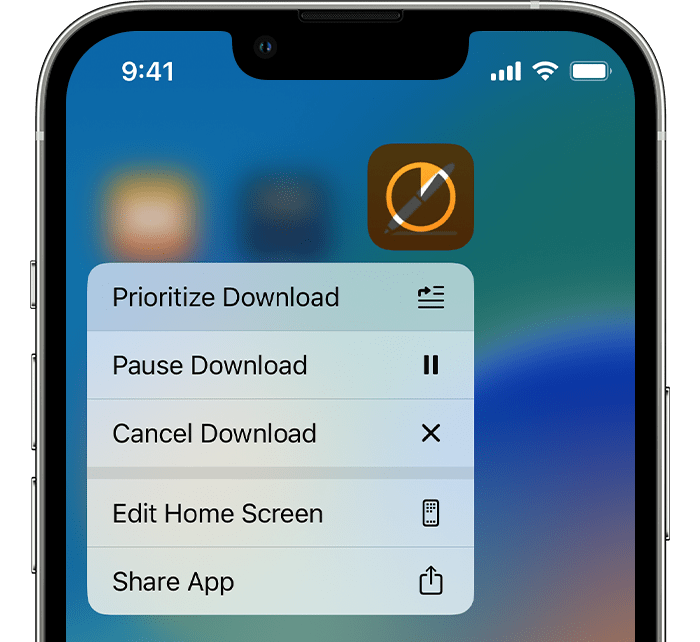
4. Prioritize the download
From the Home Screen, touch and hold the app. From the menu that appears, choose Prioritize Download.
5. Restart your device
Restart your iPhone or iPad, then check to see if you can download or update apps.
Restart your iPhone
Restart your iPad
If you still can't download or update apps
Contact Apple Support
Thanks!
I have searched and searched for the answer I just found here from markwmsn. (Thank you) I'm sure once you know it's the physical button, it's easy. However, I'm a very experienced Mac user and hadn't encountered that particular instruction before. I double-clicked on the screen right where it told me to double-click. When that didn't work, I tried hard to get my finger / pencil right on the little bit of white next to the double-click words. It simply never occurred to me that a physical button was the solution. We use "button" regularly to refer to places on the screen that are selected by touch. The "confirm" showed me to go to the upper right corner of the screen. The words came up to double-click. And so I did. This is a horrible ui, at least without some initial further instruction readily available. Shame on Apple.
Double-click to install an app?