Kids Apple Watch SE- no app store

My sons Apple Watch SE (which is part of family share) does not have the App Store. In the “screen time” setting, I have not instituted content restrictions. However, in the “always allowed” setting, the App Store does not come up

as an option to allow under “choose apps”. How do I go about getting the App Store on his watch or in the “choose apps” section so I can add it to his allowed apps? (I also have twins and their watches do not have this problem). Thank you.

Apple Watch SE

Posted on Aug 9, 2023 4:35 PM

Reply
3 replies

Aug 10, 2023 12:17 PM in response to mwindom

Hi there mwindom,


If the App Store is not showing on your son's Apple Watch, is it paired to another device or did you set it up with your iPhone using the steps here? Set up Apple Watch for a family member


If you set it up with your iPhone, then follow these steps from that article to manage which apps or features can be used on your son's Apple Watch:

Manage a family member's Apple Watch after you set it up
You can use your iPhone to adjust settings and customize features on a Family Setup watch:
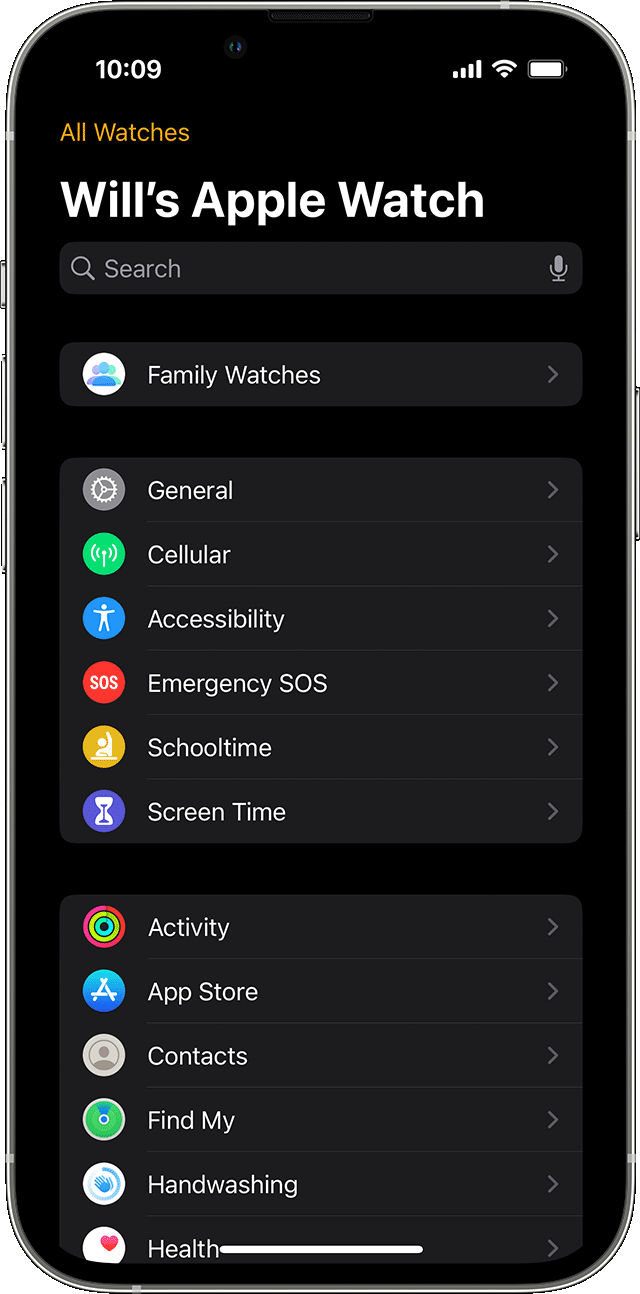
1. Open the Apple Watch app on the iPhone that you used to set up the watch.
2. Tap All Watches, tap the watch under Family Watches, then tap Done.
3. Choose a setting to adjust.
The settings for management options after Apple Watch setup on an iPhone.


If you are trying to accomplish something else, please provide more details so that we can continue to assist.


Cheers!

Aug 10, 2023 3:04 PM in response to mwindom

Hello mwindom,


Welcome to Apple Support Communities. We understand the importance of getting this issue resolved, and we'd like to help. Next, let's try to restart your iPhone, and the Apple Watch that has this issue by following these steps:


Restart your iPhone

Restart Apple Watch


Restarting is a simple step that can resolve many unexpected behaviors. If the issue persists, unpairing the Apple Watch with this problem, and repairing it would be the next best steps. Check this out:


Unpair and erase your Apple Watch

Set up and pair your Apple Watch with iPhone

Set up a family member’s Apple Watch


If that didn't help, we'd recommend that you contact Apple Support directly. Depending on your region, you may be able to reach them here: Get Support


We hope this information is useful. Kind regards.

Aug 10, 2023 2:41 PM in response to Ben_Z1

Hi,

Thank you for the help. I do have his watch setup thru my phone. However, I have been doing as you instructed above in order to get to the section that allows me to add and change their settings. For some reason, my other two sons watches' have the app store listed on their settings, which allows me to "approve it". However, this son's watch does not have it listed for me to add. The above is the watch I am having problems with. App store is not listed under "Choose Apps". The below is a picture of my other sons watch where I was able to find the app store in "Choose Apps" and added to his "Allowed Apps" section.I have made sure that nothing is restricted on the problem watch so I don't understand why I can't find the app store to add to his watch.

Thank you!

This thread has been closed by the system or the community team. You may vote for any posts you find helpful, or search the Community for additional answers.

Kids Apple Watch SE- no app store

Welcome to Apple Support Community
A forum where Apple customers help each other with their products. Get started with your Apple Account.