Text button stuck
The shift button does not work on my text messages
iPhone 12, iOS 16
The shift button does not work on my text messages
iPhone 12, iOS 16
Hi there Stuckbad,
If a button on your iPhone keyboard isn't responding as expected, you'll want to start by ensuring it's updated to the latest software version, which is iOS 16.6. You can see the currently installed version in Settings > General > About > Software Version. If needed, learn how to update your iPhone here: Update your iPhone or iPad - Apple Support
If your iPhone is updated and the key to capital letters still isn't working in Messages, try restarting your iPhone with the steps below to see if that resolves the issue for you:
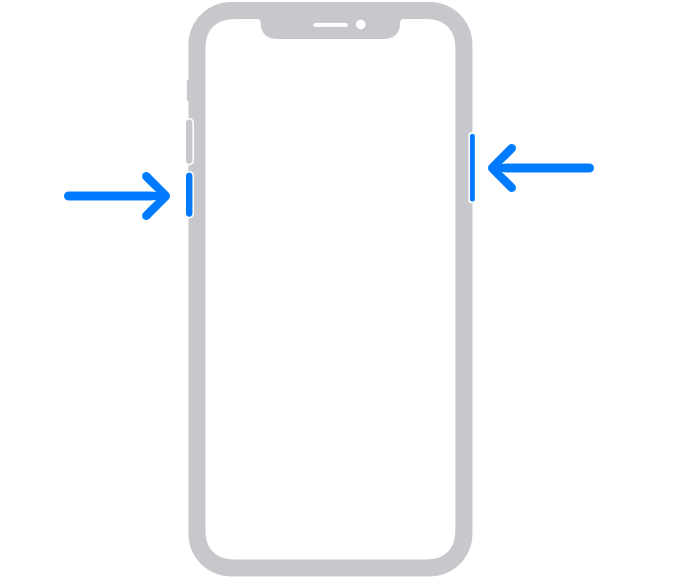
1. Press and hold either volume button and the side button until the power-off slider appears.
2. Drag the slider, then wait 30 seconds for your device to turn off. If your device is frozen or unresponsive, force restart your device.
3. To turn your device back on, press and hold the side button (on the right side of your iPhone) until you see the Apple logo.
You'll find those steps here: Restart your iPhone - Apple Support
Next, make sure you're tapping the correct button on the keyboard:
* Type uppercase letters: Tap, or touch
This support article provides more information about typing on your iPhone: Type with the onscreen keyboard on iPhone - Apple Support
If the issue persists, you'll want to reach out to Apple Support directly for further assistance. They're best-equipped to take a closer look at the issue and provide some additional guidance. This link will help you get started: Apple Support
Take care.
Hi there Stuckbad,
If a button on your iPhone keyboard isn't responding as expected, you'll want to start by ensuring it's updated to the latest software version, which is iOS 16.6. You can see the currently installed version in Settings > General > About > Software Version. If needed, learn how to update your iPhone here: Update your iPhone or iPad - Apple Support
If your iPhone is updated and the key to capital letters still isn't working in Messages, try restarting your iPhone with the steps below to see if that resolves the issue for you:
1. Press and hold either volume button and the side button until the power-off slider appears.
2. Drag the slider, then wait 30 seconds for your device to turn off. If your device is frozen or unresponsive, force restart your device.
3. To turn your device back on, press and hold the side button (on the right side of your iPhone) until you see the Apple logo.
You'll find those steps here: Restart your iPhone - Apple Support
Next, make sure you're tapping the correct button on the keyboard:
* Type uppercase letters: Tap
This support article provides more information about typing on your iPhone: Type with the onscreen keyboard on iPhone - Apple Support
If the issue persists, you'll want to reach out to Apple Support directly for further assistance. They're best-equipped to take a closer look at the issue and provide some additional guidance. This link will help you get started: Apple Support
Take care.
Text button stuck