iPhone 13 Pro OverHeating

Hey Team Apple,

I bought it 2 months ago please help my 13 pro is just getting over heated again and again in only 15 minutes of scrolling Instagram,Fb etc

and I use my phone at near room temperature (28 degree Celsius) and normal brightness and normal use but still getting over heated

no background running apps

like all thing is well but still getting over heated in only 15 minutes please help

iPhone 13 Pro, iOS 16

Posted on Aug 28, 2023 12:45 AM

Reply
Question marked as Top-ranking reply

Posted on Aug 28, 2023 1:05 AM

When I had a somwhat similar issue this is What I did...


  1. Took a backup on iCloud (Which I do regularly)
  2. Logged out of the Apple ID
  3. Erase --> Erase iPhone - Apple Support (IN)
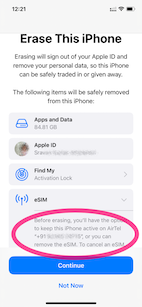
    1. Keep eSIM Data was the option I chose (See the pic)
    2. .
  4. Set up my iPhone and restored it from iCloud Backup
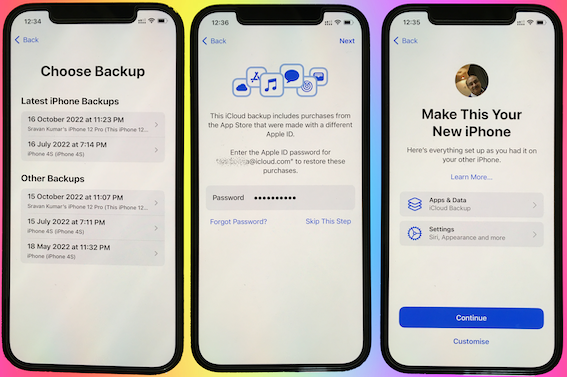

I continued to have the same issue with the heating.


I repeated the above steps but this time I did not restore from the iCloud Backup. I set it up as a new iPhone.


Waited for 3 days. There is no heating issue, now.


Conclusion.:

  • There is no hardware issue!
  • This is not an iOS 16.0.3 issue
  • Some Apps or iPhone storage and some settings may be heating up the device.


Action Plan:

  • I will now slowly get my all data back one by one.
  • Using the elimination process I will try to find out which app or settings were causing this...


Now the heating issue isn't there anymore. I am adding apps one by one and keeping tab on the heating issue.



My experience says this is purely caused by some third-party app that you may have installed.


I am not aware of the ambient temperature in which you are using the iPhone. However --> Keeping iPhone, iPad, and iPod touch within acceptable ...


Store the device where the temperature is between -20º and 45º C (-4º to 113º F). Don’t leave the device in your car, because temperatures in parked cars can exceed this range.


Use iOS devices where the ambient temperature is between 0º and 35º C (32º to 95º F). Low- or high-temperature conditions might cause the device to change its behavior to regulate its temperature. Using an iOS device in very cold conditions outside of its operating range might temporarily shorten battery life and could cause the device to turn off. Battery life will return to normal when you bring the device back to higher ambient temperatures. Using an iOS device in very hot conditions can permanently shorten battery life.


2 replies
Question marked as Top-ranking reply

Aug 28, 2023 1:05 AM in response to User7867

When I had a somwhat similar issue this is What I did...


  1. Took a backup on iCloud (Which I do regularly)
  2. Logged out of the Apple ID
  3. Erase --> Erase iPhone - Apple Support (IN)
    1. Keep eSIM Data was the option I chose (See the pic)
    2. .
  4. Set up my iPhone and restored it from iCloud Backup


I continued to have the same issue with the heating.


I repeated the above steps but this time I did not restore from the iCloud Backup. I set it up as a new iPhone.


Waited for 3 days. There is no heating issue, now.


Conclusion.:

  • There is no hardware issue!
  • This is not an iOS 16.0.3 issue
  • Some Apps or iPhone storage and some settings may be heating up the device.


Action Plan:

  • I will now slowly get my all data back one by one.
  • Using the elimination process I will try to find out which app or settings were causing this...


Now the heating issue isn't there anymore. I am adding apps one by one and keeping tab on the heating issue.


My experience says this is purely caused by some third-party app that you may have installed.


I am not aware of the ambient temperature in which you are using the iPhone. However --> Keeping iPhone, iPad, and iPod touch within acceptable ...


Store the device where the temperature is between -20º and 45º C (-4º to 113º F). Don’t leave the device in your car, because temperatures in parked cars can exceed this range.


Use iOS devices where the ambient temperature is between 0º and 35º C (32º to 95º F). Low- or high-temperature conditions might cause the device to change its behavior to regulate its temperature. Using an iOS device in very cold conditions outside of its operating range might temporarily shorten battery life and could cause the device to turn off. Battery life will return to normal when you bring the device back to higher ambient temperatures. Using an iOS device in very hot conditions can permanently shorten battery life.


This thread has been closed by the system or the community team. You may vote for any posts you find helpful, or search the Community for additional answers.

iPhone 13 Pro OverHeating

Welcome to Apple Support Community
A forum where Apple customers help each other with their products. Get started with your Apple Account.