Forcing a disconnect from FIND MY - Airpods Pro 2

I just recently got my airpods pro 2 replaced, and maybe my old set are still connected to find my? I remove it from the app and it says it will reconnect if they're connect to the internet. As soon as I remove them, they reappear. These AirPods are in an Applestore or have been shipped off somewhere. I have no access to them anymore. I also assume they still cant be connected to the internet after over a week since being replaced. I've reset my current airpods and disconnected and reconnect them thinking it was a glitch. How do I force these out of FInd My???


Thanks

iPhone 14 Pro Max

Posted on Aug 29, 2023 9:48 AM

Reply
Question marked as Top-ranking reply

Posted on Aug 31, 2023 7:35 AM

Hi PhilWadden,


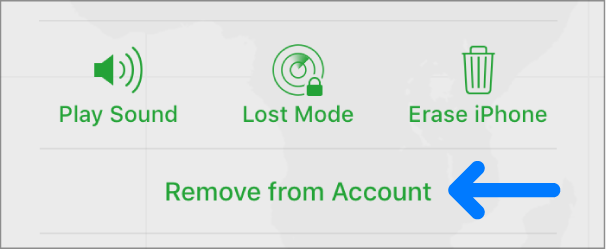
You are correct that there's not a way to erase AirPods. Do you have the "Remove from Account" button as shown in this link? Remove a device from Find Devices on iCloud.com - Apple Support


"Remove a device from the Devices list

If you’re not using a device, you can temporarily remove it from your account so it doesn’t show up in your Devices list. When the device goes online again, it reappears in the list if it has Activation Lock turned on (for an iPhone, iPad, iPod touch, Mac, or Apple Watch) or is paired with your iOS or iPadOS device (for AirPods or a Beats product).

1) Turn off the device, or put AirPods in their case. The device must be offline before you can remove it from the Devices list.

2) In Find Devices on iCloud.com, click All Devices, then select the device you want to remove.

3) If you don’t see All Devices, it’s because you’ve already selected a device. Click the name of the current device in the center of the Find Devices toolbar to see the Devices list, then select a new device.


Click Remove from Account.

The Remove from Account button."


If not, use this link to reach us directly to look into the issue further: Get Support


Take care.

Similar questions

5 replies
Question marked as Top-ranking reply

Aug 31, 2023 7:35 AM in response to PhilWadden

Hi PhilWadden,


You are correct that there's not a way to erase AirPods. Do you have the "Remove from Account" button as shown in this link? Remove a device from Find Devices on iCloud.com - Apple Support


"Remove a device from the Devices list

If you’re not using a device, you can temporarily remove it from your account so it doesn’t show up in your Devices list. When the device goes online again, it reappears in the list if it has Activation Lock turned on (for an iPhone, iPad, iPod touch, Mac, or Apple Watch) or is paired with your iOS or iPadOS device (for AirPods or a Beats product).

1) Turn off the device, or put AirPods in their case. The device must be offline before you can remove it from the Devices list.

2) In Find Devices on iCloud.com, click All Devices, then select the device you want to remove.

3) If you don’t see All Devices, it’s because you’ve already selected a device. Click the name of the current device in the center of the Find Devices toolbar to see the Devices list, then select a new device.


Click Remove from Account.

The Remove from Account button."


If not, use this link to reach us directly to look into the issue further: Get Support


Take care.

This thread has been closed by the system or the community team. You may vote for any posts you find helpful, or search the Community for additional answers.

Forcing a disconnect from FIND MY - Airpods Pro 2

Welcome to Apple Support Community
A forum where Apple customers help each other with their products. Get started with your Apple Account.