Configure Time To Stand Reminder for Every 20 Minutes

My doctors and physical therapist want me to get up for 1-2 minutes every 20 minutes throughout the day - not just once an hour. So far the only way I can see to configure that kind of reminder on the Apple watch is to set the Timer for 20 minutes and restart it every 20 minutes. That is going to run the battery down more quickly than the watch reminder software popping up a message every 20 minutes. Unless someone is already aware of a way to configure the reminders for every 20 minutes, I would like to propose that the software be updated to make the Time To Stand reminder configurable. How and where do I make this suggestion?

Posted on Aug 30, 2023 6:22 AM

Reply
Question marked as Top-ranking reply

Posted on Aug 30, 2023 9:41 AM

Make this feature request directly to Apple using this link:

Product Feedback - Apple


PS: I made a similar request some time ago requesting that I get Stand reminders even after teaching my goal (until I take the watch off my wrist).


6 replies

Mar 17, 2024 2:25 AM in response to Froggy Grodkin

This is to update my findings.


After reinstating the Reminder to Stand for one minute every hour, it only functioned once for the rest of the evening. IMO, it should have alerted me a few times.

The next day, it alerted me twice. In comparison, it should have alerted me several times.

As time passes, this feature seems deeply flawed. I yearn to return to its original performance, which, although irritating, could successfully encourage a brief hourly standing session.


The OP could achieve the desired goal. This may seem OTT, but it is a once-only set-up.


  1. Decide on the maximum length of the longest day. In this example, between 06:00 and 22:00, and then at 20min intervals. You will need to apply the Repeat setting to each alarm.
  2. On the Apple Watch, set the Alarm for 06:20 and then at twenty-minute intervals until the day ends. This means three alarms per hour over sixteen hours, requiring a total of ✿forty-six alarms. Increasing the alarm to thirty-minute intervals will require a total of ✿thirty alarms because ✿one less alarm is needed in the first and last hours.
  3. Although not tried in practice, the Don't Disturb feature may be suitable for determining the end of a day. To remind you, a day must be started by switching this feature off.


Please consider hitting the ⇧ above left if this helps.


Aug 30, 2023 1:31 PM in response to seeyabye

I don't know that the timer will run the battery down especially quickly. But, you might also look at some of the Pomodoro apps out there. They are intended to help productivity by having you work for 20 minutes (or some other interval) and then take a break for 5 minutes (or some other interval) throughout the workday. But, I'm sure a lot of them could be used for what you want.


I also use an app called Wakeout which has a similar function but it reminds you to move and gives you simple exercises to do. It's a little dorky but I love it. It is not, however, free.


There's another app called Alarmed by Yoctoville that will let you set recurring timers. It's an iPhone app but the notifications would fire on your watch.

Mar 14, 2024 5:48 AM in response to javaliga

When I purchased the Apple Watch 4, annoyingly, a Stand Notification sounded every 60 minutes for me to stand.

I cannot remember how the event was terminated.

When I advanced to Watch 5, this scenario continued to play out. Eventually, I found a way to control it:


Using the Apple Watch > Settings > Activity > Stand Reminders:
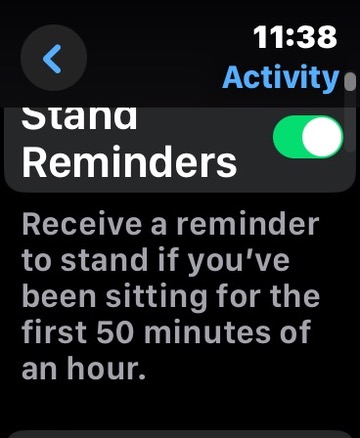


I had been seeking to recover this solution in Watch 6, and in my search, I discovered this thread.

It also resolved how to turn the reminder off.


Unfortunately, it does not directly help the OP.


However, using the Watch [Warning Spoiler], the following fails to retain input, placing this back to square one:


Reminders > scrolldown to TESTS > Add Reminder + in TESTS:


In the above, hit the + sign:


In the above, hit the microphone icon at the bottom right:


Taking a ScreenShot appears not to be possible, advising that Dictation failed.

However, after hitting the mic icon, I spoke the words:


Remind me after I have been sitting for one hour.


Tapped on the top right, a radio button was hit, and advice was displayed informing that there were no Reminders in TESTS.


Scrolling upward was awkward, but possible to:


I spoke the words:


Remind me after I have been sitting for one hour and every hour afterwards.


The idea is to explore where what needs to be said.

Sadly, the display continued to show identically to the last ScreenShot above.

I have to break off now, but please be encouraged to experiment.

Either someone knows the solution or will find out how to achieve the objective of the OP.

Good luck.


This thread has been closed by the system or the community team. You may vote for any posts you find helpful, or search the Community for additional answers.

Configure Time To Stand Reminder for Every 20 Minutes

Welcome to Apple Support Community
A forum where Apple customers help each other with their products. Get started with your Apple Account.

